
 Facebook
 Google
 GitHub
 Linkedin
AT commands not responding on ESP8266-01
- Thread starter zazas321
- Start date

 I have 1 nodemcu development board which has built in esp8266.Maybe I should test that one at some point.
Scroll to continue with content
Raymond Genovese
- Joined Mar 5, 2016
- 1,653
Okay just to update you guys... I have come to school where we have proper supply and breadboard, I have made few tests:
1. I have connected my ESP8266 to FTDI adapter as shown below:

As you can see , same circuit as yesterday, and I was able to get a response from AT command.
2. Then I have moved on to Arduino UNO and ESP8266 and built this circuit:

Before connecting my arduino to ESP. I have uploaded blank sketch to arduino and then connected to ESP. None of the AT commands were working either termite or arduino serial monitor.
I have swapped the RX and TX pins of ESP, so basically instead of TX-RX, RX-TX I have connected TX to TX and RX to RX. With this configuration , I was able to get AT command response.
3. I have uploaded following sketch to Arduino :
I have connected Arduino TX to ESP TX ( with votlage divider ofcourse)
and RX to RX - no response from AT commands at different baudrates
Then I have changed the connections to RX - TX and TX-RX, and I got AT command response but the arduino TX led was flashing very fast again and outputting some question marks. I have double checked all my connections and realised that once I touch or move some of my jumper cables, the arduino TX led slows down and stops outputting question marks - so It was probably becuase some bad connection on the breadboard. Okay so I fixed that problem and made sure all the wires are tight and properly connected, but every now and then I get some strange symbol or error when I type AT command:
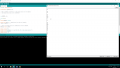
. Why in the 2nd case where I connected the ESP to arduino with a blank sketch I require RX -RX and TX-TX connection but in case 3, I need to connect it TX to RX and RX to TX?
1. I have connected my ESP8266 to FTDI adapter as shown below:
As you can see , same circuit as yesterday, and I was able to get a response from AT command.
2. Then I have moved on to Arduino UNO and ESP8266 and built this circuit:
Before connecting my arduino to ESP. I have uploaded blank sketch to arduino and then connected to ESP. None of the AT commands were working either termite or arduino serial monitor.
I have swapped the RX and TX pins of ESP, so basically instead of TX-RX, RX-TX I have connected TX to TX and RX to RX. With this configuration , I was able to get AT command response.
3. I have uploaded following sketch to Arduino :
C:
#include <SoftwareSerial.h>

SoftwareSerial mySerial(2,3);

// When a command is entered in to the serial monitor on the computer
// the Arduino will relay it to the ESP8266


int LEDPIN = 13;

void setup()
{
pinMode(LEDPIN, OUTPUT);

Serial.begin(9600); // communication with the host computer
//while (!Serial) { ; }

// Start the software serial for communication with the ESP8266
mySerial.begin(115200);

Serial.println("");
Serial.println("Remember to to set Both NL & CR in the serial monitor.");
Serial.println("Ready");
Serial.println("");
}

void loop()
{
// listen for communication from the ESP8266 and then write it to the serial monitor
if ( mySerial.available() ) { Serial.write( mySerial.read() ); }

// listen for user input and send it to the ESP8266
if ( Serial.available() ) { mySerial.write( Serial.read() ); }
}
I have connected Arduino TX to ESP TX ( with votlage divider ofcourse)
and RX to RX - no response from AT commands at different baudrates
Then I have changed the connections to RX - TX and TX-RX, and I got AT command response but the arduino TX led was flashing very fast again and outputting some question marks. I have double checked all my connections and realised that once I touch or move some of my jumper cables, the arduino TX led slows down and stops outputting question marks - so It was probably becuase some bad connection on the breadboard. Okay so I fixed that problem and made sure all the wires are tight and properly connected, but every now and then I get some strange symbol or error when I type AT command:
. Why in the 2nd case where I connected the ESP to arduino with a blank sketch I require RX -RX and TX-TX connection but in case 3, I need to connect it TX to RX and RX to TX?
Last edited by a moderator:

djsfantasi
- Joined Apr 11, 2010
- 9,237
If I’m reading the datasheet correctly, by connecting the ESP8266 reset to ground through a resistor, the device is permanently in reset mode. Pulling that pin down is how to reset the device. It should go to Vcc instead.
Ah that same mistake again from yesterday.. sorry. I have got a switch between the reset and GND. It is nnot permamently in reset mode.If I’m reading the datasheet correctly, by connecting the ESP8266 reset to ground through a resistor, the device is permanently in reset mode. Pulling that pin down is how to reset the device. It should go to Vcc instead.
I have tested to upload the following code:
C:
#include <SoftwareSerial.h> //Including the software serial library
#define DEBUG true
SoftwareSerial esp8266(2,3); // This will make the Arduino pin 2 as the RX pin and Arduino pin 3 as the TX. Software UART
/* So you have to connect the TX of the esp8266 to the pin 2 of the Arduino and the TX of the esp8266 to the pin 3 of the Arduino. This means that you need to connect the TX line from the esp to the Arduino's pin 2 */

void setup()
{
Serial.begin(9600); // Setting the baudrate to 9600
esp8266.begin(9600); // Set it according to your esp’s baudrate. Different esp’s have different baud rates.
pinMode(11,OUTPUT); // Setting the pin 11 as the output pin.
digitalWrite(11,LOW); // Making it low.
pinMode(12,OUTPUT); // Setting the pin 12 as the output pin..
digitalWrite(12,LOW); // Making pin 12 low.
pinMode(13,OUTPUT); // Setting the pin 13 as the output pin.
digitalWrite(13,LOW); // Making pin 13 low.
sendData("AT+RST\r\n",2000,DEBUG); //This command will reset module to default
sendData("AT+CWMODE=2\r\n",1000,DEBUG); // This will configure the mode as access point
sendData("AT+CIFSR\r\n",1000,DEBUG); // This will get ip address and will show it
sendData("AT+CIPMUX=1\r\n",1000,DEBUG); // This will configure the ESP8266 for multiple connections
sendData("AT+CIPSERVER=1,80\r\n",1000,DEBUG); // This will set the server on port 80
}
void loop()
{
if(esp8266.available()) // Checking that whether the esp8266 is sending a message or not (Software UART Data)
{
if(esp8266.find("+IPD,"))
{
delay(1000); // Waiting for 1 sec
int connectionId = esp8266.read()-48; // Subtracting 48 from the character to get the number.
esp8266.find("pin="); // Advancing the cursor to the "pin="
int pinNumber = (esp8266.read()-48)*10; // Getting the first number which is pin 13
pinNumber += (esp8266.read()-48); // This will get the second number. For example, if the pin number is 13 then the 2nd number will be 3 and then add it to the first number
digitalWrite(pinNumber, !digitalRead(pinNumber)); // This will toggle the pin
// The following commands will close the connection
String closeCommand = "AT+CIPCLOSE=";
closeCommand+=connectionId;
closeCommand+="\r\n";
sendData(closeCommand,1000,DEBUG); // Sending the data to the ESP8266 to close the command
}
}
}
String sendData(String command, const int timeout, boolean debug) // Function to send the data to the esp8266
{
String response = "";
esp8266.print(command); // Send the command to the ESP8266
long int time = millis();
while( (time+timeout) > millis()) // ESP8266 will wait for some time for the data to receive
{
while(esp8266.available()) // Checking whether ESP8266 has received the data or not
{
char c = esp8266.read(); // Read the next character.
response+=c; // Storing the response from the ESP8266
}
}
if(debug)
{
Serial.print(response); // Printing the response of the ESP8266 on the serial monitor.
}
return response;
}
This is the picture I have taken from the website guide, However, I do not get any response when I upload this code and I think I know why. In his code, he is using
esp8266.begin(9600); // Set it according to your esp’s baudrate. Different esp’s have different baud rates.
But my ESP8266 is operating at 115200. So I hace changed that line of code to:
esp8266.begin(115200); // Set it according to your esp’s baudrate. Different esp’s have different baud rates.
And the output I get looks like this :
Maybe I have to reconfigure my ESP8266 to operate at same baud rate (9600) ?
Last edited by a moderator:
I have just tried another program :
https://www.instructables.com/id/Simple-Webserver-Using-Arduino-UNOMega-and-ESP8266/
But i seem to get same corrupted response to the AT commands.
I do not seem to get proper response form these commands:
sendData("AT+RST\r\n",2000,DEBUG); //This command will reset module to default
sendData("AT+CWMODE=2\r\n",1000,DEBUG); // This will configure the mode as access point
sendData("AT+CIFSR\r\n",1000,DEBUG); // This will get ip address and will show it
sendData("AT+CIPMUX=1\r\n",1000,DEBUG); // This will configure the ESP8266 for multiple connections
sendData("AT+CIPSERVER=1,80\r\n",1000,DEBUG); // This will set the server on port 80
https://www.instructables.com/id/Simple-Webserver-Using-Arduino-UNOMega-and-ESP8266/
C:
/*
Arduino Webserver using ESP8266
Displays temperature in a webpage
Arduino Mega has three Serial communication ports,this code works well with
Arduino Mega.For UNO users,use Softserial library to connect ESP8266 with
Arduino UNO
If you're unsure about your Arduino model or its pin cofigurations,please check
the documentation at [URL]http://www.arduino.cc[/URL]
modified August 2016
By Joyson Chinta and Gladson Kujur
*/
#define DEBUG true
#include<SoftwareSerial.h>
#define DEBUG true
SoftwareSerial esp8266(2,3);
void setup()
{
Serial.begin(9600); ///////For Serial monitor
esp8266.begin(115200); ///////ESP Baud rate
pinMode(11,OUTPUT); /////used if connecting a LED to pin 11
digitalWrite(11,LOW);
sendData("AT+RST\r\n",2000,DEBUG); // reset module
sendData("AT+CWMODE=2\r\n",1000,DEBUG); // configure as access point
sendData("AT+CIFSR\r\n",1000,DEBUG); // get ip address
sendData("AT+CIPMUX=1\r\n",1000,DEBUG); // configure for multiple connections
sendData("AT+CIPSERVER=1,80\r\n",1000,DEBUG); // turn on server on port 80
}
float sensetemp() ///////function to sense temperature.
{
int val = analogRead(A0);
float mv = ( val/1024.0)*5000;
float celcius = mv/10;
return(celcius);
}
int connectionId;
void loop()
{
if(esp8266.available())
{
/////////////////////Recieving from web browser to toggle led
if(esp8266.find("+IPD,"))
{
delay(300);
connectionId = esp8266.read()-48;
if(esp8266.find("pin="))
{
Serial.println("recieving data from web browser");
int pinNumber = (esp8266.read()-48)*10;
pinNumber += (esp8266.read()-48);
digitalWrite(pinNumber, !digitalRead(pinNumber));
}
/////////////////////Sending data to browser
else
{
String webpage = "<h1>Hello World</h1>";
espsend(webpage);
}
if(sensetemp() != 0)
{
String add1="<h4>Temperature=</h4>";
String two = String(sensetemp(), 3);
add1+= two;
add1+="℃"; //////////Hex code for degree celcius
espsend(add1);
}
else
{
String c="sensor is not conneted";
espsend(c);
}
String closeCommand = "AT+CIPCLOSE="; ////////////////close the socket connection////esp command
closeCommand+=connectionId; // append connection id
closeCommand+="\r\n";
sendData(closeCommand,3000,DEBUG);
}
}
}
//////////////////////////////sends data from ESP to webpage///////////////////////////
void espsend(String d)
{
String cipSend = " AT+CIPSEND=";
cipSend += connectionId;
cipSend += ",";
cipSend +=d.length();
cipSend +="\r\n";
sendData(cipSend,1000,DEBUG);
sendData(d,1000,DEBUG);
}
//////////////gets the data from esp and displays in serial monitor///////////////////////
String sendData(String command, const int timeout, boolean debug)
{
String response = "";
esp8266.print(command);
long int time = millis();
while( (time+timeout) > millis())
{
while(esp8266.available())
{
char c = esp8266.read(); // read the next character.
response+=c;
}
}
if(debug)
{
Serial.print(response); //displays the esp response messages in arduino Serial monitor
}
return response;
}I do not seem to get proper response form these commands:
sendData("AT+RST\r\n",2000,DEBUG); //This command will reset module to default
sendData("AT+CWMODE=2\r\n",1000,DEBUG); // This will configure the mode as access point
sendData("AT+CIFSR\r\n",1000,DEBUG); // This will get ip address and will show it
sendData("AT+CIPMUX=1\r\n",1000,DEBUG); // This will configure the ESP8266 for multiple connections
sendData("AT+CIPSERVER=1,80\r\n",1000,DEBUG); // This will set the server on port 80
Last edited by a moderator:
djsfantasi
- Joined Apr 11, 2010
- 9,237
A) When including listings, please use code tags so we don’t have to scroll and scroll and scroll.
B) If you have a switch to ground, when it is open, the input is floating. Random actions can and will occur. You need a pull-up resistor in the reset input to ensure that it’s high. Otherwise a solar flare, your cat walking by or any of a multitude of random actions will reset your ESP8266.
Additionally, you don’t need the resistor to ground.
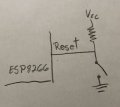
B) If you have a switch to ground, when it is open, the input is floating. Random actions can and will occur. You need a pull-up resistor in the reset input to ensure that it’s high. Otherwise a solar flare, your cat walking by or any of a multitude of random actions will reset your ESP8266.
Additionally, you don’t need the resistor to ground.

Raymond Genovese
- Joined Mar 5, 2016
- 1,653
Therein lies an example of why you have been working on this for soooooo long, as you say.Ah that same mistake again from yesterday.. sorry. I have got a switch between the reset and GND. It is nnot permamently in reset mode.
This is post #88.
Back in post #26, I pointed out the exact same thing as dj did in post #84. You acknowledged the error from "yesterday".
BUT YOU HAVE STILL NOT POSTED AN ACCURATE SCHEMATIC OF THE CIRCUIT THAT YOU ARE USING (and I am yelling, so to speak).
I believe the reason is that you simply do not appreciate how important it is to do that.
Now dj responded reasonably in post #87, but I am almost willing to bet that you have a reset connection as illustrated (outlined in red) in this pic, because you copied it from somewhere, don't understand it and are not willing to spend any time understanding it. Consequently, he will spend 10 posts, trying to figure out what you are doing and why.
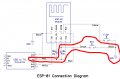
Go back to post #29 where I said:
I am glad that you are making some progress, but , whether you believe me or not: You need to start paying attention to these details or the chances of you getting help will go down.But, I think that the next step is for you to figure out why there is a switch on the reset line and why there are other resistors. That will help you understand the chip and make it easier.
Last edited:
Hey guys. I have corrected my circuit as you both advised me and draw a new schematic for it:

I have redone all the previous tests I have done - same results.
In terms of why there is a switch at a reset pin - I assume it is to reset the ESP8266 to turn it into working mode. Another switch would be used with GPIO_0 pin and the module should be reset while gpio0 pin is pulled down and by doing that , module can be turned into a flashing mode - however that is not necessary for me as I am not trying to program the ESP8266, I am only programming arduino.#
I have found another simple guide how to control a led through a web server:
https://www.electronicshub.org/wifi-controlled-led-using-esp8266-and-arduino/
and the code:
After the code has been uploaded to Arduino , the serial monitor looks like that:
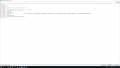
The program was supposed to show the IP adress of the ESP, but it clearly didint. As suggested in the same website, I have used IP network scanner software but I do not seem to recognise any IP relevant IP adress that would belong to ESP:
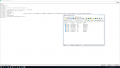
I do not know how to test/troubleshoot anymore. The only thing I can think of is to find a way to flish a newest AT firmware to it but again - my previous attempts flashing a new firmware ended up with 2 bricked ESP8266 chips.
Again guys, thank you for all your patience and help I really appreciate. Would you be able to suggest me some further troubleshooting?
Moderators note : Used code tags AGAIN, Please use the code tags for pieces of code !
I have redone all the previous tests I have done - same results.
In terms of why there is a switch at a reset pin - I assume it is to reset the ESP8266 to turn it into working mode. Another switch would be used with GPIO_0 pin and the module should be reset while gpio0 pin is pulled down and by doing that , module can be turned into a flashing mode - however that is not necessary for me as I am not trying to program the ESP8266, I am only programming arduino.#
I have found another simple guide how to control a led through a web server:
https://www.electronicshub.org/wifi-controlled-led-using-esp8266-and-arduino/
and the code:
C:
#include <SoftwareSerial.h>
SoftwareSerial esp8266(2,3); //Pin 2 & 3 of Arduino as RX and TX. Connect TX and RX of ESP8266 respectively.
#define DEBUG true
#define led_pin 11 //LED is connected to Pin 11 of Arduino
void setup()
{
pinMode(led_pin, OUTPUT);
digitalWrite(led_pin, LOW);
Serial.begin(9600);
esp8266.begin(115200); //Baud rate for communicating with ESP8266. Your's might be different.
esp8266Serial("AT+RST\r\n", 5000, DEBUG); // Reset the ESP8266
esp8266Serial("AT+CWMODE=1\r\n", 5000, DEBUG); //Set station mode Operation
esp8266Serial("AT+CWJAP=\"SSID\",\"Password\"\r\n", 5000, DEBUG);//Enter your WiFi network's SSID and Password.
while(!esp8266.find("OK"))
{
}
esp8266Serial("AT+CIFSR\r\n", 5000, DEBUG);//You will get the IP Address of the ESP8266 from this command.
esp8266Serial("AT+CIPMUX=1\r\n", 5000, DEBUG);
esp8266Serial("AT+CIPSERVER=1,80\r\n", 5000, DEBUG);
}
void loop()
{
if (esp8266.available())
{
if (esp8266.find("+IPD,"))
{
String msg;
esp8266.find("?");
msg = esp8266.readStringUntil(' ');
String command1 = msg.substring(0, 3);
String command2 = msg.substring(4);
if (DEBUG)
{
Serial.println(command1);//Must print "led"
Serial.println(command2);//Must print "ON" or "OFF"
}
delay(100);
if (command2 == "ON")
{
digitalWrite(led_pin, HIGH);
}
else
{
digitalWrite(led_pin, LOW);
}
}
}
}
String esp8266Serial(String command, const int timeout, boolean debug)
{
String response = "";
esp8266.print(command);
long int time = millis();
while ( (time + timeout) > millis())
{
while (esp8266.available())
{
char c = esp8266.read();
response += c;
}
}
if (debug)
{
Serial.print(response);
}
return response;
}The program was supposed to show the IP adress of the ESP, but it clearly didint. As suggested in the same website, I have used IP network scanner software but I do not seem to recognise any IP relevant IP adress that would belong to ESP:
I do not know how to test/troubleshoot anymore. The only thing I can think of is to find a way to flish a newest AT firmware to it but again - my previous attempts flashing a new firmware ended up with 2 bricked ESP8266 chips.
Again guys, thank you for all your patience and help I really appreciate. Would you be able to suggest me some further troubleshooting?
Moderators note : Used code tags AGAIN, Please use the code tags for pieces of code !
Last edited by a moderator:

Andrei Suditu
- Joined Jul 27, 2016
- 52
They do not brick them by flashing.The bootlader is there and working...the strange strings you see are bootlader related and are at a diffrent baud rates.
Make sure to have a common ground and get the correct AT frimwere.....
Some are striped down from what i remember to fit the flash or what not.
Also you could try the phy-flasher( or the newer tool that uses python for flashing.)
Also make sure you match your baud rate to the AT frimwere baud rate.
You can't brick them so easy.
Make sure to have a common ground and get the correct AT frimwere.....
Some are striped down from what i remember to fit the flash or what not.
Also you could try the phy-flasher( or the newer tool that uses python for flashing.)
Also make sure you match your baud rate to the AT frimwere baud rate.
You can't brick them so easy.
I still seem to have same problem when running this code:
The TX arduino LED keeps flashing very fsat and outputting question marks and some garbage as well:
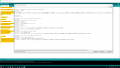
As you can see, it someitmes outputs something about WIFI disconnect which is from previous programs?? I have uploaded a new sketch why would I still get something related to WIFI DISCONNECTED?
When I close the arduino serial monitor - Arduino TX led is permamently ON but not flashing - when I open the serial monitor - starts flashing straight away
Moderators note : Used code tags AGAIN, Please use the code tags for pieces of code !
C:
#include <SoftwareSerial.h>

SoftwareSerial mySerial(2,3);

// When a command is entered in to the serial monitor on the computer
// the Arduino will relay it to the ESP8266
//ARDUINO TX - RX, RX-TX
//

int LEDPIN = 13;

void setup()
{
pinMode(LEDPIN, OUTPUT);

Serial.begin(9600); // communication with the host computer
//while (!Serial) { ; }

// Start the software serial for communication with the ESP8266
mySerial.begin(115200);

Serial.println("");
Serial.println("Remember to to set Both NL & CR in the serial monitor.");
Serial.println("Ready");
Serial.println("");
}

void loop()
{
// listen for communication from the ESP8266 and then write it to the serial monitor
if ( mySerial.available() ) { Serial.write( mySerial.read() ); }
//listen for user input and send it to the ESP8266
if ( Serial.available() ) { mySerial.write( Serial.read() ); }
}As you can see, it someitmes outputs something about WIFI disconnect which is from previous programs?? I have uploaded a new sketch why would I still get something related to WIFI DISCONNECTED?
When I close the arduino serial monitor - Arduino TX led is permamently ON but not flashing - when I open the serial monitor - starts flashing straight away
Moderators note : Used code tags AGAIN, Please use the code tags for pieces of code !
Last edited by a moderator:
Raymond Genovese
- Joined Mar 5, 2016
- 1,653
I suggest that you stop running programs when you do not know what they do and then start asking questions about why they are not doing what you want them to do. It is not likely that you will stumble into a finished project.
1. Please look at post #21. What difference do you see between your schematic and the diagram illustrated in post #21?
2. Please learn how to use code tags when you include code in your posts. Read through this thread https://forum.allaboutcircuits.com/threads/small-improvement-to-code-tag.113254/page-2
if you use [ code=c ] at the beginning and then paste the code and at the ending use [ / code ] it will suffice. Note that I have inserted spaces between the brackets so that you can see it. When you don't use those spaces, something like
if (!understanding()){
    read(more);
}
will look like this:
1. Please look at post #21. What difference do you see between your schematic and the diagram illustrated in post #21?
2. Please learn how to use code tags when you include code in your posts. Read through this thread https://forum.allaboutcircuits.com/threads/small-improvement-to-code-tag.113254/page-2
if you use [ code=c ] at the beginning and then paste the code and at the ending use [ / code ] it will suffice. Note that I have inserted spaces between the brackets so that you can see it. When you don't use those spaces, something like
if (!understanding()){
    read(more);
}
will look like this:
C:
if (!understanding()){
read(more);
}
Last edited:
I suggest that you stop running programs when you do not know what they do and then start asking questions about why they are not doing what you want them to do. It is not likely that you will stumble into a finished project.
1. Please look at post #21. What difference do you see between your schematic and the diagram illustrated in post #21?
2. Please learn how to use code tags when you include code in your posts. Read through this thread https://forum.allaboutcircuits.com/threads/small-improvement-to-code-tag.113254/page-2
if you use [ code=c ] at the beginning and then paste the code and at the ending use [ / code ] it will suffice. Note that I have inserted spaces between the brackets so that you can see it. When you don't use those spaces, something like
if (!understanding()){
read(more);
}
will look like this:
C:if (!understanding()){ read(more); }
Thank you for your answer. The difference is 10k resistor from ch_en to vcc. I have done that just now - same results.
Olay i will stsrt using code tags - sorry
Raymond Genovese
- Joined Mar 5, 2016
- 1,653
Thank you for your answer. The difference is 10k resistor from ch_en to vcc. I have done that just now - same results.
Which pin does the ESP Tx go to on the Arduino in your schematic?
Which pin does the ESP TX got to on the Arduino in the diagram in post #21?
Edited because that line is connected the same. My mistake.
Last edited:
Raymond Genovese
- Joined Mar 5, 2016
- 1,653
Perhaps I should.On my schematic ESP TX goes to the 2nd pin of Arduino ( which is software serial RX) - this is exactly the same as the post 21.
Perhaps you should have a closer look into my schematic?
You're right, sorry about that. No excuses.
No problem. I have connected my old ESP8266 to the circuit to test them. The RED light of ESP is always ON on both of them, when I press the reset button, nothing happens, but when buttons is released Blue led flashes. Do not seem to be able get any AT commands from my 2 old ESP's. I've got nodemcu develpment board, perhaps I would find it easier to work with and setup? Have you had some previous experience with nodemcu?Perhaps I should.
You're right, sorry about that. No excuses.





