Yes I have the same circuit but I havent downloaded anything . I assume thats the AT firmware that I need to upload. Im trying to be carefull with the firmware updates because as I mentioned before my last two ESP's that I have tried to update firmware ended up bad (ESP no responding/not able to flash/update either) .
Nope the picture of where to get AT was from the site you need to goto to get it the second one is
is from a link you posted that setup is missing a resistor to VDD from reset.
I have never bricked a esp But then I aways used https://www.espressif.com/en/support/download/other-tools
seeing they made the ESP I figured they new best.
Okay thank you. I will try and look into that tommorow. Il try and update the version of my AT firmware. Having looked at the previous poctures that I have uploaded here, the firmware version of my esp is 1.3 (atleast thats what AT+GMR tells me). The newest version is 1.7 as far as I can tell so my firnware is definately old
I am a little confused, but your last schematic shows RX-TX and TX-RX. This is how the schematic posted by @be80be shows it. But you describe in your posts that it is connected RX-RX and TX-TX. And this page has a schematic that shows the same-same connection as being correct.
But I don't think that works well when you are sending faster to the uno then it's sending to your computer.
Code:
This example code is in the public domain.

*/
#include <SoftwareSerial.h>

SoftwareSerial mySerial(10, 11); // RX, TX

void setup() {
  // Open serial communications and wait for port to open:
  Serial.begin(57600);
  while (!Serial) {
    ; // wait for serial port to connect. Needed for native USB port only
  }


  Serial.println("Goodnight moon!");

  // set the data rate for the SoftwareSerial port
  mySerial.begin(9600);
  mySerial.println("Hello, world?");
}

void loop() { // run over and over
  if (mySerial.available()) {
    Serial.write(mySerial.read());
  }
  if (Serial.available()) {
    mySerial.write(Serial.read());
  }
}
But I don't think that works well when you are sending faster to the uno then it's sending to your computer.
Code:
This example code is in the public domain.

*/
#include <SoftwareSerial.h>

SoftwareSerial mySerial(10, 11); // RX, TX

void setup() {
  // Open serial communications and wait for port to open:
  Serial.begin(57600);
  while (!Serial) {
    ; // wait for serial port to connect. Needed for native USB port only
  }


  Serial.println("Goodnight moon!");

  // set the data rate for the SoftwareSerial port
  mySerial.begin(9600);
  mySerial.println("Hello, world?");
}

void loop() { // run over and over
  if (mySerial.available()) {
    Serial.write(mySerial.read());
  }
  if (Serial.available()) {
    mySerial.write(Serial.read());
  }
}
I was just reviewing this thread. We are now over 100 posts.
I think it is time for you (@zazas321) to post a nice clear picture of your breadboarded circuit and power supply. Having some other sets of eyes on it might be helpful. While these ESPs can be frustrating, it doesn't normally take this long and this many boards to get a decent and reliable circuit to consistently send and receive a response from a few simple AT commands.
Repeatedly in the thread, I am reading things like:
I have double checked all my connections and realised that once I touch or move some of my jumper cables, the arduino TX led slows down and stops outputting question marks - so It was probably becuase some bad connection on the breadboard. Okay so I fixed that problem and made sure all the wires are tight and properly connected, but every now and then I get some strange symbol or error when I type AT command:
and there have been bad power supplies and the same or similar terminal programs posted at least 5 times. [I think back in #55 that I posted the terminal program with baud rates of 115200 for both software serial and the serial monitor]. You seem to now be focused on changing the ESP baud rate to 9600.
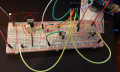
Let's take a look at what you are seeing with the board. Please take a nice clean pic that will show us the breadboard, the power supplies (the one at school or the one that you built or whichever one you are using currently) and connections.
Okay, so the power supply that I am using at home is this one:
I use a chip to step down the voltage to 5V, then I feed that voltage into other voltage regulator that steps the voltage down to 3.3V for ESP.
C:
#include <SoftwareSerial.h>

SoftwareSerial mySerial(2,3);

// When a command is entered in to the serial monitor on the computer
// the Arduino will relay it to the ESP8266
//ARDUINO TX - RX, RX-TX
//

int LEDPIN = 13;

void setup()
{
pinMode(LEDPIN, OUTPUT);

Serial.begin(9600); // communication with the host computer
//while (!Serial) { ; }

// Start the software serial for communication with the ESP8266
mySerial.begin(115200);

Serial.println("");
Serial.println("Remember to to set Both NL & CR in the serial monitor.");
Serial.println("Ready");
Serial.println("");
}

void loop()
{
// listen for communication from the ESP8266 and then write it to the serial monitor
if ( mySerial.available() ) { Serial.write( mySerial.read() ); }
//listen for user input and send it to the ESP8266
if ( Serial.available() ) { mySerial.write( Serial.read() ); }
}
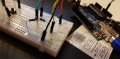
As soon as I upload the program and open arduino serial monitor, Arduino TX led starts flashing. However, I am receiving response form AT command, but sometimes its outputting me some strange signs ( check picture).
First observations. I assume that any component which doesn’t connect to anything is not needed. Otherwise there is a mistake in your breadboard.
The resistor terminating at j59 doesn’t connect to anything.
The resistor terminating at d57 doesn’t connect to anything.
Also, I have mentioned this many posts ago. Please ask directly if you don’t get it. If there are multiple characters available, you are at risk of losing some. Here is your code:
C:
void loop() {

// listen for communication from the ESP8266 and then write it to the serial monitor
if ( mySerial.available() ) { Serial.write( mySerial.read() ); }

//listen for user input and send it to the ESP8266
if ( Serial.available() ) { mySerial.write( Serial.read() ); }
... should be more like my code, IMHO:
C:
void loop() {

// listen for communication from the ESP8266 and then write it to the serial monitor
while( mySerial.available() ) {
     Serial.write( mySerial.read() );
}

//listen for user input and send it to the ESP8266
while (Serial.available() ) {
     mySerial.write( Serial.read() );
     }
And can someone else confirm that TX-RX & RX-TX is the correct connection? I have used shields that require TX-TX, etc connections. Not having used the EDP 8266, I don’t know the proper configurations. But there are online references that state either connection is correct. I’ve posted one earlier in this thread. TX-RX or TX-TX. The TS has stated earlier that he got his configuration to work with the latter configuration.
These 2 resistors are connected togethrt at j53. May look deceiving in the picture. Im connecting 2 1k resistors to make potential divider for my arduino TX line
These 2 resistors are connected togethrt at j53. May look deceiving in the picture. Im connecting 2 1k resistors to make potential divider for my arduino TX line
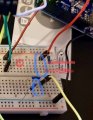
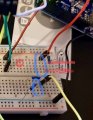
Nothing is connected at j53! I cannot imagine what you are looking at. It’s not the picture you posted.
In the attached picture, j53 is circled in red. Nothing is there. Nor is there anything in that row.
Circled in blue are the unconnected ends. Where do you think they go. I’ll admit that d57 may be connected, but it’s not clear. In any case, the other resistor is not connected to anything.
First, I suggest that you post accurate schematics so old people like myself don't hemorrhage trying to understand what you are doing and why. But, we have been through that before.
Then, I would suggest that you build the power supply on a board so that you can connect only 3.3V and GND to your breadboard.
Then I would suggest that you get a breadboard adapter for the ESP-01 (see links that I have already posted).
Then I would suggest that you trim all of the leads on the components so that they are small and not flailing about.
Then I would suggest that you use smaller jumper leads and make them yourself if needed.
You sometimes get appropriate responses to AT commands but you never seem to do that for long. You have a very noisy and messy circuit.
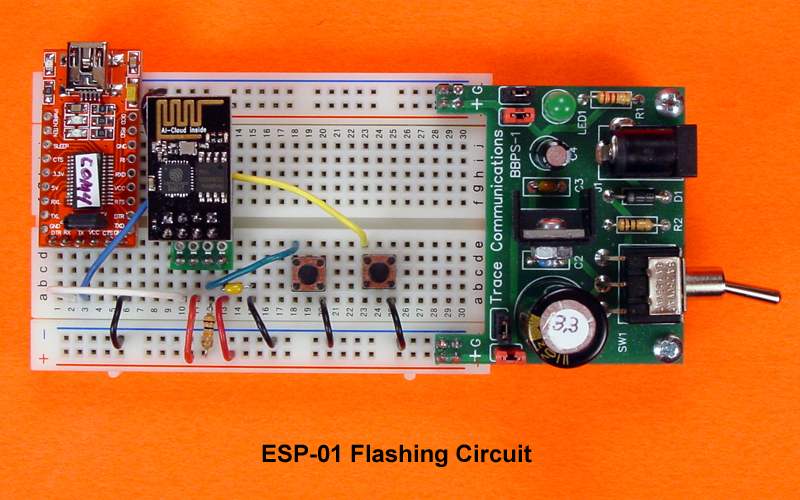
Edited to add, here are a couple of neat layouts...
Alternatively, you could choose another project until you develop the skills necessary to complete this one.
Or a more modern one. I would have suggested that you program it with the Arduino language and skip the AT altogether. I have one like the pic and have used it many times. But, I honestly am not sure how much it would help because I think it would introduce a whole bunch of additional problems.
You just need a little more guided experience - at least that is what it seems like to me. What level is the course you are taking and how much programming and electronics experience have you had?

 Facebook
 Google
 GitHub
 Linkedin



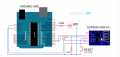

 . I assume thats the AT firmware that I need to upload. Im trying to be carefull with the firmware updates because as I mentioned before my last two ESP's that I have tried to update firmware ended up bad (ESP no responding/not able to flash/update either) .