Arduino power supply with Software Serial trouble

Thread Starter

Miquel19

Joined Aug 16, 2020
37
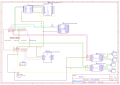
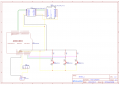
You have'nt make corrections to the scematics as i suggested in posting #11 and therefore your system ca'nt work. Please read this posting again and make right connections.

Edit: At the moment your system communicates via serial connection on pins 2 and 3, wireless connection can not work due wrong wiring.
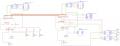
Sorry, I just forgot about changing this on the schematics. The circuit's good now?Schematic_Cotxe_2020-08-22_22-25-48.png
I have done what you said, but the problem still is the same. When I disconnect the wires between the 2 Arduinos everything stops working
 

djsfantasi

Joined Apr 11, 2010
9,237
By the way, the schematic is hard to read. Sometimes, wires are on top of each other and I can’t tell where they are connected. Like the yellow wire in the upper left.
 

Thread Starter

Miquel19

Joined Aug 16, 2020
37
In your controller side you use AltSoftSerial library and you initialize this with pin numbers. A correct example can found in AltSoftSerial library page.
I have changed it. But the problem still here. When I send one order, everything stops running. Another weird thing is that I can't use AltSoftSerial with the other wifi module. I don't know why AltSoftSerial makes the car module not to work.
Arduino (Controller sketch):
#include <AltSoftSerial.h>
#include <SoftwareSerial.h>
#define b1 A5
#define b2 A4
#define b3 A3
#define b4 A2
#define b5 A1
#define led A0
AltSoftSerial wifi;
SoftwareSerial configuracio(2, 3); //Rx Tx
String Nom_Wifi;
String Contrasenya_Wifi;
char car;
String ordre;
String ip;
int estat=1;
int pos=0;
String IP_Coenxio="";
int contador=0;
bool comprovant=false;
void setup() {
  pinMode(b1, INPUT);
  pinMode(b2, INPUT);
  pinMode(b3, INPUT);
  pinMode(b4, INPUT);
  pinMode(b5, INPUT);
  pinMode(led, OUTPUT);
  wifi.begin(9600);
  configuracio.begin(9600);


  paperera();

  paperera();
  delay(1000);
  while(comprovant==false){  //This while loop looks if the wifi module its in the uart-wifi passthrough mode
    wifi.println("AT");
    delay(1000);
    comprovant=comprovar();
    estat+=1;
    if(estat==6){
      estat=1;
      break;
    }
  }
 
  if(estat!=1){  //This for loop waits until it gets the three information packets
    while(pos!=3){
      if(configuracio.available()>0){
       if(pos==0){
         Nom_Wifi=llegir_configuracio();
        }
        if(pos==1){
          Contrasenya_Wifi=llegir_configuracio();
        }
       if(pos==2){
         ip=llegir_configuracio();
       }
       pos+=1;
     }   
   }
   Serial.end();
    comprovant=false;
    while(comprovant==false){
      wifi.println("AT+RST");
      delay(2000);
      comprovant=comprovar(); 
    }
    comprovant=false;
    while(comprovant==false){
      wifi.println("AT+CWMODE=1");
      delay(2000);
      comprovant=comprovar();
    }
    comprovant=false;
    while(comprovant==false){
      wifi.println("AT+CIPMODE=1");
      delay(2000);
      comprovant=comprovar();
    }
    String ssidpass="AT+CWJAP=\""+String(Nom_Wifi)+"\",\""+String(Contrasenya_Wifi)+"\"";
    String Ip_Conexio="AT+CIPSTART=\"TCP\",\""+ip+"\",80";
    comprovant=false;
    while(comprovant==false){
      wifi.println(ssidpass);
      delay(8000);
      paperera();
      wifi.println(Ip_Conexio);
      delay(5000);
      comprovant=comprovar();
    }
    wifi.println("AT+CIPSEND");
    delay(1000);
  }
}


void loop() {  //The main loop sends the data with a little delay (if not, we collapse the car's serial buffer)
  if(digitalRead(b1)==HIGH){
    digitalWrite(led, HIGH);
    delay(100);
    digitalWrite(led, LOW);

    wifi.write("a");
    delay(300);
  }
  if(digitalRead(b2)==HIGH){
    digitalWrite(led, HIGH);
    delay(100);
    digitalWrite(led, LOW);

    wifi.write("w");
    delay(300);
  }
  if(digitalRead(b3)==HIGH){
    digitalWrite(led, HIGH);
    delay(100);
    digitalWrite(led, LOW);

    wifi.write("d");
    delay(300);
  }
  if(digitalRead(b4)==HIGH){
    digitalWrite(led, HIGH);
    delay(100);
    digitalWrite(led, LOW);

    wifi.write("s");
    delay(300);
  }
  if(digitalRead(b5)==HIGH){
    digitalWrite(led, HIGH);
    delay(100);
    digitalWrite(led, LOW);

    wifi.write("x");
    delay(1000);
    wifi.write("+++");
    delay(2000);
    wifi.println("AT+CIPCLOSE");
    delay(1000);
  }
}


void paperera(){  //It discartes the characters stored in the serial buffer
  char car;
  if(configuracio.available()){
    while(configuracio.available()){
      car=configuracio.read();
      delay(20);
    }
  }
  if(wifi.available()){
    while(wifi.available()){
      car=wifi.read();
      delay(20);
    }
  }
}


String llegir_wifi(){  //Reads the wifi characters and returns an string with them
  char car;
  String ip;
  if(wifi.available()){
    while(wifi.available()){
      car=wifi.read();
      ip+=car;
      delay(5);
    }
  }
  return ip;
}


String llegir_configuracio(){  //Reads the Software Serial characters and returns an string with them
  char car;
  String ip;
  if(configuracio.available()){
    while(configuracio.available()){
      car=configuracio.read();
      ip+=car;
      delay(5);
    }
  }
  return ip;
}


bool comprovar(){  //Search specific responses fot the AT COMMANDS to check if the command has runed succesfuly
  if(wifi.find("OK")||wifi.find("CON")||wifi.find("GOT")||wifi.find("IP")){
    return true;
  }
}
 

trebla

Joined Jun 29, 2019
599
Via which serial connection you send the order, wifi or wired?

You need use AltSoftSerial if you want use more than one sofware serial port communications in same time. If you communicate with different software serial ports in different time you can use standard SoftwareSerial.
 

djsfantasi

Joined Apr 11, 2010
9,237
You use pins D2 and D3 to connect both Arduino’s via “configuration” (sp?). That object uses software serial.

Whatever that object does, without the wires it won’t work. You need to use the object “wifi” instead...

I also didn’t see where you create the object “wifi”?
 

djsfantasi

Joined Apr 11, 2010
9,237
You use pins D2 and D3 to connect both Arduino’s via “configuration” (sp?). That object uses software serial.

Whatever that object does, without the wires it won’t work. You need to use the object “wifi” instead...

I also didn’t see where you create the object “wifi”?
Look at line 10 of your controller code.
 

Thread Starter

Miquel19

Joined Aug 16, 2020
37
Via which serial connection you send the order, wifi or wired?

You need use AltSoftSerial if you want use more than one sofware serial port communications in same time. If you communicate with different software serial ports in different time you can use standard SoftwareSerial.
First of all, the car module starts the connexion with the wifi and creates a server. Then it transmits using the wires the wifi parameters (that I have already put before uploading the program to the Arduino) and the server IP. After that, the controller connects to the wifi and then starts the connection with the server that the car created. Then, the orders I'm sending are via wifi, and the wires are not useful anymore, so I want to remove them.
 

Thread Starter

Miquel19

Joined Aug 16, 2020
37
Look at line 10 of your controller code.
These wires only need to send information once. Then, they become an annoyance, because I'm making a control remote car.
Normally, I'm able to send one order using wifi before everything breaks. I don't know what do you see on line 10. I can send the information I need with the wires between Arduino. The problem appears when I want to send information using the wifi modules, and remove the wires.
 

djsfantasi

Joined Apr 11, 2010
9,237
All I can suggest is to remove those wires and write two short sketches...

The first will just send “Hello” over Wifi

The second wait for a message via WiFi and print it on the console.

You need to learn how to send and receive via WiFi without any other complications. Once you have that working, you can merge the code into your control and car sketches.

You can try this approach with other functions as well.
 

Thread Starter

Miquel19

Joined Aug 16, 2020
37
All I can suggest is to remove those wires and write two short sketches...

The first will just send “Hello” over Wifi

The second wait for a message via WiFi and print it on the console.

You need to learn how to send and receive via WiFi without any other complications. Once you have that working, you can merge the code into your control and car sketches.

You can try this approach with other functions as well.
Now, I don't know why it started working (some hours ago anything was working). Its kind of crazy, but now works, so thanks all of you for your help.

Many thanks.

Miquel
 

djsfantasi

Joined Apr 11, 2010
9,237
Just a wild thought... Do you connect both Arduinos to your laptop/PC at the same time? Are you certain that each one is connected to it's own COM port? I had a similar problem and it turned out that the sketches were uploaded to the wrong Arduino.
 

Thread Starter

Miquel19

Joined Aug 16, 2020
37
Just a wild thought... Do you connect both Arduinos to your laptop/PC at the same time? Are you certain that each one is connected to it's own COM port? I had a similar problem and it turned out that the sketches were uploaded to the wrong Arduino.
Well, this happened to me some weeks ago, but fortunately, I saw it without losing to much time. But I mean, my prototype does really weird things. Every time I want to like start using the car, to prepare the connection I need to:
1. Power the controller and the car separately
2. Connect the wires between both Arduino
3. Wait some seconds until the configuration has finished.
I can't do it with different order because then it will fail (I don't know why). But also if I do that, is not always going to succeed and it maybe won't work. I suspect that's a problem of the batteries because as you said, the ESP8266 its very power consuming. I will investigate more when I buy the definitive batteries but is really weird jajja.
 

djsfantasi

Joined Apr 11, 2010
9,237
I went back and carefully read your code. It appears to me that the function in lines 169-180 gets the IP address of the car and sends it over the serial connection. Formed by those wires. If you don’t have those wires connected, the controller doesn’t know the Wi-Fi address (IP) for the car and it won’t/can’t work.


I’d use fixed IP addresses so you don’t need the serial connection. If you have the address, any other configuration can be sent over WiFi. I’d hard code the SSID as well.


Another approach (which I use) is to add an SD card reader to at least one of your Arduinos. If it was the controller, then you could have an SD card for each car, and insert it into the controller when needed.

Another concern is that you have blocking code when the serial connection on pins 2/3 aren’t connected.

I’d start a sketch that doesn’t use pins 2/3 at all. Delete all references to connexion()functions! Then debug from there.
 

Thread Starter

Miquel19

Joined Aug 16, 2020
37
I went back and carefully read your code. It appears to me that the function in lines 169-180 gets the IP address of the car and sends it over the serial connection. Formed by those wires. If you don’t have those wires connected, the controller doesn’t know the Wi-Fi address (IP) for the car and it won’t/can’t work.


I’d use fixed IP addresses so you don’t need the serial connection. If you have the address, any other configuration can be sent over WiFi. I’d hard code the SSID as well.


Another approach (which I use) is to add an SD card reader to at least one of your Arduinos. If it was the controller, then you could have an SD card for each car, and insert it into the controller when needed.

Another concern is that you have blocking code when the serial connection on pins 2/3 aren’t connected.

I’d start a sketch that doesn’t use pins 2/3 at all. Delete all references to connexion()functions! Then debug from there.
The problem is that needs to be an easy and fast process (the connection between the car and controller), because I'm building this car as a project to give it to a school in my town that asked me if I can do it. And I want to make it the easiest way for them to use it. And if I do it in this way, if they want to change like the wifi SSID or the password, they will only need to change it from one Arduino, and maybe it will be easier for them.

But maybe I will do something like what you said. It will be easier and it will work always, and it's an important thing.

The part that I blocked the serial connection on pins 2/3 is because I saw that when I reset the car and controller Arduino (not resetting the module) the connection was like automatically and if I do it in this way, it was faster. Now I think that this doesn't work. I will make some tests to see but I don't expect it to do it (these lasts days is not doing it).

I will also reread the code carefully to see if I see some bug and fix it.
 

djsfantasi

Joined Apr 11, 2010
9,237
The problem is that needs to be an easy and fast process (the connection between the car and controller), because I'm building this car as a project to give it to a school in my town that asked me if I can do it. And I want to make it the easiest way for them to use it. And if I do it in this way, if they want to change like the wifi SSID or the password, they will only need to change it from one Arduino, and maybe it will be easier for them.

But maybe I will do something like what you said. It will be easier and it will work always, and it's an important thing.

The part that I blocked the serial connection on pins 2/3 is because I saw that when I reset the car and controller Arduino (not resetting the module) the connection was like automatically and if I do it in this way, it was faster. Now I think that this doesn't work.
I can’t think of a faster nor easier way than hard-coding the configuration. If they want to change the IP, SSID or password with your method, you need to change the code anyway. So updating the hard-coded values is just as easy...

Good luck!
 

Thread Starter

Miquel19

Joined Aug 16, 2020
37
I can’t think of a faster nor easier way than hard-coding the configuration. If they want to change the IP, SSID or password with your method, you need to change the code anyway. So updating the hard-coded values is just as easy...

Good luck!
Well, I will try my best. Many thanks for the help you have been giving me these days, and have a nice day.

Miquel
 
Top