Amplify high frequency signal

Bordodynov

Joined May 20, 2015
3,431
Ericgibs, You feed him from the spoon as a baby.
I have already updated the information on my site. There is also an instruction.
For those who do not need to use LTspice constantly, this is justified. But I think that for the author of this topic it is not so. He needs a good tool, And taking with the models and symbols of the elements is useful, but makes it difficult to use and pushes potential users. I think LTspice is a great program, and I want this program to be convenient for using as ORCAD, MicroCap, Multisim and Simetrix.
See
https://forum.allaboutcircuits.com/...v-dc-400-ma-linear-power-supply.150587/page-2
#24 - #31
And about the resistors (both), to get a normal gain, I reduced the resistors by a factor of 10.Why did it happen I do not know.Probably internal transistors have better frequency properties at higher currents.
 

ebp

Joined Feb 8, 2018
2,332
When using high-bandwidth op amps, always consult the datasheet. Frequently the manufacturer will make specific recommendations for feedback resistor values. Often the feedback resistor is quite low in value - a few hundred ohms is typical. Most high bandwidth op amps have quite low input impedance and using a feedback resistor that is too high will compromise performance.
 

ericgibbs

Joined Jan 29, 2010
21,444
Ericgibs, You feed him from the spoon as a baby.
hi @Bordodynov
I would point out, you are the one who is posting completed working circuits.
All I am trying to do is help the TS is get the simulations running on his PC, when he has trouble with the models.
I am following this thread, in order to do that, I have to find the models from your linked/files and create a working sub folder for the simulation so that I can run the sim.
As I have already created a sub folder, it seems the logical step is to post that folder.

Eric

BTW:
I would like to say that I consider your work and development of LTSpice is First Class.
Personally, I find your posted LTS simulations very informative.
 
Last edited:

Thread Starter

PsySc0rpi0n

Joined Mar 4, 2014
1,786
Hello.

I'm sorry if I'm asking too many simple questions. But in fact, I have sorted out the problems about running your (Mr. @Bordodynov) libraries. It's not that the issue! And I always try to do things prior to come here asking for help. As you guys see, I built my own symbol for the OPA691 that was not in default folder. So, I'm not always waiting someone to feed me with a spoon like a baby.

My latest question arose because in the beginning of this thread we started by using an LMH6654 (or LMH6655) and after reading the datasheet I did the simple math for a specific output voltage and came up with the values for the feedback resistors. Then Mr. @Bordodynov increased their value by a factor of 10x and amplification got closer to what I was expecting. Now the same happened but for the feedback resistors without that 10x factor. This I didn't understood. That's why I came here to ask why!

By the way, I really appreciate Mr. @ericgibbs help here and also Mr. @Bordodynov great circuit solutions here and in Yahoo Groups (which is another great source of information and electronics and LTSpice skills).

Next week I'll buy these components to test them with the real circuit and will post here the results.

As for now, I have another big problem that I'm not sure I can solve.
This ebay DDS module I bought (AD9850) has 2 outputs and I think they are filtered outputs and the wave forms are quite acceptable while in open circuit. But when I attach the load to this DDS output, either of them, I get a pretty "ugly" wave form on scope! I'm not sure why this happens. I know about possible causes at this frequency and I'm not sure I can improve it and also I don't know how bad this will be to the circuit results.
 

Thread Starter

PsySc0rpi0n

Joined Mar 4, 2014
1,786
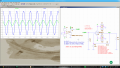
Ok, with the resistors Rf and Rg with the 10x factor I get this:
upload_2018-7-28_20-33-41.png

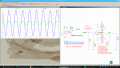
Without the 10x factor I get this:
upload_2018-7-28_20-35-29.png


I made no changes to the model file taken from TI site. The same I posted a couple of posts before!

Edited;
Also I was trying to measure the gain by evaluating the input signal and output signal amplitudes and then dividing them but I can't make the measurement to work.
Check the .meas commands I have in schematic, please!
 

Attachments

Last edited:

Bordodynov

Joined May 20, 2015
3,431
Ok, with the resistors Rf and Rg with the 10x factor I get this:
..............
Check the .meas commands I have in schematic, please!
.meas GAIN pp v(out)/2/0.4 ==> meas GAIN pp v(out)/2/0.24
.meas voutmax max v(out)
.meas voutmin min v(Out)
.meas vampoutmax (vmax -vmin) ==>.meas vampoutmax param (voutmax -voutmin)
.meas vsigmax max v(vsigin)
.meas vsigmin min v(vsigin)
.meas vsigampmax (vsigmax - vsigmin) ==> .meas vsigampmax param (vsigmax - vsigmin)
.meas avgain (vampoutmax) / (vsigampmax) ==> .meas avgain param (vampoutmax) / (vsigampmax)

And further. I'm having trouble simulating your circuit. You did not add the library file and the operatic symbol.
I had to correct it. If you rewrote my libraries in the right place, then I would not have this difficulty (after all, I have my library).
For LTspiceIV it's easy. But if LTspiceXVII is used, the usual error is: Files are written to the wrong "lib" folder (only two "lib" folders),
but it's not scary, just the elements will not be there. I need to write my library to the desired "lib" folder. This is the way I described on my website. But I will repeat. To find the desired location of the folder "lib", start typing the element (click on the symbol of the logical element in the menu) and you will immediately see the desired address.
Rewrite the contents of my "lib" folder to the found folder. Now between people who have my library it is enough to send the circuit itself,
without thinking about the models and symbols of the elements. The Yahoo Group does not like my approach. Well, in each monastery own charter.
For that, having overcome the initial difficulties, it will be easy to continue using the program! In the Russian segment this is how LTspice is used. Their library is included in mine. I just sorted the models for convenience.
I'm ready to listen to any suggestions for expanding my library!
 

ericgibbs

Joined Jan 29, 2010
21,444
Ok, with the resistors Rf and Rg with the 10x factor I get this:
hi Jose,
Read page #11 of the OPA691 datasheet, it explains the current feedback operation and the low impedance requirement of the external components.
E
 

Thread Starter

PsySc0rpi0n

Joined Mar 4, 2014
1,786
.meas GAIN pp v(out)/2/0.4 ==> meas GAIN pp v(out)/2/0.24
.meas voutmax max v(out)
.meas voutmin min v(Out)
.meas vampoutmax (vmax -vmin) ==>.meas vampoutmax param (voutmax -voutmin)
.meas vsigmax max v(vsigin)
.meas vsigmin min v(vsigin)
.meas vsigampmax (vsigmax - vsigmin) ==> .meas vsigampmax param (vsigmax - vsigmin)
.meas avgain (vampoutmax) / (vsigampmax) ==> .meas avgain param (vampoutmax) / (vsigampmax)

And further. I'm having trouble simulating your circuit. You did not add the library file and the operatic symbol.
I had to correct it. If you rewrote my libraries in the right place, then I would not have this difficulty (after all, I have my library).
For LTspiceIV it's easy. But if LTspiceXVII is used, the usual error is: Files are written to the wrong "lib" folder (only two "lib" folders),
but it's not scary, just the elements will not be there. I need to write my library to the desired "lib" folder. This is the way I described on my website. But I will repeat. To find the desired location of the folder "lib", start typing the element (click on the symbol of the logical element in the menu) and you will immediately see the desired address.
Rewrite the contents of my "lib" folder to the found folder. Now between people who have my library it is enough to send the circuit itself,
without thinking about the models and symbols of the elements. The Yahoo Group does not like my approach. Well, in each monastery own charter.
For that, having overcome the initial difficulties, it will be easy to continue using the program! In the Russian segment this is how LTspice is used. Their library is included in mine. I just sorted the models for convenience.
I'm ready to listen to any suggestions for expanding my library!
Thanks for fixing my measurement commands.
About that ".meas GAIN pp v(out)/2/0.4" I set that last divider to 0.4 (initially I said 480mVpp but for safety I used 400mVpp) because the goal gain was obtained comparing two Vpp voltages. I mean, when I did 3 / 0.4, I have compared 3Vpp with 0.4Vpp. By using 3 / 0.24 I would be comparing a Vpp with a Vamp (I assume Vamp = Vpp / 2).

About the libraries in LTSpice, let me clear this out that I'm not sure I already said it or not. I'm using Linux, and unfortunately, there is no Linux version of LTSpice, as far as I know, so I'm using LTSpice "behind" Wine. But I think folders have the same path.
Ok, I'll tell here exactly the steps I took to copy your libraries into my default LTSpiceXVII folder.
Mr. @Bordodynov I'm sorry but there was part of your text I couldn't understand at 100%. I don't understand when you say:

To find the desired location of the folder "lib", start typing the element (click on the symbol of the logical element in the menu) and you will immediately see the desired address.
Where do you "start typing the element"??? You mean inside LTSpice, when you want to select a component from LTSpice menu? OR are you referring to Windows Explorer address bar? Anyway, below are the steps I followed to overwrite default libraries with yours:

1 - Downloaded your .zip file from here (2nd link of post #25).
2 - Unzipped it into some folder. An LTSpiceXVII folder and 2 HELP files are extracted.
3 - I enter in this LTSpiceXVII folder and I see 3 other folders. "examples", "lib", and "soft".
4 - I select those 3 folders and copy them into my LTSpiceXVII folder which is "C:\Program Files\LTC\LTSpiceXVII". My linux path is rather "~/.wine\drive_c/Program\ Files/LTC/LTSpiceXVII"

And after restarting LTSpice, when I add a new component to the schematic, I only need to start typing "OPA" and it shows up in the list along with many others. I don't know what problems you ran into.

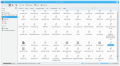
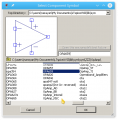
This is my LTSpiceXVII/lib/sub folder where you can see OPA691.LIB selected. At the top of the window you can see the path of the folder.
upload_2018-7-29_10-52-54.png

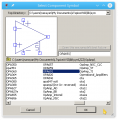
When I add a new symbol to a schematic, and start typing "OPA...", this is what I see:
upload_2018-7-29_10-56-20.png

But I admit there is something weird I'm not sure it's ok.
In the above image I typed "OPA69" and the OPA691 showed up with the OPA659 above it.
But if I type "OPA659" I can't find OPA691 below it!
upload_2018-7-29_10-58-53.png

Is this ok to happen or...???
 

Bordodynov

Joined May 20, 2015
3,431
I think this is a feature of LTspiceXVII.If you want to see all the items, just go to the ZZZ / OpAmp folder when you enter the component.I apologize for my English (I use Google translator).You placed the symbols of the elements correctly, but here the placement of the models is in doubt.Models should be in ../My Documents/LTspiceXVII/lib/sub and in ../My Documents/LTspiceXVII/lib/cmp.
 

Thread Starter

PsySc0rpi0n

Joined Mar 4, 2014
1,786
Ok. No problem, we will manage to understand one way or another! :)

My LTSpiceXVII 'cmp' folder looks like this:
upload_2018-7-29_13-49-5.png


This one is the same folder from the link of your libraries. It's just the same. I copied it to my default LTSpiceXVII install folder!
upload_2018-7-29_13-50-9.png

So I think my folders structure and content is the same as yours. In this 'cmp' folder there is no OPA691 related files.

And about the ZZZ folder. Is that a folder you created by hand or is this already by default with LTSpiceXVII installation?
 

Bordodynov

Joined May 20, 2015
3,431
You all look wrong.I already wrote that there are two folders - ../Program File / LTC / LTspiceXVII / lib and ../My Documents / LTC / LTspiceXVII / lib.So that's it.The information should be in the second folder.What you wrote down in the first folder is not right, but absolutely does not interfere.As I wrote, you made a common mistake.I've met her many times.So many people did wrong.Now you can copy the contents of the first folder to the second one.
 

Thread Starter

PsySc0rpi0n

Joined Mar 4, 2014
1,786
Models should be in ../My Documents/LTspiceXVII/lib/sub and in ../My Documents/LTspiceXVII/lib/cmp.
You all look wrong.I already wrote that there are two folders - ../Program File / LTC / LTspiceXVII / lib and ../My Documents / LTC / LTspiceXVII / lib.So that's it.The information should be in the second folder.What you wrote down in the first folder is not right, but absolutely does not interfere.As I wrote, you made a common mistake.I've met her many times.So many people did wrong.Now you can copy the contents of the first folder to the second one.
Ahh ok. I think I got it. Somehow I haven't noticed there were 2 different folders. You mentioned the same folder first. You have been mentioning:
../My Documents/LTspiceXVII/lib/sub
and
../My Documents/LTspiceXVII/lib/cmp

but I think you meant:
../My Documents/LTspiceXVII/lib/sub
and
../Program Files/LTSpiceXVII/lib/sub
and
../My Documents/LTspiceXVII/lib/cmp
and
../Program Files/LTSpiceXVII/lib/cmp
 

Thread Starter

PsySc0rpi0n

Joined Mar 4, 2014
1,786
Ok, I solved the problem. I had to delete both LTSpiceXVII folders and reinstall it again. Then I copied your library folders only into "My Documents" folder of LTSpiceXVII and I guess it worked!

Now I'm just not sure if it is like you're expecting Mr. @Bordodynov. I hope it is!

I'm going to upload here again my .asc file with your OPA691 files from your libraries and please check if they are OK now and let me know!
 

Attachments

Bordodynov

Joined May 20, 2015
3,431
There is no need to refer to the library using the ".inc" and "lib" commands. The link to the library is in the symbol itself. You can check whether you installed everything correctly by taking my file and running the calculation.
 

Thread Starter

PsySc0rpi0n

Joined Mar 4, 2014
1,786
Hello.
Finally I had the chance to test the pcb of the circuit with the OPA691. As expected the amplifier doesn't work with the real circuit. However, I think it is well designed because I tested it with a signal generator at the lab, and apparently it is amplifying the signal!

Now, what may cause the amplifier not to work from the circuit the input signal is coming from? The circuit behind the input signal of the amplifier is just a uC (AtMega328P), an LCD and the ebay signal generator! If it helps, I can paste here a complete schematic or a block diagram of what I have!
 
Top