Adding browser to a TV...

joeyd999

Joined Jun 6, 2011
6,246
Hi. Please move if should be in another subforum.

How to install a browser on a 'smart' TV ? Found this but zero instructions for a non-skilled old fart on how to do it ----> https://rigorousthemes.com/blog/best-browsers-for-smart-tv/

Do you know how or done it ?

Here is another for my TCL brand TV ----> https://play.google.com/store/apps/details?id=com.tcl.browser&hl=en :oops:
This is a serious suggestion (it's what I do):

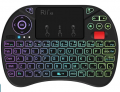
Find a cheap, used 5 to 8 year old PC with an HDMI video output, and a wireless mouse/keypad, or:

Selection_159.png

Hook the PC up to your TV, and install your favorite multimedia distribution of Linux.

Now you've got a full-blown PC attached to your TV for browsing, movies, email, serious work, whatever.

And all the software is free.
 

Jon Chandler

Joined Jun 12, 2008
1,571
Look for the Google Ap Store under apps on your TV. Open it, search for browser and see what's available for your TV. Install one of the options found.

Go to apps again on the TV and look for the browser.

All of this of course depends on having a network or wifi connection to the TV.
 

joeyd999

Joined Jun 6, 2011
6,246
This is a serious suggestion (it's what I do):

Find a cheap, used 5 to 8 year old PC with an HDMI video output, and a wireless mouse/keypad, or:

View attachment 330931

Hook the PC up to your TV, and install your favorite multimedia distribution of Linux.

Now you've got a full-blown PC attached to your TV for browsing, movies, email, serious work, whatever.

And all the software is free.
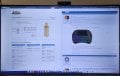
This is my setup on a 50" Hisense 4K UHD:

20240904_140458.jpg
 

Thread Starter

Externet

Joined Nov 29, 2005
2,628
Thanks.
That Hisense 50" does not have a browser either. Neither the 'Onn' nor the 'TCL' Been told the 'Element' brand does. What I currently have is a pristine dedicated only for TV Chromebook hooked to ethernet and to the TV on HDMI receiving all the broadcasts I want in the planet and with that exact same mini keyboard.

Just exploring how I could reduce parts count with a smart TV with added browser, to liberate the laptop and one less remote...
 

Jon Chandler

Joined Jun 12, 2008
1,571
Just exploring how I could reduce parts count with a smart TV with added browser
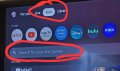
As I explained, it appears your tv is based on Google TV. So do the following


Look for the Google Ap Store under apps on your TV. Open it, search for browser and see what's available for your TV. Install one of the options found.

Go to apps again on the TV and look for the browser.

20240904_125524.jpg
 

nsaspook

Joined Aug 27, 2009
16,273
Thanks.
That Hisense 50" does not have a browser either. Neither the 'Onn' nor the 'TCL' Been told the 'Element' brand does. What I currently have is a pristine dedicated only for TV Chromebook hooked to ethernet and to the TV on HDMI receiving all the broadcasts I want in the planet and with that exact same mini keyboard.

Just exploring how I could reduce parts count with a smart TV with added browser, to liberate the laptop and one less remote...
Those 'Smart' TV app browsers are insecure as hell. Stick with the Chromebook.
 

Thread Starter

Externet

Joined Nov 29, 2005
2,628
Thanks, fellows.
The TV shows 95% content as from RokuTV "applications". The non-Roku apps does not show a browser of any kind after search. :(

My phone has nothing to play in me watching TV, nor I want that interaction. I do one or the other, Know nothing what mirroring is nor want to know.

TV is a 2 day new TLC model 43S451 and its manual does not mention sheeet of being Googly nor Androidish or else. Customer service for the browser link does not respond. If nothing progresses, next action could be return the TV an buy a 'Element' brand. Will see.
 

Jon Chandler

Joined Jun 12, 2008
1,571
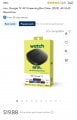
Buy one of these from Walmart. Widely regarded as the best low-cost streaming box. I've been using one for the last year.

It allows adding apps from the Google PlayStore (including a brower) and is simple to set up.

It's been verified free from Spyware a d GoogleTV provides a ton of channels.

This will work better than the canned programs in any smart tvTV.

And yes, it's 20 bucks.

Screenshot_20240904_192205_Walmart.jpg
 

Jon Chandler

Joined Jun 12, 2008
1,571
Many library systems in the US offer Hoopla for free. This service allows you to watch several movies (selected from a long list) each month or tv programs.

The Onn streaming box supports this and many other free services.
 

BobTPH

Joined Jun 5, 2013
11,484
You response to my suggestion (mirroring your phone screen) was puzzling to say the least.

You asked for a browser for your TV. To me that means viewing web pages in your TV, not watching TV. Perhaps you mean something different than that. Can you please clarify?
 

Thread Starter

Externet

Joined Nov 29, 2005
2,628
Hi Bob.
I do not know what mirroring is nor want to know; I never mix my TV and my telephone.:rolleyes:

I do watch foreign television broadcasting over the internet since 4 years ago. I select which broadcaster channel and country with a browser. Right now the browser is part of a dedicated laptop only to watch such programs, feeding the TV on HDMI and am happy the way it works. Preferred sources are saved as 'favorites' or 'bookmarks' and let me click-jump from one to another. I want to eliminate the extra equipment with a TV that includes a browser.

I suppose there is other sources, but one is ----> https://wwitv.com/portal.htm

This is not Rokus or Hulus or Apples or Slings or Fubos or those things...
 
Last edited:

BobTPH

Joined Jun 5, 2013
11,484
Ok. Using the phone would allow you to do that. Mirroring just means your phone screen is duplicated on the TV screen.

But, clearly you are not open to that. I hope you find another solution.

I assume there are not streaming apps for the programming you want to watch.

Edit: I have used Roku (external), Roku (built in), Amazon FireStick and AppleTV. None had a browser. This is why I use my phone.
 

Thread Starter

Externet

Joined Nov 29, 2005
2,628
I assume there are not streaming apps for the programming you want to watch.
¿¿¿??? Many TV stations transmit (stream) over the internet without the intrusion of Rokus and Netflixes and Hulus... I never understood why there is any reason to receive something on a Roku that I can receive direct. But hey, that is me. OH! ... Perhaps to pay Roku to see their advertisements ?

One example of thousands ---> https://canal2mdp.com.ar/

Samsung televisions have a browser in their TVs for years, ( their 'smart hub' ) ; but I prefer avoid that brand TV.

Scratching my head... would my phone had to stay on to watch TV your mirror way ? And how does the phone communicate to the TV?
 
Last edited:

Jon Chandler

Joined Jun 12, 2008
1,571
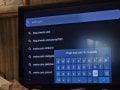
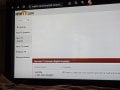
On the $20 Onn streaming box I mentioned above, go to apps and install "Browser".

Entering the URL by the remote is tedious at best, but there are phone apps for remote control that give you a keyboard.

Done.

20240905_102029.jpg

20240905_102341.jpg
 
Top