3 Digit Frequency Counter

MrChips

Joined Oct 2, 2009
34,820
Where is the two-stage monostable circuit already suggested?
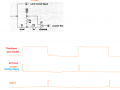
The circuit panic gave you constitute a monostable, i.e. an edge-to-pulse generator. Each one introduces a delay. Study how this circuit works. A rising or falling edge is differentiated via C1. You can choose which edge to be the trigger by setting R1 as a pull-up (trigger on falling edge) or as pull-down (trigger on rising edge). The time constant is determined by R1 x C1. Then you decide if you want a positive-going pulse at the output or a negative-going pulse, by inserting or not inserting an inverter at the output.

Use one stage for a delay. The second stage becomes your RESET signal.
1731518105768.png
 

panic mode

Joined Oct 10, 2011
4,995
resistors form DC path for inputs of the gate so normally inputs are high. the only time this changes is when there is transition that pulls C1 low. this occurs when time base signal changes from true to false (falling edge).
RC forms small delay (it takes time to charge capacitor). this time delays is roughly T=R*C = 1000 Ohm * 0.0000001 Farad = 0.0001 seconds = 0.1ms
so gate produces short pulse while the input is low.
this 0.1ms is much shorter than time base.
when timebase signal changes from false to true (rising edge). capacitor also tries to lift voltage at the gate input. but the input is already true so cannot be "more true". so this transistion is filtered out. output of the gate produces pulse only when left side of C1 is pulled low (falling edge). this is only temporary, the gate always returns to stable state hence this a variant of a monstable.

one can also connect top side of R1 to 0VDC instead of Vcc. this will pull the input low (normal state). once the transition from false to true (rising edge) is intoduced to left side of C1, gate will trigger and then return to stable state as capacitor gets charged.

note that in this case gates are shown with 2 inputs each. so unised input is pulled high permanently. circuit in post #33 is using single input gate (you can also just connect both inputs together). the interesting part of circuit is #33 is that RC element arrangements are not the same, R1,C1 form low pass filter to add delay and react to slow change. R2C2 form high pass filter to differentiate input signal (extract edges - react to fast change).
 

Thread Starter

NapSolo

Joined Oct 29, 2024
115
The circuit panic gave you constitute a monostable, i.e. an edge-to-pulse generator. Each one introduces a delay. Study how this circuit works. A rising or falling edge is differentiated via C1. You can choose which edge to be the trigger by setting R1 as a pull-up (trigger on falling edge) or as pull-down (trigger on rising edge). The time constant is determined by R1 x C1. Then you decide if you want a positive-going pulse at the output or a negative-going pulse, by inserting or not inserting an inverter at the output.

Use one stage for a delay. The second stage becomes your RESET signal.

View attachment 335710
Ok. " Use one stage for a delay. The second stage becomes your RESET signal. " Does this mean one stage for
the STORE and the second stage for RESET? Should the timebase be 1 or 2 Hz?
 

MisterBill2

Joined Jan 23, 2018
27,553
If the reset pins are not held LOW there will be no counting and all zeros will be displayed. And if the first goal is to get it to count, then reset must be low. Also, clock disable must be low to count, and then go high before the data is latched.

The simple sequencer that always works does not use ANY RC time constants: it uses a CD4017 to generate the various controls, and a dual 4013 to hold them as required. It uses a high frequency pulse train from early in the time base, and it also provides a time-base reset so that the time base count is always the same. And the sequence, started by the time base: Count disable, latch data, reset counter, reset time base, count enable. A cd4013 FF is used to hold the count disabled so that nothing is changing while the data is latching. reset time base may happen at the same instant as count enable. And no RC timing to struggle with. and no discrete R and C to mount some place.
 

sarahMCML

Joined May 11, 2019
697
So the timebase should be 2Hz?

I ran a sim of the circuit as follows.
View attachment 335721
Yes there's a bug in it which means that the reset stays High for the duration that the Timebase is Low. My mistake! That's what I get for not being able to breadboarding my design!
But by feeding the Timebase to the 4033 clocks, and your signal to the Inhibit pins, the count stops as soon as the timebase goes Low. This means however that the high portion needs to be a full 1 second itself, so a 2 second timebase is needed!
 

Thread Starter

NapSolo

Joined Oct 29, 2024
115
The circuit panic gave you constitute a monostable, i.e. an edge-to-pulse generator. Each one introduces a delay. Study how this circuit works. A rising or falling edge is differentiated via C1. You can choose which edge to be the trigger by setting R1 as a pull-up (trigger on falling edge) or as pull-down (trigger on rising edge). The time constant is determined by R1 x C1. Then you decide if you want a positive-going pulse at the output or a negative-going pulse, by inserting or not inserting an inverter at the output.

Use one stage for a delay. The second stage becomes your RESET signal.
View attachment 335710
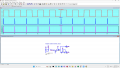
Based on all the info I have the following circuit. A high STORE signal is generated based on the rising edge
of the 1 Hz timebase and a high RESET signal is generated off of the falling edge of the STORE signal. From
Spice it looks like these signals will overlap.

1731536000525.png
 

panic mode

Joined Oct 10, 2011
4,995
i still see STORE and RESET happening at the same time. but maybe that is just me...
this is why i was cascading them... so one triggers another and they do not overlap... or one has to use different circuit like in post #33 where low pass filter can be adjusted to delay signal.
1731536582927.png
 

sarahMCML

Joined May 11, 2019
697
OK. Thanks! I changed the timebase to 2 Hz. Here is the simulation result. Should the RESET not be a narrow pulse?
I have tried various values for C1 and R1 but no luck.
View attachment 335729
Yes, as I said, it doesn't work!
You need to move U1 onto the output of U2, and reconnect the end of R1 to the output of U3. Then the Reset output should be Low while the time base is in its High, counting, phase.
I'd personally make the capacitors much smaller and the resistors larger since the time constants only need to be small, and it reduces the charge/discharge current needed.
Your timebase needs to be 0.5Hz for this circuit, because it only counts the input during the High phase of the timebase cycle!
 

MrChips

Joined Oct 2, 2009
34,820
1 Hz or 2 Hz timebase?
There should be no guessing here, no design by trial and error. You design a circuit based on how you feel it should work, not by how the circuit is behaving or misbehaving.

Here is how I would design it.

1) I want a 1 Hz timebase because I want the display to show Hz, not some fraction or multiple of frequency.

2) I only need two signals, STORE, and RESET. I want these two signals to be as short as possible, shorter than 100 ns or whatever is the shortest the chips will accept. I can use the oscilloscope to verify the pulse width.

3) I can choose either the rising edge of the 1 Hz timebase or the falling edge, whichever is convenient. It doesn't matter.
At every 1-second mark, a STORE pulse is generated. Use the STORE pulse to generate the RESET pulse.

Hence the counters are reset immediately after the data is stored.
With this simple design, the counting period of 1 second is shortened by the duration of two timing pulses, hopefully less that 200 ns. You can calculate what effect this will have on the displayed frequency. If the frequency to be measured is lower than 5 MHz it will not affect the displayed result.

Edit: If you want to display up 0-5 MHz with a 1-second timebase, you will need to show 7 digits.
 

MisterBill2

Joined Jan 23, 2018
27,553
No! You need three signals: Count enable, latch, and reset. And it makes a whole lot more sense to generate that sequence using a counter IC, so that you are not having to struggle with RC timers that vary with the supply voltage and the temperature.
 

panic mode

Joined Oct 10, 2011
4,995
i too like idea of using counter to generate control signals. also with some careful planning one can get rid of dead time - present concept only uses half period of the the timebase, meaning that refresh is taking twice as long as needed. and i like the idea of fast update.
1731595233998.png
 

Thread Starter

NapSolo

Joined Oct 29, 2024
115
1 Hz or 2 Hz timebase?
There should be no guessing here, no design by trial and error. You design a circuit based on how you feel it should work, not by how the circuit is behaving or misbehaving.

Here is how I would design it.

1) I want a 1 Hz timebase because I want the display to show Hz, not some fraction or multiple of frequency.

2) I only need two signals, STORE, and RESET. I want these two signals to be as short as possible, shorter than 100 ns or whatever is the shortest the chips will accept. I can use the oscilloscope to verify the pulse width.

3) I can choose either the rising edge of the 1 Hz timebase or the falling edge, whichever is convenient. It doesn't matter.
At every 1-second mark, a STORE pulse is generated. Use the STORE pulse to generate the RESET pulse.

Hence the counters are reset immediately after the data is stored.
With this simple design, the counting period of 1 second is shortened by the duration of two timing pulses, hopefully less that 200 ns. You can calculate what effect this will have on the displayed frequency. If the frequency to be measured is lower than 5 MHz it will not affect the displayed result.

Edit: If you want to display up 0-5 MHz with a 1-second timebase, you will need to show 7 digits.
Hi

I understand what you are telling me in post #46 and #49. I simulated the following circuit (from panic)
and breadboarded it and it did not work.

1731597316603.png
 

MrChips

Joined Oct 2, 2009
34,820
Be more specific when you say "it did not work".

You have the two most important items to test and confirm your hardware designs:

1) You have the physical circuit.
2) You have an oscilloscope.

Test your physical circuit and confirm that the control pulses appear in time and voltage where you want them to be. This is a prerequisite for a working design.
 

Thread Starter

NapSolo

Joined Oct 29, 2024
115
Be more specific when you say "it did not work".

You have the two most important items to test and confirm your hardware designs:

1) You have the physical circuit.
2) You have an oscilloscope.

Test your physical circuit and confirm that the control pulses appear in time and voltage where you want them to be. This is a prerequisite for a working design.
physical circuit
1731601192133.png
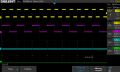
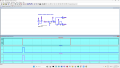
scope image
1731601552619.png

Channel 3 is STORE and Channel 4 is RESET
 

MrChips

Joined Oct 2, 2009
34,820
Expand the time scale so that you can measure the pulse widths.
You will need to change trigger to falling edge.
After you have done that, change C1 and C2 to 10 nF and measure the pulse widths again.
 

MrChips

Joined Oct 2, 2009
34,820
Sorry, I misread the oscilloscope screen on post #55.
You want to trigger on the rising edge of CH2.

Draw out with pencil and paper what you think the waveforms should look like at all points in the circuit, i.e. before C1 and after C1, before C2 and after C2, before U2 and after U2, before U3 and after U3.

Check this with the oscilloscope.

The oscilloscope waveforms show channels 3 and 4 pulses occurring at the same time. You need to put an inverter between U1 and C2.
 
I’ve had similar issues with counters before. A couple of quick things to check: make sure your input signal level is strong enough for the counter to detect it, and double-check the timebase accuracy. Also, if the STORE signal isn’t aligned right, it might mess with the count. I’d look at the connections on the breadboard too—sometimes it’s something as simple as a loose wire.
 

Thread Starter

NapSolo

Joined Oct 29, 2024
115
Sorry, I misread the oscilloscope screen on post #55.
You want to trigger on the rising edge of CH2.

Draw out with pencil and paper what you think the waveforms should look like at all points in the circuit, i.e. before C1 and after C1, before C2 and after C2, before U2 and after U2, before U3 and after U3.

Check this with the oscilloscope.

The oscilloscope waveforms show channels 3 and 4 pulses occurring at the same time. You need to put an inverter between U1 and C2.
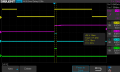
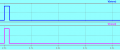
Here is the pulse width measurement for channel 3 (STORE) and channel 4 (RESET). When I replace the 10 uF caps with 10 nF
caps, I see no pulses on channel 3 or 4 no matter how I set the time scale.

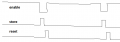
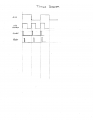
I have attached a timing diagram showing the required signals.

Placing an inverter between U1 and C2 makes the RESET pulse disappear.
 

Attachments

Last edited:
Top