3 Digit Frequency Counter

Thread Starter

NapSolo

Joined Oct 29, 2024
115
Hi

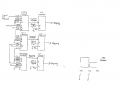
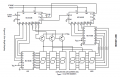
Here is a frequency counter circuit that I breadboarded. The circuit started out as a 0 to 999
counter. I modified it to measure an externally generated 100 Hz signal but the display only
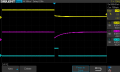
shows a zero. I have attached a schematic as well as a scope image of the control circuit.
Channel 1 is the timebase and channel to is the STORE signal. Not sure what the problem is.

Thanks
 

Attachments

Thread Starter

NapSolo

Joined Oct 29, 2024
115
Is the blue image the input signal, what voltage level is it and how is it generated?
The blue image is the 4 volt 2Hz timebase generated by a CD4060. The input signal to be
measured is a 4 volt 100 Hz signal generated by a function generator fed into pin#1 of
the units counter.
 

sarahMCML

Joined May 11, 2019
695
Hi

Here is a frequency counter circuit that I breadboarded. The circuit started out as a 0 to 999
counter. I modified it to measure an externally generated 100 Hz signal but the display only
shows a zero. I have attached a schematic as well as a scope image of the control circuit.
Channel 1 is the timebase and channel to is the STORE signal. Not sure what the problem is.

Thanks
The way you have it wired now, you should see the 100 Hz pulses on the 4042 outputs, UNTIL the clock pulse goes High, at which point they should freeze momentarily. When it goes Low again they should restart. Please check the Polarity and Clock operation.
 

Thread Starter

NapSolo

Joined Oct 29, 2024
115
The way you have it wired now, you should see the 100 Hz pulses on the 4042 outputs, UNTIL the clock pulse goes High, at which point they should freeze momentarily. When it goes Low again they should restart. Please check the Polarity and Clock operation.
Hi Sarah

I am rather confused. Should the sequence of events be Count...Store...Reset?
 

MrChips

Joined Oct 2, 2009
34,629
Start by drawing with pencil and paper, the timing diagram showing the sequence of events as YOU want them to happen.
 

MrChips

Joined Oct 2, 2009
34,629
Will it work? I don't know.
You need to indicate in the timing diagram the event and duration for all four events, Reset...Count...Store...Display.
 

AnalogKid

Joined Aug 1, 2013
12,050
Not exactly on topic, but if you want to take a different approach, here is one that reduces 6 chips to 2 (plus three transistors). The 4553 has been a very reliable performer for me.

For your application, lop off the right half of the schematic. Click for a larger image.

ak


1731362660079.png
 

Attachments

Last edited:

Thread Starter

NapSolo

Joined Oct 29, 2024
115
Store and Display are two separate functions. What happens if Reset appears while still in Store sequence?
I have no clue how to do this. I don't know how Reset could happen while in Store mode if
everything is controlled by the timebase signal. Doesn't the display show whatever values
are on the "Q" outputs of the Latches no matter what mode is in effect? I don't see how
this circuit will work with a 2Hz timebase either.
 
Last edited:

panic mode

Joined Oct 10, 2011
4,868
do outputs of counters change while some test signal is brought in? if not counters are not working. if they are working, the problem is with store. i would consider running counters without RESET.... that way there should always be something to on the outputs (and changing). and if you (temporarily) connect store to input, every pulse will not just be counted but also displayed. if this works, you have confirmation that counters, latches and displays are working. the only thing that need to be ironed out is the control signals derived from time base OR... your input signal... perhaps it needs conditioning/amplification.
 

MrChips

Joined Oct 2, 2009
34,629
There are propagation delays in digital logic gates. You have to make sure that when two control signals are changing at the same time, that, after all propagation delays are accounted for, the signals appear in the correct sequence with no two control signals overlapping.
 

Thread Starter

NapSolo

Joined Oct 29, 2024
115
do outputs of counters change while some test signal is brought in? if not counters are not working. if they are working, the problem is with store. i would consider running counters without RESET.... that way there should always be something to on the outputs (and changing). and if you (temporarily) connect store to input, every pulse will not just be counted but also displayed. if this works, you have confirmation that counters, latches and displays are working. the only thing that need to be ironed out is the control signals derived from time base OR... your input signal... perhaps it needs conditioning/amplification.
hi
Initially I had a 0 to 999 counter and it worked. I then modified it to work as a frequency counter.
I think that the RESET is the problem or at least part of the problem.
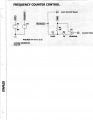
and where is that part of the circuit? how the control signals are derived from time base?
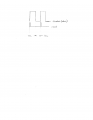
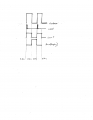
Here is the control circuit. It gets a 2Hz timebase signal from a CD4060.
 

Attachments

Thread Starter

NapSolo

Joined Oct 29, 2024
115
There are propagation delays in digital logic gates. You have to make sure that when two control signals are changing at the same time, that, after all propagation delays are accounted for, the signals appear in the correct sequence with no two control signals overlapping.
Where do I need the propagation delays and how do I do it? I am just a novice.
 

Attachments

MrChips

Joined Oct 2, 2009
34,629
As a first step, remove the RESET control signal going into the counter. Set the RESET input to the counter to the inactive state.
Then look at the RESET signal on the oscilloscope with a zoomed-in view and compare the timing with the other important control signals. Look to see if there is any overlap with other control signals.
 
Top