Facebook
 Google
 GitHub
 Linkedin
We were asked to design and simulate a digital lock system using logic gates and switches. This project will simulate a basic 4-digit PIN lock system that requires the correct sequence of switch positions to unlock a "door". We have to provide a project report that includes the system's logic design, circuit diagram, truth tables, PCB layout and explanation of how it works. Luckily there's no hardware or anything hands on involved. Everything will be done through software.
The main materials to use are:
And the requirements are (Bold text indicate most of our issues):
Since we're beginners we thought it'd be easier if we went straight to breadboarding using tinker cad here.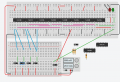
So this is our circuit right now and it has some flaws.
If anyone is willing to help me with my issues with this circuit I would gladly appreciate it. I'm not too bright when it comes to these but I really need people who can help me with designing and improving this. Including help with creating the schematic diagram and pcb layout
The main materials to use are:
- Circuit Simulator Software (you may choose what software to use)
- Set of switches (4 toggle switches)
- LEDs
- Logic Gates (AND, OR, NOT)
And the requirements are (Bold text indicate most of our issues):
- Use four switches for input to simulate the 4-digit PIN entry.
- The system should have a predefined 4-digit PIN sequence of switch positions that, when correctly set, will unlock the system.
- The system should have a lock and unlock state.
- When the correct 4-digit PIN is entered in the lock state, an LED should indicate that the system is unlocked.
- Incorrect PIN entries should keep the system in the locked state.
- Use AND, OR, and NOT gates to design the logic for checking the PIN.
- Provide a reset button to reset the system to the locked state.
- Use LEDs to visually indicate the lock and unlock states.
Since we're beginners we thought it'd be easier if we went straight to breadboarding using tinker cad here.
So this is our circuit right now and it has some flaws.
- Red LED doesn't light up on incorrect input
- I don't know how to make reset function a push button instead of a switch
- Circuit Looks too complex
If anyone is willing to help me with my issues with this circuit I would gladly appreciate it. I'm not too bright when it comes to these but I really need people who can help me with designing and improving this. Including help with creating the schematic diagram and pcb layout