3 Digit Frequency Counter

Thread Starter

NapSolo

Joined Oct 29, 2024
115
As a first step, remove the RESET control signal going into the counter. Set the RESET input to the counter to the inactive state.
Then look at the RESET signal on the oscilloscope with a zoomed-in view and compare the timing with the other important control signals. Look to see if there is any overlap with other control signals.
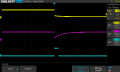
Here is a screen shot of the control signals.

Channel 1 is the timebase and channel 2 is the RESET signal. To me it looks like the positive edge of the
timebase and the RESET overlap but I don't know how to use the scope to detect that.
 

Attachments

MrChips

Joined Oct 2, 2009
34,823
Here is a screen shot of the control signals.

Channel 1 is the timebase and channel 2 is the RESET signal. To me it looks like the positive edge of the
timebase and the RESET overlap but I don't know how to use the scope to detect that.
You have a 4-channel oscilloscope. Connect the 4th channel to the STORE signal.
 

panic mode

Joined Oct 10, 2011
4,995
there is a store signal... in your schematics it is called latch control signal.
but if latching is done using clocked logic, it would take place on a rising clock edge.
i think pin 5 of your latch is CLOCK signal, so you get something like this.
and guess what display would show in this case

1731424930035.png
 

MrChips

Joined Oct 2, 2009
34,823
You have to understand that you are attempting to build a digital circuit.
The process begins with laying out the specifications followed by doing the design. You cannot expect the circuit to work if it is not designed properly in the first place. This is not a trial and error process.

The design process involves laying out how YOU want the circuit to function. You then design the circuit to fulfill those requirements. If you anticipate that there is a potential for control signals to interfere with each other, then you create a design to avoid that from happening.

You have to take the effort to learn how to do these things on your own. You cannot make personal progress if you always have to rely on others to show you how to do it.
 

sarahMCML

Joined May 11, 2019
697
I have something related to panic mode's #25 diagram, but I'll delay sending it until you work through it further yourself, if that's OK with you?
 

Thread Starter

NapSolo

Joined Oct 29, 2024
115
I have something related to panic mode's #25 diagram, but I'll delay sending it until you work through it further yourself, if that's OK with you?
Thanks Sarah.
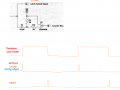
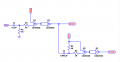
I have attached a timing diagram. The timebase is 1Hz. The RESET needs to occur just
prior to the count and the STORE needs to occur immediately after the count. I have attached a schematic
but I am told that I need to teach myself how to do this. If I was given a circuit that would work, I could
then figure out how and why it works! That would teach me how to handle timimg circuits without asking
for help.
 

Attachments

sarahMCML

Joined May 11, 2019
697
Thanks Sarah.
I have attached a timing diagram. The timebase is 1Hz. The RESET needs to occur just
prior to the count and the STORE needs to occur immediately after the count. I have attached a schematic
but I am told that I need to teach myself how to do this. If I was given a circuit that would work, I could
then figure out how and why it works! That would teach me how to handle timimg circuits without asking
for help.
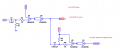
Unfortunately your circuit will reset the counters and then almost immediately store the now zero count into the latches. You need it to be the other way round, store then reset!
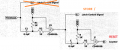
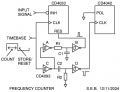
I'll enclose my circuit, which is only for the first digit, and is also slightly different from panic mode's, as I noted. It needs the 4033's Clock and Inhibit pins rewired for both counters. See if you can tell why?
The time constant for R2/C2 just has to be a bit longer than that for R1/C1. Just connect both gate inputs together on the 4093. I used all the gates in the package, although you could save 2 if needed!
It should work, although I have neither the 4033's or 4042's to test it.

FreqCounter.png

Edit: And before anyone says it, yes my circuit does only count for half of one complete timebase cycle!
 
Last edited:

panic mode

Joined Oct 10, 2011
4,995
apparently you are not learning anything yet...
1731514585090.png

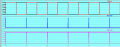
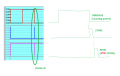
you are STILL first RESETing counter and then LATCHING the cleared result...
1731514329523.png
so no wonder you get zero displayed....
details MATTER...

1. you want to count during timebase. counting is not shown,... only STOREd result will be shown.
2. when timebase is done, you need to have a pulse to STORE and display result. this value will stay frozen on display until next STORE pulse.
3. and then, AFTER the value is stored, you need to RESET counter. stored value is still displayed.

so zoom into your timing diagram


EDIT

make sure to use correct signal polarity
i was just trying to show sequence, not correct signal level..

1731514381784.png
 
Last edited:

MrChips

Joined Oct 2, 2009
34,823
You need to be aware of two types of registers.

1) There is a clocked register where data is captured on one edge, either the rising edge of the clock or the falling edge of the clock. You need to look up which edge is the active edge. This is known as edge-triggered clock.

2) There is a transparent latch. The register transfers data from input to output while the control signal is active. This is called a level-sensitive clock signal. You need to look up if the control signal is active-LOW or active-HIGH. In other words, if the control signal is active-HIGH, the data is transferred while the signal is HIGH. The data is latched on the falling edge of the control signal.

Given the above information, let us assume that the STORE function is type (2) active-HIGH.
Also let us assume that the RESET function is type (2) active-LOW. (For the sake of discussion, this does not really matter.)

Data is captured on the falling edge of STORE.
Hence, you want RESET to appear AFTER the falling edge of STORE.

If the RESET signal is generated by the falling edge of STORE then that satisfies the requirement that there is no overlap, provided that there is no delay in the STORE logic. If there is a delay then you will have to precede the RESET with a delay using the two-stage monostable circuit already suggested.
 

Thread Starter

NapSolo

Joined Oct 29, 2024
115
Unfortunately your circuit will reset the counters and then almost immediately store the now zero count into the latches. You need it to be the other way round, store then reset!
I'll enclose my circuit, which is only for the first digit, and is also slightly different from panic mode's, as I noted. It needs the 4033's Clock and Inhibit pins rewired for both counters. See if you can tell why?
The time constant for R2/C2 just has to be a bit longer than that for R1/C1. Just connect both gate inputs together on the 4093. I used all the gates in the package, although you could save 2 if needed!
It should work, although I have neither the 4033's or 4042's to test it.

View attachment 335697
Thanks so much Sarah. In post #6, MrChips told me to do Reset first which I thought was wrong. Oh well I know now.
I will continue to work on this!
 

Thread Starter

NapSolo

Joined Oct 29, 2024
115
You need to be aware of two types of registers.

1) There is a clocked register where data is captured on one edge, either the rising edge of the clock or the falling edge of the clock. You need to look up which edge is the active edge. This is known as edge-triggered clock.

2) There is a transparent latch. The register transfers data from input to output while the control signal is active. This is called a level-sensitive clock signal. You need to look up if the control signal is active-LOW or active-HIGH. In other words, if the control signal is active-HIGH, the data is transferred while the signal is HIGH. The data is latched on the falling edge of the control signal.

Given the above information, let us assume that the STORE function is type (2) active-HIGH.
Also let us assume that the RESET function is type (2) active-LOW. (For the sake of discussion, this does not really matter.)

Data is captured on the falling edge of STORE.
Hence, you want RESET to appear AFTER the falling edge of STORE.

If the RESET signal is generated by the falling edge of STORE then that satisfies the requirement that there is no overlap, provided that there is no delay in the STORE logic. If there is a delay then you will have to precede the RESET with a delay using the two-stage monostable circuit already suggested.
Where is the two-stage monostable circuit already suggested?
 

Thread Starter

NapSolo

Joined Oct 29, 2024
115
apparently you are not learning anything yet...
View attachment 335700

you are STILL first RESETing counter and then LATCHING the cleared result...
View attachment 335698
so no wonder you get zero displayed....
details MATTER...

1. you want to count during timebase. counting is not shown,... only STOREd result will be shown.
2. when timebase is done, you need to have a pulse to STORE and display result. this value will stay frozen on display until next STORE pulse.
3. and then, AFTER the value is stored, you need to RESET counter. stored value is still displayed.

so zoom into your timing diagram


EDIT

make sure to use correct signal polarity
i was just trying to show sequence, not correct signal level..

View attachment 335699
Thanks panic mode!
 

panic mode

Joined Oct 10, 2011
4,995
In post #6, MrChips told me to do Reset first which I thought was wrong.
Everything he stated was spot on... things happen in a loop, over and over again so it does not matter what is the "first" step, only SEQUENCE of steps matters.

"count" part is where you get the value. this is the key. you do not want to reset this value until you have stored it. so look at the #6 sequence again :

reset...count...store..display...reset...count...store...display...

even if you remove some of actions from the begin so that loop starts at any point, you still get working system as long as sequence is correct. all of the following will work:
a) reset...count...store..display...reset...count...store...display...
b) count...store..display...reset...count...store...display...reset...
c) store..display...reset...count...store...display... reset...count...
d) display...reset...count...store...display... reset...count...store..

by making reset first step, you just make sure that there is no initial glitch when starting up.
 
Last edited:
Top