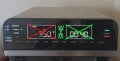
What kind of ribbon cable is this?

Thread Starter

MikeA

Joined Jan 20, 2013
442
I have a kitchen appliance that has a capacitive touch control panel that has failed. Some areas of the touch panel do not work.

So I opened it up and started to touch test points next to the ribbon cable connector that goes to the touch panel. I mapped every test point to a touch button, and all functions that are "dead" from the control panel can be activated just fine by touching the test points.
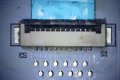
Photo on 11-8-24 at 12.02 PM.jpg

So I assumed that the failure is at the connector of the ribbon cable. I scraped of a blob of silicone that was over the connector and found this.

Photo on 11-8-24 at 11.12 AM.jpg

It's a ribbon cable with 1mm pitch.

Photo on 11-8-24 at 11.13 AM.jpg

And really zoomed in.

Photo on 11-8-24 at 11.14 AM.jpg

It looked like some sort of metal under black paint, but when I tried to scrape it with an Exacto knife it just crumbled. Could it be some carbon/graphite tracks?

I tried measuring resistance by just touching the black, and I get about 20 ohm across 1cm of track.

What exactly am I working with here?
 

Diletante

Joined Jan 29, 2017
9
It does look like a graphite version of the clear, metallised ribbon cables used for LCDs. Are the light patches on the close-up photos material lifted from the connector? What state are the connector pins in?
 

Thread Starter

MikeA

Joined Jan 20, 2013
442
It does look like a graphite version of the clear, metallised ribbon cables used for LCDs.
I've seen graphite ribbon cables for decades, but they were usually much different in appearance. They were much thinner, and didn't appear to have something metallic in the graphite. This one seems to have something silvery (metallic?) in it. It looks exactly like a ribbon cable that would have thick and durable copper tracks.

Are the light patches on the close-up photos material lifted from the connector? What state are the connector pins in?
Yes. The material is gone where the pins were. I don't think it lifted, I think it just crumbled when the cable was clipped in. Maybe this was designed to be a non-reusable type of connection? Connect it once and done.

I'm not an expert in these types of connectors, perhaps it's not even the right connector. Maybe it's designed for copper tracked ribbon cables, and the supplier of the touch panel changed to graphite, and they didn't care.

So perhaps there is someone experienced here and could validate or invalidate my theory.

The issue I'm having is apparently very very common with my appliance. They are failing left and right.
 

Diletante

Joined Jan 29, 2017
9
Thanks for the info.

It looks like you have clean pads available on the PCB that correlate with the connector. Does it look viable to solder a new short cable from those pads to a connector of your choosing and do the same at the control panel end?
 

Thread Starter

MikeA

Joined Jan 20, 2013
442
Does it look viable to solder a new short cable from those pads to a connector of your choosing and do the same at the control panel end?
I was thinking of actually plugging in a proper copper track ribbon cable into the control panel connector, and then somehow join the graphite end to it.

After a little Googling these ribbon cables are called FFC/FPC, but I had little luck finding any FFC/FPC connectors explicitly for graphite tracks. I think all the ones I see online have metal pins designed to indent a copper track. Which I think caused the original problem here.
 

Diletante

Joined Jan 29, 2017
9
Well done tracking down the ribbon cables.

I was thinking of actually plugging in a proper copper track ribbon cable into the control panel connector, and then somehow join the graphite end to it.
That does not sound like a particularly reliable solution.:)
What does the other end of that ribbon cable look like - does it have the same connector?
 

Thread Starter

MikeA

Joined Jan 20, 2013
442
What does the other end of that ribbon cable look like - does it have the same connector?
That's the thing, there is no other end. The touch panel itself is big piece of plastic with a "tab" coming off of it, which is the ribbon cable in the pictures. It's all one solid piece.
 

Thread Starter

MikeA

Joined Jan 20, 2013
442
I ordered a ZIF FFC connector on Aliexpress for a buck, which might work with graphite. As long as the pins are wide and gently push against the track it should make decent contact without damage.
 

Thread Starter

MikeA

Joined Jan 20, 2013
442
So I got some some small 12 track ribbon cables that have copper tracks and inserted them into the connectors soldered to the control panel PCB. All tracks have good connection through that connector as I can trigger all the control panel function by touching the tracks with a probe.

Next I soldered a ZIF connector to the end of the ribbon cable to essentially create a ribbon extender with a male and a female end. Then I cut off about 1.5mm where the original ribbon cable had damage and plugged that into the DIY extender. No improvement at all.

Same 4 areas of the touch panel were unresponsive.
 

Thread Starter

MikeA

Joined Jan 20, 2013
442
And the 4 areas that are dead are the temperature select, time select and the (+) and (-) buttons to adjust time and temperatures.

The touch panel has two 12 pin ribbon cables coming out of it. The dead area crossed out in red was on one ribbon cable, and the dead area crossed out in green was on the other ribbon cable. Which should have tipped me off that the tracks are probably broken inside the touch panel. But it didn't. I had hope.

instant_omni_pro_panel.jpg
 

Thread Starter

MikeA

Joined Jan 20, 2013
442
So I just drilled 4 holes into the plastic and put in 3mm bolts with a little wire soldered to the test pads on the PCB. Now it's working fine.

Another issue this oven had was that the touch panel was sending signals as if buttons were touched when no one was even near the oven. This has also been resolved after I messed with it. But before it would even turn on and heat up in the middle of the night.

A lot of people online complain about this specific model turning on by itself and the buttons not working, so it's clearly a widespread problem. I was very surprised the company was unwilling to replace it with such a severe liability as an oven turning on by itself.

But apparently this Instant Omni Pro oven is owned by Instant Brands.
https://en.wikipedia.org/wiki/Instant_Brands

And they went through a bankruptcy in February 2024. I'm not a lawyer but maybe that makes them legally not liable for any damages caused by products sold prior to bankruptcy? Who knows. All I know is this will be our last purchase from Instant. :cool:
 

Diletante

Joined Jan 29, 2017
9
So I just drilled 4 holes into the plastic and put in 3mm bolts with a little wire soldered to the test pads on the PCB. Now it's working fine.

And they went through a bankruptcy in February 2024. I'm not a lawyer but maybe that makes them legally not liable for any damages caused by products sold prior to bankruptcy? Who knows. All I know is this will be our last purchase from Instant.
:cool:
Thanks for coming back and well done for the fix - determination works.

It makes one want to see a teardown _before_ buying from some of these brands if they are committing stuff like this.
 
Top