USB questions

Thread Starter

Futurist

Joined Apr 8, 2025
749
1747658810517.png
You don't need to know anything about how USB works in order to use it. With the cheap little interface boards, you just let the converter chip sit between the computer and a microcontroller, and it looks like a serial port as far as the software at either end is concerned. A big advance over RS232 ports is that the USB cable carries 5V from the computer, so you don't need an external power supply as long as your device doesn't draw much current.
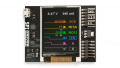
I've been using a gadget named SPIDriver. I use it to enable my desktop PC to control an NRF24L01+ transceiver (which uses SPI).

But it's cumbersome, has a limited set of commands it supports and overall fine for proof of concept but a bit of a kludge as a component, it also costs 30 dollars.

It uses the same FTDI chip that most other boards use, but won't let me use a GPIO pin as input.
 
Last edited:

Thread Starter

Futurist

Joined Apr 8, 2025
749
You don't need to know anything about how USB works in order to use it. With the cheap little interface boards, you just let the converter chip sit between the computer and a microcontroller, and it looks like a serial port as far as the software at either end is concerned. A big advance over RS232 ports is that the USB cable carries 5V from the computer, so you don't need an external power supply as long as your device doesn't draw much current.
Also @John P

Can you share details on any boards that do use USB as a virtual COM port, to manage an SPI device? I mean are there devices that are similar to SPIDriver but have no display and don't cost 30 dollars?
 

John P

Joined Oct 14, 2008
2,061
Also @John P

Can you share details on any boards that do use USB as a virtual COM port, to manage an SPI device? I mean are there devices that are similar to SPIDriver but have no display and don't cost 30 dollars?
If you want a quick and easy way to do this, get an Arduino Nano. Write code for it to do whatever you need on SPI, and make it send data to the computer in ASCII form, so you can see what it's doing in the monitor. You can type manually to control what it does on the SPI port. Then later you can write code on the computer to send the same data on the USB line.
 

Thread Starter

Futurist

Joined Apr 8, 2025
749
If you want a quick and easy way to do this, get an Arduino Nano. Write code for it to do whatever you need on SPI, and make it send data to the computer in ASCII form, so you can see what it's doing in the monitor. You can type manually to control what it does on the SPI port. Then later you can write code on the computer to send the same data on the USB line.
Thanks, well I don't want to write code for it, I just want some kind of bridge that lets PC software interact with the NRF24, that's my goal here, just a bridge that's otherwise invisible.
 
Last edited:
Top