Trying to understand dry contact relay

Thread Starter

cmisip

Joined Sep 23, 2017
89
I am trying to test the dry contact relay on the Outdoor station of this intercom system.
http://wiring.alphacommunications.com/AWD188.PDF
Page 2 shows a schematic of the dry contact relay that has the normally open or normally closed option and a common terminal. I cant seem to be able to get the relay to work. I was trying the normally open (NO) relay contact. My understanding it that it is basically like a switch. Engaging the software control to "close" the switch should simply lead to NO contact and COM contact shorting. This should show up on the multimeter as 0 resistance between the NO and COM contacts. I even tried with an LED ( requisite resistor and power supply of course ) and tried to connect the NO to the GND power source and the COM to the LED ( in series with the resistor and Vcc). The LED does not light when I engage the software control to "close" the switch. I verified that the LED circuit works because If I replace the NO and COM wires with a wire that shorts GND to the LED, the LED lights. Is there something wrong with my understanding of how this works?

Thanks,
Chris
 

philba

Joined Aug 17, 2017
959
Go about it methodically. The relay has a coil. Find it and measure the voltage across the coil pins. If you're getting 0V (or close to it) when you close the switch then you have two places to look: whether you are really closing the switch via sw or the driver circuit isn't working.
 

dendad

Joined Feb 20, 2016
4,635
I take it this is the internal relay to the unit.
Does the relay click when you operate it? You should be able to hear it.
Can you measure the resistance of the coil to make sure it in not open circuit?
Then measure the voltage across the coil as it is operated.
First make sure the relay is actually moving internally.

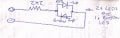
TestLed.jpg
Here is a handy tester I use all the time.
If you can get a bicolour LED that has 2 terminals it is a bit neater, but 2 LEDs can be used.
Heat shrink tubing around the resistor and LED make it neat. A red and green LED back to back is used so it can show polarity. Mine has a red wire to the LED anode, and green wire to the green LED anode. Then the colour the LED lights shows which wire is the positive.

Make this and solder it across the relay coil then you can see if power is applied.
 

Tonyr1084

Joined Sep 24, 2015
9,744
Whatever software device you're using, is it able to put out the necessary current to close the relay?

Another thing to test for is that there IS contact between C & NC (Common and Normal Closed). Energize the relay. C/NC should open up. If it doesn't then the relay is not actuating. Meaning either you don't have enough voltage or current to drive the relay, or the relay coil is shot. You can test the resistance across the coil terminals to see if the coil shows continuity or not. You should see some resistance, depending on the coil, it will be low or high, or somewhere in-between. The point is you don't want it to show open. If the coil is open then the relay is dead.

If the relay coil is good then have a look at the voltage of the coil, whether it's 5 VDC (if that's what your controller is putting out) or if it's something like 120 VAC. If everything is hooked up right and everything is working on the proper voltage then it should actuate the relay. If it doesn't then there may be something in the software causing a bug in the system.

You can manually test the relay by connecting a voltage source (not from the controller) across the pins of the coil of the relay. Use the proper voltage with sufficient current (I say sufficient current because I don't know what relay you're using or what the specs are). Your linked document doesn't say anything about the relay. If it came with the system then either it's not wired properly or there's a defect.
 
@cmisp Your understanding is correct, but your methodology needs some help.

Continuity between NC and C is defined without power to the relay coil. Do That test without power.
e.g. Continuity between C and NC and no continuity between C and NO.

EDIT: Per @Tonyr1084 and @crutschow in the posts below, I fixed it. My bad. Too many things going on today and I'm tired.

Repeat with power turned on.

Now do whatever you have to do to make the relay change state.

So, you need to check both the C-NC and C-NO states. If they are have no continuity, it may be an option/
 
Last edited:

Tonyr1084

Joined Sep 24, 2015
9,744
Continuity between NO and C is defined without power to the relay coil. Do That test without power.
e.g. Continuity between C and NO and no continuity between C and NC.
Not one to argue here, but when a relay is in a de-energized state the C(common) and NO(normally OPEN) contacts should have no connection; and the C & the NC(normally closed) contacts SHOULD have continuity when the relay is de-energized. Those states only switch when the relay is powered. I think you just got your terms reversed. I do the same thing too. Only I probably do it more often than you.

I DO agree with checking continuity in all states: C & NO should be open when not powered and closed when powered. C & NC should be closed when not powered and open when powered. Four states to test for, two with relay energized and two with the relay NOT energized.
 

Thread Starter

cmisip

Joined Sep 23, 2017
89
Thanks guys, I did run it by their technical support as well and they said my assumption was correct with regards to the use of the multimeter or the LED to test if the relay works. And I did also check the NC and C connection and with that, the LED does not turn off when the software engages the relay with the unlock button. So its probably a broken unit and I am sending it back.

Chris
 
Top