troubleshooting a tv power supply

R!f@@

Joined Apr 2, 2009
10,004
video isn't going to happen for awhile. i think heat from sun made main unit little too hot. so going to have to wait. no video showing. kind of like when i try to turn on the tv like 8 times. the ground shield gets hot and tv doesn't work
That;s funny....which part is over heating
 

Thread Starter

johndoe45

Joined Jan 30, 2010
364
the ground shield cover. inside there i'm guessing. all the time i try and turn on the tv a lot. it just feels hot when i touch it and when i turn on the tv the next morning it works. that incident happened about a month ago with dvd drive smoking.
 

R!f@@

Joined Apr 2, 2009
10,004
hey that was pretty good video.
But I like to see a longer one.
I like to see what happens with a cold start like fresh in the morning.
Start recording at the sec u switch on TV and I like to see the after effects.

From what I see now is that it's just a white screen .
Am I rght?
If so then make sure that the black cable which connects from main board to LCD back is properly connected. Slight loose here will create that sort of problems, mainly at the LCD connector point. Where the cable terminates to the back. This connector has self locking locks at the sides, check them and see that the cable is properly inserted.
 

Thread Starter

johndoe45

Joined Jan 30, 2010
364
ok. will do that after get ready to head over to girlfriends. two of the prongs at end of black male connector on main board got bent one time when i tried to insert the black cable. and i bent them back. maybe i have been getting white video since then. i don't remember. so maybe they aren't bent back properly if they are that sensitive. will do this when done getting ready.

and longer video. you mean when going into standby? or what?
cause it is always going to be white screen if turn on. unplug. turn on. unplug. turn on, etc.

it does go to standby. and audio didn't work when the video used to show snowy screen awhile back
 

Thread Starter

johndoe45

Joined Jan 30, 2010
364
will do that tonight. girlfriend wants me over. but it went to standby in about a minute. have a video if want me to up it. but just same white screen but longer video until it shuts off.
 

Thread Starter

johndoe45

Joined Jan 30, 2010
364
straightened out the two bent connectors and tried and tried to start tv. couldn't get picture besides white screen. will try tomorrow. not turning on anymore. why is that ground shield overheating and causing tv to not turn on if that is the cause?

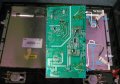
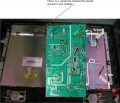
also on these connections (in the picture), how do i plug them in?????

i've tried every combination. leads to no picture or that white screen.
 

Attachments

Last edited:

R!f@@

Joined Apr 2, 2009
10,004
Those connectors the CCFL connectors. They are not necessary for the picture reproduction but the backlite.
The connector I am talking about is at the center of the shield I have showed in the pic. That is the cable which LVDS signal is fed to the LCD drivers.
Problem here will lead to no picture, even one disconnected wire will show a blank screen.
Check it.
 

Attachments

Thread Starter

johndoe45

Joined Jan 30, 2010
364
thanks. been switching those around for awhile. and for no reason. now can just focus on black cable

so you think white screen is cause of black cable? there is nothing wrong with board that can cause this white screen?

still trying. tv doesn't come on at all so will have to wait a little bit before i try again
 

R!f@@

Joined Apr 2, 2009
10,004
there the case of that shield getting too hot...I think we have to peek inside somehow.
Now I am asking not telling u to do it. What can u, or how could u go about removing that shield
 

Thread Starter

johndoe45

Joined Jan 30, 2010
364
i'm sorry. been trying to sign in for hours and now you are offline. i could use my other soldering gun (one that smokes the desoldering wick in like 2 seconds. way too powerful for me not to damage board and tip is huge). so maybe just tap the solder with big gun to get solder liquified. would this let my weaker solder gun liquify the solder easier? then i could use the weaker one and vacuum pump????

would this work to take off the shield?

i've even tried to add new solder to old solder to help it solidify but when i use desolder pump. just pulls off new solder and old solder is still there

and the black cord is loose or something like you said. cause i messed with it yesterday and day before. am now getting no picture. messed with it some more and tried to kick on very very dimly could barely see light but turned off. so have to mess with it little more to get it to that white screen or picture. however i don't want to mess with pins too much cause don't want to crack one.

brother is coming in on friday. so will make sure to take a picture of EVERYTHING with his 15 MP camera and up the pictures.
 
Last edited:

R!f@@

Joined Apr 2, 2009
10,004
Once the shield is removed, I can tell you how to measure the LVDS voltage levels as the image processor is inside that, and we need to find out why the shield is producing too much heat.
You can use the big gun to liquid the solder at the shield solder tab as you need fast heat transfer to the shield as it will cool the solder faster. Trick here is not to apply pressure to the board with the iron as force will damage the tracks. For this you will need a buddy to help you out since you don't have the skills in these type of things as I have learned over years to perfect.
If the shield does not have surface solder holding it but a go through tab and solder on the other side, will make things easier to remove the shield. But for this u need some one to hold the board stable. Apply solder and heat up the shield, apply solder to all the solder joints before hand. Hold the board and use the big iron to melt the solder, and simultaneity slightly lift the shield from the other side, lift a mm by mm, try one tab at a time sequentially. do tot press with iron tip on to the board, always apply slight pressure with the iron and do not try to yank the shield, slight lift will help in removing the shield without damage to the board.
If the board tends to heat up stop and let it cool down and resume by applying solder.
Patient work habit will get things done more effectively, and keep the board soldr side up, not vertical, as this will help in keeping the molten solder from running around but in place where u want it.
 

Thread Starter

johndoe45

Joined Jan 30, 2010
364
i have to be doing something wrong. tried yesterday and right now for twenty minutes.

using big gun (100/140 Watt), the solder liquifies but i have to touch the solder with big tip and going to burn board. i would think with that kind of wattage, i would be able to touch the tip of the shield (on solder side that sticks out) and the solder below it would start melting. Am i right?
 
Top