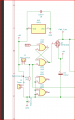
Q4 switches on power to the rest of the circuit when U4 tells it to.
Im not sure if I draw this correctly? will there be power on to the rest of the circuit all the time as I draw it?
Q4 switches on power to the rest of the circuit when U4 tells it to.
Im not sure if I draw this correctly? will there be power on to the rest of the circuit all the time as I draw it?
Exactly so. R4 C3 gives you the 20mS pulse rate, but with 2.7M/10nF its quite susceptible to noise. likewise (P1 + R3) C3 gives you one position, (P2 + R3) C3 gives the other. With C3 10nF then again P1/P2 are have to be large pots to give the range also with tiny currents. The result is your trigger point is likely to be quite variable, a few mV of noise on the power lines could shift timing. Now a PCB with a good solid ground plane will improve that, but increasing the charging/discharging currents will improve it more.
Here's a revised element from Q1/Q2 through to your servo output, using the same numbering scheme as your schematic with the addition of R7 . I've also suggested putting some additional decoupling capacitors (C9/C10) by the servo connector. This should have better stability and cope better with component tolerances and temperature variations.
I have now received my PCB from China and soldered according to the diagram you provided.
My problem is that I can't trim the servo arms position to 0 and 180 degrees.
Is it because I done have the small signal diode put in yet?
You need some sort of diode there for it to work at all.. else your timing is all out... temporarily tack an 1N4001 on to the pads to test. We never got to review your PCB layout....
You need some sort of diode there for it to work at all.. else your timing is all out... temporarily tack an 1N4001 on to the pads to test. We never got to review your PCB layout....
When you say PCB Layout you don't mean the diagram. Do you mean how the components are placed and how they are traced?
Please tell me what file to post.
I know I can't expect you to have, but have you breadboarded the diagram with the approvements you suggested? I am just curious if it did work for you? Because I can't trim the position on the breadboard either.
Interesting, because I'm sure you said you did have it working with the original parts and this was just a rationalisation. Are you sure the diode is soldered in the right way round? No i didn't breadboard it, just ran a simulation. which worked fine.. see post #20.
zip up your kicad 'Jumping jack santa' folder and post it here and lets have a look...
Correct, I remember that. It worked before your very fine improvement to reduce noise and I had decided to accept the noise my original project had, until you came up with the improvement. Thank you for that. And I also thought I had it working on the breadboard with your improved changes, until I realized that I forgot to replace the trimpots to 10K according to your improved diagram. At least that is what I recall. If I had it working with your improvement except the trimpots, I unfortunately dont remember anymore. I think I do. but that would mean that I would have seen it working with your improvement diagram only with 100K trimpots instead of your 10K trimpot.
Thats my big issue in learning electronics. I cant sit with it each night and I forget some of it and get out of track. Hopefully I will improve.
I just checked the diode and it is put in the right way. BUT! nice suggetion you had because the other diodes around the 4017 I soldered in the wrong way because of incorrect direction of the diode icon on the breadboard.
Get yourself a loose-leaf notebook (the spiral-bound ones that lie flat) and every time you start to try something make a note, draw the circuit or sketch out what you plan to do, and note the date/time, then after write what happened, any measurements you take and so on It'll be hard at first but in a few days you'll be doing it automatically. It helps get your thoughts in order before trying something, and reminds you what you changed so you can put it back... and saves wasting time doing something you already tried!
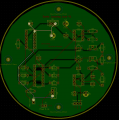
As far as I can see the board looks mostly OK. Though you could have avoided a few long traces by better positioning of components. And your diodes on the 4017 are all the wrong way round on the schematic which is why the silkscreen is wrong.
But the big issue is your power trace... that's all wrong...
The feed to the MOSFET switch is far too long and the trace is tiny....
And the highest current component - the servo is right at the far end....
Pity you didn't get this reviewed beforehand...
The power input, regulator, power switch and servo connector should have all been next to each other.
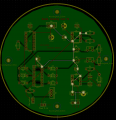
As far as I can see the board looks mostly OK. Though you could have avoided a few long traces by better positioning of components. And your diodes on the 4017 are all the wrong way round on the schematic which is why the silkscreen is wrong.
But the big issue is your power trace... that's all wrong...
The feed to the MOSFET switch is far too long and the trace is tiny.... View attachment 214528
And the highest current component - the servo is right at the far end.... View attachment 214527

 Facebook
 Google
 GitHub
 Linkedin