Technics SU-VX800 amplifier

MrChips

Joined Oct 2, 2009
34,866
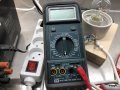
Set the meter to 200 ohm resistance.

GDM354A Ohmmeter 1024x768.jpg


Test the DMM and probes by touching the two probes together.
Your reading should be close to 000. The meter should give an audible continuous "beeeep".

1588248318053.png
 

MrChips

Joined Oct 2, 2009
34,866
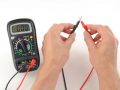
After confirming that the DMM is working propertly on the 200-ohm range, take two measurements as show in the two photos below with POWER OFF.
'M' stands for your DMM.
The expected reading is close to 000 in both cases.

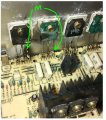
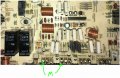
TP501-R547-R549.jpg


TP502-R548-R550.jpg
 

Thread Starter

Marius83

Joined Dec 28, 2017
423
Tested the DMM, with probes togheter it shows 0 ohm and beeps of course.
But with my mini grabbers hooked togheter there was another story... crazy values varying.. like bad connection.

i have now sanded the mini grabbers and cleaned them, they are now showing a steady 1.3 Ohm, it seems like i can't get it any better...

Checked the output transistor legs as in your pictures, 0 at both readings.

Tested again TP502 minus to GROUND, still reads -3,3V
Then i reversed the reading with plus probe to GROUND, got +3.3V
:rolleyes:

Also measured resistance between TP502 pins, shows the same as earlier shown in picture.
I get the same value at lowest resistance setting with just putting the mini grabbers together, as putting them on TP502


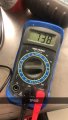
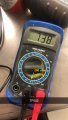
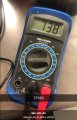
Tried to hook up the other DMM just to see... and it showed this value

What value should we be looking at checking resistance at TP502?

IMG_4221.JPG
 
Last edited:

MrChips

Joined Oct 2, 2009
34,866
You a still setting the DMM range to 2000K which is telling us one thing - that there is a bad connection somewhere at TP502.
All readings ought to be close to 000 when the meter is set to 200.

With POWER OFF
Repeat the following with the meter set to 200.

TP502 + to Q508 E
TP502 + to Q510 E
TP502 - to Q508 E
TP502 - to Q510 E
 

JoeJester

Joined Apr 26, 2005
4,390
Your meter should be set to the 200.

meter.jpg

With power off: If that is the resistance from TP502, redo it at 200 ohms .... if all you see is the four digits flashing, then measure across R550, R548, R570, and R572. The reading should be close to 0.220 Report back. If the numbers are flashing, that means the resistance is higher than 200 ohms. Your buzzer should go off as well, because we are measuring a lower resistance.
 
Last edited:

Thread Starter

Marius83

Joined Dec 28, 2017
423
Your meter should be set to the 200.

View attachment 205848

With power off: If that is the resistance from TP502, redo it at 200 ohms .... if all you see is the four digits flashing, then measure across R550, R548, R570, and R572. The reading should be close to 0.220 Report back. If the numbers are flashing, that means the resistance is higher than 200 ohms. Your buzzer should go off as well, because we are measuring a lower resistance.

MrChips said set to lowest resistance range... i just oversaw range....and i thought he meant the highest value on the meter because lower resistance, higher value... hehe... i misinterpreted that.o_O

At lowest value, 200 it just shows 0 at measuring TP502, and both pins at TP502 to GND.
No digits flashing... so won't need to measure at the resistors then? Or should i do it anyway?
 
Last edited:

Thread Starter

Marius83

Joined Dec 28, 2017
423
Meter at 200.

Measured:

TP502 + to Q508 E : 1.5 Ohm
TP502 + to Q510 E : 0 ohm
TP502 - to Q508 E : 0 Ohm
TP502 - to Q510 E 1.5 Ohm

Correction by MrChips 2020 May 03:
Should have posted:
TP502 + to Q508 E : 1.5 Ohm
TP502 + to Q510 E : OL
TP502 - to Q508 E : OL
TP502 - to Q510 E 1.5 Ohm
 
Last edited by a moderator:

MrChips

Joined Oct 2, 2009
34,866
Thanks for the readings.
These have brought more questions than answers.

1) In post #491, voltage readings at TP502 are inconsistent.

Measured TP502 + to - : +0.1V
+ to GND: 0V
- to GND: -3.2V

0V -3.2V is inconsistent with the differential reading of +0.1V

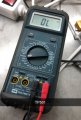
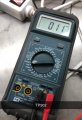
2) In post #499, photos do not reflect an expected reading of 000 ohms.

0L would be an indication of an open circuit, i.e. possibly bad probe contacts.

011 is an indication of about 1MΩ resistance.
(When you get a chance, for your own information, touch the two meter probes together with the meter set to 2000M as shown in the photo. The meter should display 010.)

TP501 Resistance.jpg

TP502 Resistance.jpg
 

MrChips

Joined Oct 2, 2009
34,866
More inconsistency,

3) In post #504, again the second meter is showing a resistance of 738MΩ.
This is inconsistent with your newest measurements in my next post #511
The expected reading should be 000.


TP502 Resistance_2.jpg
 

MrChips

Joined Oct 2, 2009
34,866
Your latest measurements as posted in post #508:

Meter at 200.
Measured:
TP502 + to Q508 E : 1.5 Ohm
TP502 + to Q510 E : 0 ohm
TP502 - to Q508 E : 0 Ohm
TP502 - to Q510 E 1.5 Ohm

My observations:

1) The labels at TP502 + and - on the board are reversed compared with the circuit schematics.
According to your measurements
TP502 + is a direct connection to Q510 E
TP502 - is a direct connection to Q508 E

2) Your readings of 0 ohm is an indication that the DMM has zero offset and perhaps is capable of measuring resistances to 0.1Ω resolution.
The measured resistance of 1.5Ω appears to be off. Expected reading is 0.4Ω.
Check what is written on the resistors, R547, R549, R548, R550.

Check:
Touch the DMM probes together with the DMM set to 200 ohms.
Reading should be 000.

Tip: Always do this meter and probe test with your DMM before taking a resistance or continuity measurement.
 

MrChips

Joined Oct 2, 2009
34,866
Your measurements in post #507.

At lowest value, 200 it just shows 0 at measuring TP502, and both pins at TP502 to GND.

This is what I would expect.
Hence why the different readings as I have covered in the previous posts?
 

MrChips

Joined Oct 2, 2009
34,866
Here is another important tip.

When using any kind of test meter, analog or digital,
when finished taking a measurement, return the range to the highest VAC range or set the DMM range switch to OFF.
Replace the meter probes to COM and VΩ jacks.
Leaving the probe in the mA or 10A jack is going to cost you dearly (as you have already discovered).
 

Thread Starter

Marius83

Joined Dec 28, 2017
423
(When you get a chance, for your own information, touch the two meter probes together with the meter set to 2000M as shown in the photo. The meter should display 010.)
Yes, DMM shows 010 when probes are connected together at 2000M setting
 

JoeJester

Joined Apr 26, 2005
4,390
Meter at 200.

Measured:

TP502 + to Q508 E : 1.5 Ohm
TP502 + to Q510 E : 0 ohm
TP502 - to Q508 E : 0 Ohm
TP502 - to Q510 E 1.5 Ohm

OK .....
First off,
TP502 + TO Q508 E should be zero
TP502 + to Q510 E should be 0.44 however, IF you used those mini-clips .... 1.5 is possible. as you already reported a 1 ohm error. Since this is a no power applied test, just use the probes.
TP502 - TO Q508 E should be 0.44
TP502 - TO Q510 E should be zero.

That's good for one set of transistors. Q509 E and Q 510 E emitter resistors would need to be tested as well. Use the probes that came with the DMM. Check the zero by shorting them and note the reading.


TP501 + to Qxxx E tests the following:
Q509 E ... Tests the connection between the + and the emitter
Q510 E ... Tests R548 and R550
Q516 E ... Tests R548 and R570
Q518 E ... Tests R548 and R572

Each resistor is 0.22 +/- 2% Your meter is has a tolerance and a plus digits count. The resistors alone can be 0.216 - 0.224 so two of them would be double that.

Do the tests over, as I described to the four emitters. Report your results.
 

Thread Starter

Marius83

Joined Dec 28, 2017
423
Your measurements in post #507.

At lowest value, 200 it just shows 0 at measuring TP502, and both pins at TP502 to GND.

This is what I would expect.
Hence why the different readings as I have covered in the previous posts?
I believe because i misinterpreted to set the DMM at the correct value i guess..... my fault.
As you saw in the pictures i was using the highest value resistance reading, which gave me 011 MΩ , but as mentioned, i get almost the same value with just the probes together; 010 MΩ

I don't know why my other DMM(blue) got the value it got.. as you pointed out in #510 But it's set on 2000K range as you can see..... i just connected it to check the difference to the other DMM.

I will also need to double check my measurement at the TP502 pins to Emitter at Q508 and Q510.. if the polarity is reversed according to the schematic.... human error can occur.... but i'm pretty sure i didn't mess up..

My mini grabbers has a 1,3 Ohm error, as mentioned earlier, i will try to test the points with the probes that showed 0 ohms from now to get a more correct reading.


@JoeJester, i will perform the tests as soon as i can.
 

MrChips

Joined Oct 2, 2009
34,866
I believe because i misinterpreted to set the DMM at the correct value i guess..... my fault.
As you saw in the pictures i was using the highest value resistance reading, which gave me 011 MΩ , but as mentioned, i get almost the same value with just the probes together; 010 MΩ
That makes sense now, i.e. you cannot use the 2000MΩ range to measure low resistances. I have never seen this behaviour in any DMM before. All my cheap DMMs max out at 20MΩ. Your meter is special.

I don't know why my other DMM(blue) got the value it got.. as you pointed out in #510 But it's set on 2000K range as you can see..... i just connected it to check the difference to the other DMM.
What reading do you get on the blue Biltema DMM set to 2000k when you touch the probes together?

I will also need to double check my measurement at the TP502 pins to Emitter at Q508 and Q510.. if the polarity is reversed according to the schematic.... human error can occur.... but i'm pretty sure i didn't mess up..
This is not your concern. The mix up is between the PCB marking and the circuit schematics.

My mini grabbers has a 1,3 Ohm error, as mentioned earlier, i will try to test the points with the probes that showed 0 ohms from now to get a more correct reading.
That makes sense. Then do not use the grabbers for this test.
 

JoeJester

Joined Apr 26, 2005
4,390
Pick a meter and use that for all your readings. Tell me which model you picked so I can find a user manual and look at the specifications. I don't like to assume things about test equipment.
 

Thread Starter

Marius83

Joined Dec 28, 2017
423
Pick a meter and use that for all your readings. Tell me which model you picked so I can find a user manual and look at the specifications. I don't like to assume things about test equipment.
My intensions was to use the GDM-354A in the pictures, not the blue Biltema, which is considered as a very cheap one.

I thought it was a better more reliable meter, it is not new, but almost not used.:rolleyes:
 
Top