Stripboard Designer

Thread Starter

Robin Mitchell

Joined Oct 25, 2009
819
Hi all,

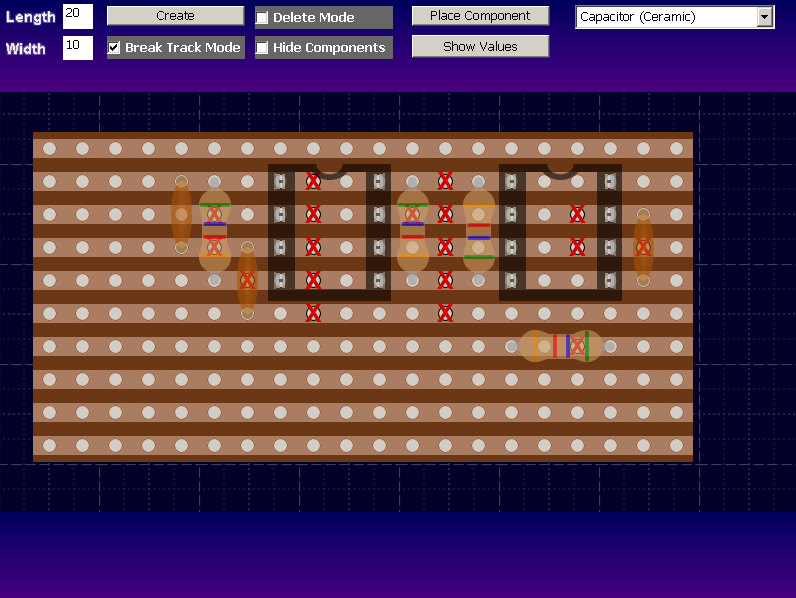
This is a piece of software that I have been working on. I have tried multiple stripboard design programs and found them to be lacking or ugly. So this one has been designed. It is still in the early days but its somewhat done. It will be made available once more components have been added.

As of now, you can save and load, break tracks etc. Wires have not been implemented but that should take the better part of an hour. This program unlike most is really smooth and works nicely so I hope it is something that will be used by the community.

Here are some screenshots:


Thread Starter

Robin Mitchell

Joined Oct 25, 2009
819
Hi max

Nope, it does not have any import features. I know that's not great for a piece of CAD software but this program is really for any small to medium design. Plus this will be for free so hey, no complaining ;)

I will look into S/W format to see if its possible.

All the best!
Robin
 

MikeML

Joined Oct 2, 2009
5,444
Import of a spice netlist would be useful. I'm not asking for auto layout, but a netlist compare between a spice netlist and the layout as it exists would be great...
 

Thread Starter

Robin Mitchell

Joined Oct 25, 2009
819
Yes and even tried some out. They just seem to lack something for me (I think its the graphics personally). I dont like programs that are difficult to use or have strange key mappings which is where my program differs:

Left click - Place and drop
Right click - Change component attributes like value and name
Mouse wheel - Rotate a component

Well thats all the controls!
 

Thread Starter

Robin Mitchell

Joined Oct 25, 2009
819
The grid lines on the background are aesthetic but I would like them to match up so I will change this. The pitch of the components is infact bang on, I checked this myself.
 

Thread Starter

Robin Mitchell

Joined Oct 25, 2009
819
Ok so the following has been added:
Wire links (horizontal and vertical)
More packages
Saving and loading
Exporting image

 
Last edited:

dashstofsk

Joined Jun 16, 2013
5
[QUOTE="I dont like programs that are difficult to use or have strange key mappings"[/QUOTE]

I think you will find that any competent program that has plenty of useful features will have key mappings of some sort to assist you in using the program, and it will be to your advantage to persist with the program and learn how to use it. As I see it the author of VeeCAD has spent a lot of time on his program and it will be very difficult for you to match its functionality.

I myself have written software that I have made available as freeware downloads, and I can tell you that these programs all take a lot of time to develop. You will spend many late nights, weeks, months tinkering with and developing your software. My advice to you: decide whether you really can commit this much time to the task. If you can then I would recommend that you definitely add some sort of netlist import feature to your program as that is how most people would want to work.
 

ISB123

Joined May 21, 2014
1,236
Are you gonna try to implement ability to import our components?And could you make TO220 stand upright and not down.
 

Thread Starter

Robin Mitchell

Joined Oct 25, 2009
819
ISB123:
This is a peliminary software and will be more of a proof of concept so this software will not enable the user to import their own components. However, not if but when I decide to make a proper piece of CAD software yes it will. It will use an object which has a specific pin configuration with an image attached ontop. The T0-220 component you see here is laid down but there actually is another one already standing ;).

Yesterday I implemented a wire colour change system.

VeeCad does not look nice, as in the layout is something I would not want seen in a final product document (like a how to build this kit). My program, while many times more crude in ability looks nice (if that makes sense). Also, I am unsure of many of these programs license agreements so for example if I was to construct a kit to sell and I needed a strip board layout could I use the VeeCad or TinyCad for this?
 
Top