Solder not reaching hidden pads - solution?

mcgyvr

Joined Oct 15, 2009
5,394
I´ve had some really old soviet resistors, the 70´s era I´d guess, the leads turned dark and you really had to scrub them with something otherwise the solder would not work. Not sure what kind of coating, but it was like trying to solder aluminium wire untill you cleaned a spot.
Yes.. obviously with something 40+ years of oxidation a mild flux alone may not be sufficient..

I apply 63/37 leaded solder to custom steel (yes just steel) nozzles I make that are used in out selective soldering machine.. I soak them overnight in "super flux" (don't have the brand/model in front of me now) and then just dip it right in a solder pot.. It adheres easily/evenly after the overnight soak..
 

Thread Starter

amundsen

Joined Aug 27, 2015
30
You need a 50W temp controlled station with broad tip.
Then you can solder SOIC much better
Those SOIC have been soldered with a good, powerful station by a professional electronician (I solder all the other parts). The black residues do not have anything to do with flux and can't be cleaned as easily.
 

takao21203

Joined Apr 28, 2012
3,702
Those SOIC have been soldered with a good, powerful station by a professional electronician (I solder all the other parts). The black residues do not have anything to do with flux and can't be cleaned as easily.
The joints aren't all even, hints point soldering. Soic is easy with broad tip just pull a solder ball and they'll look completely even.

I've found with the new station tip, even tqfp is easy needs no Flux.

So you say the black stuff isn't Flux? Maybe you can loosen it gently with a screwdriver.

The solder wire should be fine. What temp, what tip, what power?

Yesterday I tried row soldering 256 joints in 10min or so...needs the right flux so the ball has a lot of heat, the flux can remove oxide film, and joint is formed instantly.

10Mins including inserting the TH parts.
 

takao21203

Joined Apr 28, 2012
3,702
If you have the problem as you describe, try to apply a lot of heat and apply excess solder wire, until good joint is formed. Then take off excess solder if necessary using the tip.

Terminal pins can require some amount of heat. I don't know what tip you use.

But if it's a point, low wattage, and you try to be conservative with solder wire, you might be trying 20 seconds or more. In that time, the overall amount of heat delivered can start to cause damage. And as described you still may not get a full joint

I can't see how you try to solder them but I've abused regular soldering irons to desolder even large PLCC and almost any kind of component.
 

Thread Starter

amundsen

Joined Aug 27, 2015
30
As I have another issue - a few pads gone after component desoldering - I think I will rebuild this circuit from scratch and take the opportunity to try another PCB provider.
 

takao21203

Joined Apr 28, 2012
3,702
As I have another issue - a few pads gone after component desoldering - I think I will rebuild this circuit from scratch and take the opportunity to try another PCB provider.
2 layer is easy just apply excess solder. 4 or more layers, damage is very likely.

I'm soldering for many years and earlier on, just used wrong equipment.

Pcb issue? Don't think so. Maybe the pads are wrong kind. If possible really provide more details.

Such as equipment, blank pcb, parts before soldering.
 

Thread Starter

amundsen

Joined Aug 27, 2015
30
Pcb issue? Don't think so. Maybe the pads are wrong kind.
Broken pads are the results of my occasional lack of patience, not a PCB issue, but this black substance is.

I have also read that solder containing silver might be a bit easier to use. What do you think?
 

takao21203

Joined Apr 28, 2012
3,702
There's countless kinds of solder on the market. Tin solder is more difficult needs to be good quality. With added lead the surface tension is different.

I was just thinking your pcb holes might be too tight. Normally if you first heat the pin for a second, then put solder wire to the Junction, it's sacked up all the way through.

I've never heard soldering TH parts from two sides is necessary.

And I do think the black residue is from the flux contained. It's not difficult to remove. But a bit sticky on silkscreen that's true

Maybe try a different kind solder wire. Lead is not ROHS. Which nobody cares a few pcbs. And on the other hand tin solder just as it is will give a starting point for whiskers to grow.

Soldering as art- you can constantly improve over the years

With the right tip, appropriate hole dia, about 330c the solder will be transported through the via. You don't need a visually perfect joint on the top side.
 

mcgyvr

Joined Oct 15, 2009
5,394
Use 63/37 tin/lead solder or 60/40 tin/lead (I like 63/37 better than 60/40)
or use K100LD (or equivalent) if you want lead free solder

Lead free solder is a bit harder to work with vs leaded solder..
It needs a bit more heat, doesn't flow as well as leaded solder and looks a bit duller (not as shiny as leaded)

In another month or so ALL professional circuit boards will be made with lead free solder because of expiring ROHS exemptions and ROHS requirements imposed by the EU..
Most are already using lead free except for "high reliability" products and that ROHS (7) exemption is expiring on July 21st..
All are using either K100LD type solders or SAC solder for lead free..
 

Thread Starter

amundsen

Joined Aug 27, 2015
30
Is K100LD available as wire? I find it only in the form of bars.

Correction: I could find it here as wire.
 
Last edited:

Tesla23

Joined May 10, 2009
560
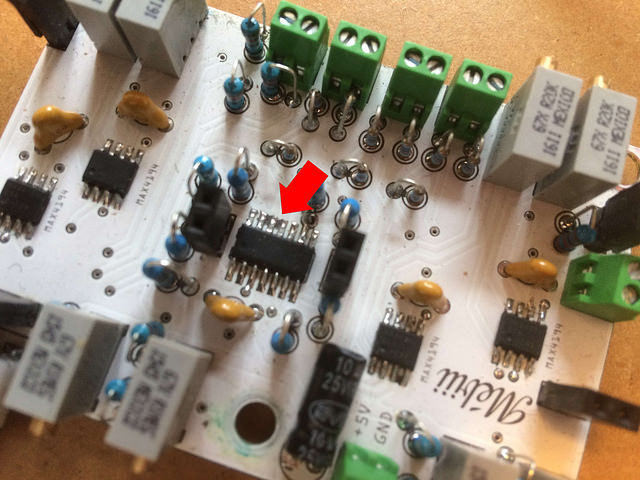
Here's a picture. You can see this in several places near IC legs, but it's most visible under the red arrow.

I'm no soldering expert, but your pads seem too small.

For hand soldering you need sufficient pad exposed to wet the pad with solder so it wicks under the component leg. From your photo it appears that the pad is almost completely hidden by the IC leg, the only way to get solder under the leg would be to use a paste. What purpose is served by the topside groundplane that passes between the IC legs and makes your pads so small?

I would redo the layout, remove unnecessary topside groundplane traces between the IC legs and use larger pads.
 

Thread Starter

amundsen

Joined Aug 27, 2015
30
I'm no soldering expert, but your pads seem too small.

I would redo the layout, remove unnecessary topside groundplane traces between the IC legs and use larger pads.
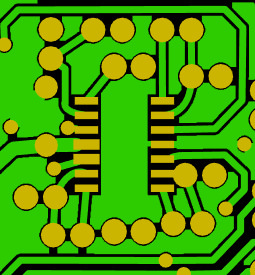
Thank you for the idea. However, looking at the Gerber file, I wonder if your suggestion can be applied. There's no groundplanes traces between the pads but above all I don't think there's any room left to have broader pads. What do you think?


Tesla23

Joined May 10, 2009
560
Thank you for the idea. However, looking at the Gerber file, I wonder if your suggestion can be applied. There's no groundplanes traces between the pads but above all I don't think there's any room left to have broader pads. What do you think?
It's a bit hard to see from the picture, but the pad should extend past the end of the IC leg. Get some fine solder (e.g. 0.5mm dia) , so that you can place the solder across (and on) the pad at the end of the chip leg, pressing against the chip leg, and melt it there - it should wick up under the IC leg. The picture looks as if you are applying a largish amount of solder on top of the leg of the IC, and are simply getting a solder blob on top of the IC leg.

If this doesn't work, try tinning the pad leaving extra solder there, and reflow by heating each leg with the iron, This is not great as you really need some flux there when you remelt the solder. Paste is best if you are placing solder under the leg to reflow.
 

Thread Starter

amundsen

Joined Aug 27, 2015
30
The picture looks as if you are applying a largish amount of solder on top of the leg of the IC, and are simply getting a solder blob on top of the IC leg..
Despite the black substance issue being the most apparent at this place, this part of the circuit seem to work as expected, no connection issue there. As written before, I have removed a few pads by accident, which has led me to order a new PCB anyway (from another provider). However I took this opportunity to move a few connections from the top of the PCB to the bottom, this will reduce the risks to have the same issue as the one which led me to post my initial message.

Thank you everyone for the attention and advice.
 

shortbus

Joined Sep 30, 2009
10,050
the black substance issue
It's hard to tell from your board photo but id the board was "tin plated" using the stuff sold to make boards,(tinnit) that may be the problem. Some of those mix in water and dip tin solutions don't work so good. Especially if the board was left in the solution too long.
 

dl324

Joined Mar 30, 2015
18,330
Thank you for the idea.
I use Eagle for my boards; that I etch myself. I increase the pad size on most components by laying a trace over the pad. The standard pads for through hole resistors are too small for toner transfer. Actually, they're too small period. I have some boards that were made at a board house and rework with the small through hole pads for resistors is problematic. On poorly made boards, the pad lifts and sometimes takes the plated through hole with it. On single sided boards (no plated through holes), more copper decreases the chances of the pad lifting because heating the pad will melt all of the adhesive holding the pad down.
 
Top