Remote control by location (PIC in Oshonsoft)

Thread Starter

camerart

Joined Feb 25, 2013
3,835
Hi,
I've just finished making the BASE TRANSMITTER PCB.

Leds are flashing and I've added a the first module (HC-12) radio, which is transmitting and will be used for HSEROUT, initially for testing.

Now I've got to get my programming bearings back, and add all of the modules. Let's hope those brain cells are still living :)

C.
 

Thread Starter

camerart

Joined Feb 25, 2013
3,835
Hi,
TRANSMITTER MODE2:

The RX receives signals from the GPS module and the REMOTE. At the moment I'm transmitting REMOTE signals via serial FTDI/HC-12. (The message has been changed from $BASE to $REMOTE)

The signals are arriving at the RX, but the program isn't processing them. Any ideas please.

_______________________________________________________________________________
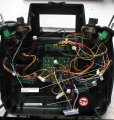
I'm going to use an broken Hitec Eclipse 7 from the past as the transmitter.

Here is a photo of the innards. All of the joysticks, need to be centralised for this project, and as you know, the throttle is held by a friction spring, which I have removed. I have marked the joystick centralizing plate for the elevator, that I have to duplicate as best as I can for the throttle.
C.
 

Attachments

Last edited:

Thread Starter

camerart

Joined Feb 25, 2013
3,835
Hi, TRANSMITTER:

I'm testing the RX using only simulated REMOTE signals.

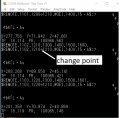
I'm getting this result: Attached

If I'm reading it correctly the first 1102 line is what's being SENT, and the second 1102 line with the marker is what's being processed. At the change point, the sentence isn't being updated, so I assume there's a timing issue.

Any ideas how to fix this please?

NOTE: The program changes slightly as I progress.
C
 

Attachments

Last edited:

Thread Starter

camerart

Joined Feb 25, 2013
3,835
Hi, TRANSMITTER
slight update on tests.

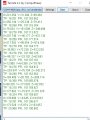
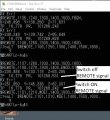
Here's the result from HSEROUT's from the computer terminal.

When the PCB and test REMOTE signal are first switched on, the signal is processed and shown on screen, then it doesn't process till I switch OFF the sending signal, on switch ON, it prcesses once, then no more.

Also there are artifacts on screen which are a puzzle.

NOTE: The program changes slightly as I progress.
C.
 

Attachments

Last edited:

Thread Starter

camerart

Joined Feb 25, 2013
3,835
Hi,
I was going to try a different 5110 LCD, to see if the sentence was being held in the LCD memory. It now shows the correct TEMP and PRESS as in the PRINT subroutine.
C.
 

Thread Starter

camerart

Joined Feb 25, 2013
3,835
Hi,
Just realised, that the list of 4x Sentences are for the SCROLL and BIG routines. For now I don't need these, and only need SML which uses Proc wr_msg/chr2lcd only.
C
 

Thread Starter

camerart

Joined Feb 25, 2013
3,835
Hi,
I'm stuck!
In order to get anything shown on the 5110 LCD this sequence must be run:
A program, e,g, from 2017 is run and nothing shows on screen, then the latest program, is run and the message from the first program shows on the screen. If power is lost from the screen it 'forgets' the message, so it is being remembered by the screen, till the later program is run.

If the first program is 'printing' data from 'say' the barometer, this is correctly shown, but not updated, when the later program is run.

I've tried all sorts of combinations from programs, but haven't 'hit' the correct one yet.

Can anyone shed any light on what's happening please?
C
 

jjw

Joined Dec 24, 2013
823
This is contradictory:
"A program, e,g, from 2017 is run and nothing shows on screen"
"If the first program is 'printing' data from 'say' the barometer, this is correctly shown,"

The lcd or the connections might be faulty, the program is faulty etc.
Test only the lcd with the program that was working before without the barometer, compass and other stuff.
 

Thread Starter

camerart

Joined Feb 25, 2013
3,835
This is contradictory:
"A program, e,g, from 2017 is run and nothing shows on screen"
"If the first program is 'printing' data from 'say' the barometer, this is correctly shown,"

The lcd or the connections might be faulty, the program is faulty etc.
Test only the lcd with the program that was working before without the barometer, compass and other stuff.
Hi J,
If program 18F2520 at #308 or from 2017, (Re-PIN mapped) this first program may have completely different messages, but appears to set-up the screen, yet nothing shows. As long as the screen is kept powered, then the later program, again as #308, is programmed, which READs 'say' the TEMP, then this shows on the screen.
C.
 

Thread Starter

camerart

Joined Feb 25, 2013
3,835
In comments chr2lcd is said to be in fontsml.bas, but
in the program there is include fonts1.bas
Hi J,
Well spotted!

I think I'm correct ion saying that when 'E' wrote font1.bas it was SMALL FONT only, then changed to include a LARGE FONT. As I only need SML FONT at the moment I'm going to use fontsml.bas. This compiles ok, but the results are the same.

It appears that the first program sets-up the 5110, then the latest program uses the settings held in the 5110 and displays digits, only once.
C.
 
Last edited:

ericgibbs

Joined Jan 29, 2010
21,452
hi C,
The first font text was 'font1.bas' it included all Upper Case 'A to Z', '0 to 9' and some symbols, the subr was called by 'chr2lcd'

We started adding 'some' lower case characters to fonts1,so we called it 'fontsml.bas' it was also called by 'chr2lcd'

E
 

jjw

Joined Dec 24, 2013
823
This is to C.
But both programs in #308 have include font1.bas not fontsml.bas
I don't believe the fontxx.bas has errors, but it is in the lcd functions.
What have you changed?
Have you checked the used Port pins to LCD.
Have you saved the program version that worked sometimes before.
 

Thread Starter

camerart

Joined Feb 25, 2013
3,835
Hi E and J,
I have all of the past programs, to search through, and earlier in this thread, I posted a program modified (PIN changes for different PCBs, and e,g, lcd_mode has been changed to lcd_dc 'DATA/COMMAND') from that 2017 program above.

Looking through FONTS I see SMALL and BIG characters, but not lower case. Upper case is showing on the 5110, so I think there is no problem with FONTs ??

I've checked the PINs with a logic analyser, and the results show, it is wired ok.

I recall when we got it going earlier, that it had to be 'played with' to get it going, perhaps there's a timing issue?

E, Without having to look at the program, can you recall the PRINT routine? You may be able to give a clue to what's happening.
When I run the sequence:
PROGRAM PIC with 2017 program, then PROGRAM PIC with last program, PRINT shows on 5110. If the 5110 loses power in between the two program, it doesn't PRINT.

When the first program is PROGRAMMED, the 5110 background shows white. Unpower 5110, then PROGRAM PIC with last program, the screen background show a hint of all black, and no digits.

If you want to look through the last program, I can add easy search comments, and post it.
C.
 
Top