@Yaakov Does the active low mean the module needs its own supply? I ask because it looks like it would depend on a high to deactivate the relay. But straight out of the box the relays would already be deactivated.
It's getting VCC from the VCC pin at bottom.... you provide the ground path with a microcontroller or button. I think they did that so you can more safely switch the diode. But there's no isolation... the jumper provides power to both sides of opto... no other way to power the relay.
@Yaakov Does the active low mean the module needs its own supply? I ask because it looks like it would depend on a high to deactivate the relay. But straight out of the box the relays would already be deactivated.
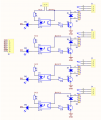
I am too, I am waiting for more information from the TS. Looking at the board, it seems the indicators are in series with the opto inputs. I don't really know, I do know that I have seen assertions they are both active low and active high, and people saying they have actually used the board with high inputs. So, I don't know.
hi,
Those inputs need to be pulled to 0V to operate the relay.
The input circuit is +5v > 100R > LED > opto coupler emitter in series >>> pull low to enable the opto Emitter.
BTW:
The opto does NOT provide isolation, as the 0V to the relay drive transistor shares the same 0V as the input low signal.
E
You are correct. I am still trying to understand why they used an opt-isolator. The transistor in the circuit would switch the relay on it's own. The relay contacts are well isolated from everything else.
You are correct. I am still trying to understand why they used an opt-isolator. The transistor in the circuit would switch the relay on it's own. The relay contacts are well isolated from everything else.
JD-VCC is set up so you can use a separate Vcc and GND to operate the relay coils with the jumper off. In my view, that means that you could have the Arduino operate only the LED side of the optos (and the signal LED) by only connecting the port bits and Arduino Vcc/Gnd. That is additional isolation and allows you to avoid trying to draw too much from the UNO 5v pin (4X coil current plus whatever else you have). It is a nice option.
@ericgibbs where do you see a 100R on your board? On the TS's advert pic, R1,4,5,8=102=1Kohm and R2,3,6,7=511=510 ohm - I don't follow.
I am too, I am waiting for more information from the TS. Looking at the board, it seems the indicators are in series with the opto inputs. I don't really know, I do know that I have seen assertions they are both active low and active high, and people saying they have actually used the board with high inputs. So, I don't know.
JD-VCC is set up so you can use a separate Vcc and GND to operate the relay coils with the jumper off. In my view, that means that you could have the Arduino operate only the LED side of the optos (and the signal LED) by only connecting the port bits and Arduino Vcc/Gnd. That is additional isolation and allows you to avoid trying to draw too much from the UNO 5v pin (4X coil current plus whatever else you have). It is a nice option.
@ericgibbs where do you see a 100R on your board? On the TS's advert pic, R1,4,5,8=102=1Kohm and R2,3,6,7=511=510 ohm - I don't follow.
The jumper. Of course, I don't see a separate GND. Those relay coils are, what, 70-90 mA each. If all 4 are operating at once, that is a real strain on the Arduino 5V pin (too lazy to look it up, but maybe more than it can source).
hi Raymond,
Got a relay PCB in front of me, rechecking the PCB.
The Input pin to end of the Cathode of the LED then to the Emitter Cathode pin of the Opto coupler then a 1k to +5v.
So I can confirm that you are correct it is 1k.
I do recall a user wanting to use a 3.3V supply to the PCB [ For an Arduino] and the circuit would not work.
We tried reducing the 1K to 100R to no avail, so we bypassed the opto and connected directly to 510R Base resistor for 3.3V high relay operation.
hi Raymond,
Got a relay PCB in front of me, rechecking the PCB.
The Input pin to end of the Cathode of the LED then to the Emitter Cathode pin of the Opto coupler then a 1k to +5v.
So I can confirm that you are correct it is 1k.
I do recall a user wanting to use a 3.3V supply to the PCB [ For an Arduino] and the circuit would not work.
We tried reducing the 1K to 100R to no avail, so we bypassed the opto and connected directly to 510R Base resistor for 3.3V high relay operation.
Ya know, the thing that I don't like about the board, and I admit that this is more feeling than knowledge, is that low-operate. I am used to using a pull-down resistor in these situations - when it is high-operate, to prevent unintended operation if the pin boots in high-impedance or has a program run-away. Again, maybe more feeling and old school than knowledge, per se, but if the GPIO were sourcing to drive the optos rather than sinking, I would feel better.
hi,
What is the 24V being used for in the project.?
If you want to switch the 24Vdc by using the relays on the PCB, use the screw block terminals on the PCB.
E
You don't use 24 volts for the relay control. The relays are rated for 5 volts. The rest of the circuitry is also built around 5 volts. If you try to power the relays using 24 volts you might as well just toss the whole thing in the scrap bin because nothing useful will be left. The relay contacts themselves can be used for 24 volts but not the relay control. If you read the ratings on top of the relays you see they can be used for many different voltages AND amperages. Do not exceed them. But the board itself operates on 5 volts. Nothing higher and ONLY on DC.
To use an external 5V power supply to power the relay coils:
Remove the jumper.
Connect the external 5 volts supply positive to the jumper pin closest to the relays, marked JD-VCC.
Connect the external 5 volt supply negative to GND on the relay board.
Connect the Arduino 5V to Vcc on the relay board.
Connect Arduino GND to GND on the relay board.
Connect the each digital output pin you want to use to its respective input pin on the relay board.
I recommend that you connect a 10 Kohm resistor from each relay input pin to VCC. This will help to avoid random relay activation during power-up.
hi,
What is the 24V being used for in the project.?
If you want to switch the 24Vdc by using the relays on the PCB, use the screw block terminals on the PCB.
E

 Facebook
 Google
 GitHub
 Linkedin