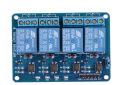
Relay board connection

btebo

Joined Jul 7, 2017
100

Attachments

Tonyr1084

Joined Sep 24, 2015
9,744
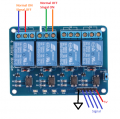
K1 = the middle screw IT WOULD APPEAR is the common leg of the switch. The left screw appears to be the normally closed leg and the right screw the normally open. It appears K1 is controlled by placing a ground (or negative) signal on the header marked GND. IN1 likely controls K1. When you apply 5 volts to IN1 K1 should switch over from normally closed to normally open.

K2, K3 & K4 should all work the same. Each relay is rated to handle 10 amps.
 

Ya’akov

Joined Jan 27, 2019
10,226
I have a Sainsmart relay board - looks identical to your post.
Your PDF says to pull the input on the board low to activate the relay while other sources for the same board say high. I don’t know which is right but I would expect high without any other information.

In addition, it would seem the VCC jumper should be pulled and a separate supply used to power the board, to ensure isolation. The external power supply should not be connected to the ground of the device driving the board.

If this is to be connected to something like an Arduino, that needs some explanation, hence my question. The other part is, what will the relays switch, this also matters if isolation isn’t required (e.g.: not switching mains or higher voltages).

So, I’d still like to know, what is running to the input and what to the output?
 

btebo

Joined Jul 7, 2017
100
Your PDF says to pull the input on the board low to activate the relay while other sources for the same board say high. I don’t know which is right but I would expect high without any other information.

In addition, it would seem the VCC jumper should be pulled and a separate supply used to power the board, to ensure isolation. The external power supply should not be connected to the ground of the device driving the board.

If this is to be connected to something like an Arduino, that needs some explanation, hence my question. The other part is, what will the relays switch, this also matters if isolation isn’t required (e.g.: not switching mains or higher voltages).

So, I’d still like to know, what is running to the input and what to the output?
Since positive voltage is provided through VCC, the input must go to ground (or low) to activate the optocoupler. Once the optocoupler is activated, it triggers the transistor and hence the relay.

I agree with separating the supply voltage by removing the jumper for total isolation- but you have the option of leaving the jumper should you wish.

As for what the TS is planning to control - he'll have to join us again...
 

Wolframore

Joined Jan 21, 2019
2,619
Updated picture
upload_2019-3-18_17-47-4.png


OK this is how it works...

Bottom Connections:
Ground
4 signal pins - to control each relay (needs 0v (ground) to activate)
VCC is 5V

Top Connections
1st channel is wired normally on - signal to turn off
2nd channel - wired normally off - signal to turn on
 
Last edited:

Tonyr1084

Joined Sep 24, 2015
9,744
In addition to post #4, looking at what others have said and posted, my comments should be taken as being "IN THE DARK". Without technical data one would have to bench test the board in order to fully understand its proper operation. I went on the assumption that you need 5 volts on the "IN1" line because that's what makes sense to me. However, the schematic posted in #3 could equally be accurate. I don't think anyone could know for sure unless they have this exact module. I sure don't. As for what @Yaakov said about an isolated power supply - that also warrants attention.

We can tell you how a lightbulb works. But unless we fully understand how you intend to use that lightbulb we can only guess. Hope you get the answers you need.
 

Tonyr1084

Joined Sep 24, 2015
9,744
There you have it. @btebo posted a drawing that seems to agree with my description of the relay switch is set up. However, @Wolframore posts a different scenario as to how the relay switches are wired.

Here's what I would suggest, once you figure out how to make the relays switch you'll need a continuity meter (a common DVM will work fine) and figure out which of the three screws is the common. Then the NO and NC contacts should become self explanatory. NO means Normally open. That means when the relay is doing nothing the contact marked as NO should be in the disconnected state while the NC, which means Normally Closed should be connected. Sometimes we assume a person knows something about what they have, other times we assume a person doesn't fully understand. If my comments come across as speaking down to you - my apologies. It's just that when you spend money on electronics the last thing you want to do is mistakenly hook up something wrong and then blow it up. Or worse, hurt someone.
 

eetech00

Joined Jun 8, 2013
4,704
Your PDF says to pull the input on the board low to activate the relay while other sources for the same board say high. I don’t know which is right but I would expect high without any other information.
Hi

The poorly written description on Amazon indicates the input requires a low to activate. One side of the optocoupler input is connected to VCC, the other is the input terminal. The traces indicate that on the PCB.

eT
 
Last edited:

btebo

Joined Jul 7, 2017
100
There you have it. @btebo posted a drawing that seems to agree with my description of the relay switch is set up. However, @Wolframore posts a different scenario as to how the relay switches are wired.

Here's what I would suggest, once you figure out how to make the relays switch you'll need a continuity meter (a common DVM will work fine) and figure out which of the three screws is the common. Then the NO and NC contacts should become self explanatory. NO means Normally open. That means when the relay is doing nothing the contact marked as NO should be in the disconnected state while the NC, which means Normally Closed should be connected. Sometimes we assume a person knows something about what they have, other times we assume a person doesn't fully understand. If my comments come across as speaking down to you - my apologies. It's just that when you spend money on electronics the last thing you want to do is mistakenly hook up something wrong and then blow it up. Or worse, hurt someone.
I've used on years ago... it took a while to figure it out since there is so little literature out there. The relay ACTIVATED when a low was provided to input - now how the silkscreen on the board showed what was NO/NC, I don't remember.... they could have "reversed" the silkscreen to make it seem that "low" was relay contacts off, "high" - relay contacts closed...
 

Tonyr1084

Joined Sep 24, 2015
9,744
@Wolframore Would you edit your drawing to avoid confusion? [edit] Thanks for the edit. [end edit]

Nevertheless, it should be noted how easy it can be confused. Testing is the best way to ensure you hook it up correctly.
 
Last edited:

Wolframore

Joined Jan 21, 2019
2,619
Already edited in the original reply... I'm pretty sure it's a logic high that sets it off... makes sense to put a N type to switch the low side on it.
 

ericgibbs

Joined Jan 29, 2010
21,401
hi,
Those inputs need to be pulled to 0V to operate the relay.
The input circuit is +5v > 100R > LED > opto coupler emitter in series >>> pull low to enable the opto Emitter.
BTW:
The opto does NOT provide isolation, as the 0V to the relay drive transistor shares the same 0V as the input low signal.
E
 

Wolframore

Joined Jan 21, 2019
2,619
Ok found it... it's way down in product description... really bad Chinese-English:

5v relay module 4-channelthis is a 5v 4-channel relay interface board. It can be controlled directly by micro-controller (raspberry pi, arduino, 8051, avr, pic, dsp, arm, arm, msp430, ttl logic) 4-channel relay output modules, relay output contacts 250a 10a. Input in1, in2, in3, in4, the signal line low effective. Vcc, gnd power input, can relay a separate power supply relay power input of jd-vcc. Uses: 1, support all mcu control. 2, the industrial sector, 3, plc control, 4, smart home control,

What a stupid design... opto with no isolation.
 

Tonyr1084

Joined Sep 24, 2015
9,744
Two layer board, or multi-layer (not likely), I can't follow the traces and be confident in any conclusions I might draw from that. Also, in the description - I haven't found where it says or even hints that an active low is required. Perhaps that's how MCU's operate, I don't have experience with them. Actually I resist MCU's. Old school. I'd rather build the logic circuit than tell an MCU to do something with my inputs. That's just stubborn old me.

[edit] @Wolframore - WOW! THAT IS OBSCURE!
 
Top