PIC16F877A - Object Detection and Rejection - Timer Interrupt

Thread Starter

daljeet795

Joined Jul 2, 2018
295
@JohnInTX I followed that thread, Sample code worked on my PIC Development board

This is a simple C program that demonstrates the basic idea to check one condotion

Code:
#include<stdio.h>

int main (void)

{
    int sensor = 1, sensorstate;

    printf("Please check sensor : ");

    scanf("%d", &sensorstate );

    printf("sensor is : %d \n", sensorstate);

    if(sensor == sensorstate)
    {
        printf("Sensor High \n");

    }

    else
    {
        printf("sensor Low \n");
    }
    return 0;
}
I am struggling with program for PIC16F877A

A Sensor gives outputs a 1 when seeing something and a 0 otherwise.

Code:
void main(void)
{

    while(1)
    {
      if (SENSOR == 1)
      {
           printf("\rThe Sensor is: %d", SENSOR);
      }
      else
     {
           printf("\rThe Sensor is: %d", SENSOR);
     }
    }
}
you said
  • convert the count to ASCII and write it to the UART - use 'printf' for this.
I used printf but my code doesn't work I don't get anything on the hyper terminal

Can you show the part of your code to send integer value to PC port?
 
Last edited:

LesJones

Joined Jan 8, 2017
4,511
Have you checked that hyper term is working by connecting TX ans RX together on the PC serial port. with Hyper term running you should see characters that you type displayed on the screen. If Hyper term does not work try "Tera Term". I find it works better than Hyper term.
How are you converting the TTL levels from the PIC's serial pins to the RS232 levels required to work with the serial port on the PC ?

Les.
 

Thread Starter

daljeet795

Joined Jul 2, 2018
295
But you were asking about the code in #261
@JohnInTX I showed it that I am struggling in this part

I already checked PIC is running for serial communication with the sample code given in the thread by you

I don't understand why the code in post 258 is not showing anything on the hyper terminal
 
Last edited:

JohnInTX

Joined Jun 26, 2012
4,787
@JohnInTX I showed it that I am struggling in this part

I already checked PIC is running for serial communication with the sample code given in the thread by you

I don't understand why the code in post 258 is not showing anything on the hyper terminal
That's because it won't compile. Who says there ain't any easy answers?
 
Last edited:

Thread Starter

daljeet795

Joined Jul 2, 2018
295
That's because it won't compile.
@JohnInTX I made a mistake while posting code
Here is code and It does compile
C:
#include <xc.h>
#include <stdio.h>
#include <conio.h>
#define SENSOR  RC1
// CONFIG
#pragma config FOSC = HS
#pragma config WDTE = OFF
#pragma config PWRTE = OFF
#pragma config BOREN = ON
#pragma config LVP = OFF
#pragma config CPD = OFF
#pragma config WRT = OFF
#pragma config CP = OFF
//END CONFIG

void putch(char data){                 
    while(!TRMT);
    TXREG = data;
}

char receive()
{
    if(OERR == 1){      // reset UART on overflow error
        CREN = 0;
        CREN = 1; 
    }
    while(RCIF==0);    // Wait till the data is received
    return(RCREG);     // Return the received data to calling function
}

unsigned char getch(){                           
    while(!RCIF);
    return RCREG;
}
void main(void) {
    TXSTA = 0b00100100;                           // TX enabled, BRGH=1
    RCSTA = 0b10010000;                           // Serial Port, Continuous Receive enabled
    SPBRG = 0x81;                                 // baud rate 9600

  
    while(1)
    {
      if (SENSOR == 1)
      {
           printf("\rThe Sensor is: %d", SENSOR);
      }
      else
     {
           printf("\rThe Sensor is: %d", SENSOR);
     }
    }
}
 

JohnInTX

Joined Jun 26, 2012
4,787
Why do you have 2 character receive routines?
Hint:
Delete getch()
Rename receive to getch()
That's not your immediate problem but details count. Note that SENSOR is not an integer as required by %d. Looking at the assembler output, it actually looks like the PORT bit gets promoted to an integer and displayed correctly but.. A first thing would be to just printf "Hello World" and get that working.

Step back, does the serial link actually work? Have you done the hardware wraps and does that confirm that the RX/TX is good as far as the PIC?
Have you written a simple getchar putchar echo routine to confirm that what you type on the PC goes through the wires to the PIC, is received correctly then immediately echoed (transmitted back to the PC) and displayed correctly? That needs to be confirmed.

After that, consider what your code does - does it print once for a SENSOR change or just over and over?

Do you think that initializing the IO might be a good idea this time??

Finally, this looks like you are moving to that Sensor->PC link? How much data are you sending and what does the data look like. This is actually pretty important.

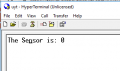
EDIT: I ran up the #268 code on the same PICDEM2 as in the referenced thread. It types out to the terminal (over and over) and follows SENSOR as written.
The Sensor is: 1
The Sensor is: 0
Fix the hardware.
 
Last edited:

Thread Starter

daljeet795

Joined Jul 2, 2018
295
Why do you have 2 character receive routines?
Hint:
Delete getch()
Rename receive to getch()
That's not your immediate problem but details count. Note that SENSOR is not an integer as required by %d. Looking at the assembler output, it actually looks like the PORT bit gets promoted to an integer and displayed correctly but.. A first thing would be to just printf "Hello World" and get that working.

Step back, does the serial link actually work? Have you done the hardware wraps and does that confirm that the RX/TX is good as far as the PIC?
Have you written a simple getchar putchar echo routine to confirm that what you type on the PC goes through the wires to the PIC, is received correctly then immediately echoed (transmitted back to the PC) and displayed correctly? That needs to be confirmed.
@JohnInTX I have done so whatever I write on the PC I get back
C:
#define _XTAL_FREQ 2000000
#include <xc.h>
#include <stdio.h>

// BEGIN CONFIG
#pragma config FOSC = HS
#pragma config WDTE = OFF
#pragma config PWRTE = OFF
#pragma config BOREN = ON
#pragma config LVP = OFF
#pragma config CPD = OFF
#pragma config WRT = OFF
#pragma config CP = OFF
//END CONFIG
void putch(char data)
{           
    while(!TRMT);
    TXREG = data;
}

unsigned char getch()   //used to get each character
{               
    while(!RCIF);
    return RCREG;
}
void send (char *s)
{
  while (*s != 0)      
  putch(*s++);      
}

void main(void) {

    char data;

    TXSTA = 0b00100100;    // TX enabled, BRGH=1
    RCSTA = 0b10010000;    // Serial Port, Continuous Receive enabled
    SPBRG = 0x81;          // baud rate 9600

    while (1)
    {              
     data = getch(); 
     putch(data);

     printf (" Echo word %c \n", data);
  }
}
Take a look at this screenshot of hyper terminal

[upload_2019-5-30_14-59-0.png

EDIT: I ran up the #268 code on the same PICDEM2 as in the referenced thread. It types out to the terminal (over and over) and follows SENSOR as written.
The Sensor is: 1
The Sensor is: 0
Fix the hardware.
I am also over and over

upload_2019-5-30_15-14-24.png

Edit : I have solved the problem I made one mistake in the code I was not setting RC1 as input PIN there is no hardware issue

TRISC = 0b00000010; //Input is RC1

upload_2019-5-30_15-31-16.png
 
Last edited:

Thread Starter

daljeet795

Joined Jul 2, 2018
295
Great!
What’s next?
@JohnInTX Next is a little bit difficult for me

Let's assume scanner connected to PC and sensor connected to PIC. so the scanner will only trigger when the sensor detects the object on the belt. the scanner will give a good/bad signal to PC Port. If the scanner gives a bad signal the rejection should be done at an accurate position on the belt

I have two program #247 for rejection and #267 for serial communication so I am trying to combine both programs into one
I am struggling to make one program
C:
#include <xc.h>
#include <stdio.h>
#include <conio.h>

#pragma config FOSC = HS  // Oscillator Selection bits (XT oscillator)
#pragma config WDTE = OFF  // Watchdog Timer Enable bit (WDT disabled)
#pragma config PWRTE = ON  // Power-up Timer Enable bit (PWRT enabled)
#pragma config BOREN = OFF  // Brown-out Reset Enable bit (BOR disabled)
#pragma config LVP = OFF  // Low-Voltage (Single-Supply) In-Circuit Serial Programming Enable bit (RB3 is digital I/O, HV on MCLR must be used for programming)
#pragma config CPD = OFF  // Data EEPROM Memory Code Protection bit (Data EEPROM code protection off)
#pragma config WRT = OFF  // Flash Program Memory Write Enable bits (Write protection off; all program memory may be written to by EECON control)
#pragma config CP = OFF  // Flash Program Memory Code Protection bit (Code protection off)
// #pragma config statements should precede project file includes.
// Use project enums instead of #define for ON and OFF.

#define ENCODER RC0
#define SENSOR  RC1
#define KICKER  RD0

#define _XTAL_FREQ 20000000  // **you need this for delays**

__bit gotIRQ;  // signals main that an interrupt

void putch(char data){             
    while(!TRMT);
    TXREG = data;
}

char getch()
{
    if(OERR == 1){      // reset UART on overflow error
        CREN = 0;
        CREN = 1;
    }
    while(RCIF==0);    // Wait till the data is received
    return(RCREG);     // Return the received data to calling function
}

void main(void)
{
  unsigned int ShiftReg = 0; //  Init to 0

  char data;

    TXSTA = 0b00100100;    // TX enabled, BRGH=1
    RCSTA = 0b10010000;    // Serial Port, Continuous Receive enabled
    SPBRG = 0x81;          // baud rate 9600
 
  INTCON = 0; // No interrupts
  TRISC = 0b00000011; // RC0 Eencoder Pin RC1 Sensor Pin
  TRISD = 0b00000000; // RD0 Kicker pin
  //CCP1 MODULE INITIALIZATION
  T1CON = 0b00000011;  // 1:1 prescale, OSC disabled, Input Synchronized, External clock on T1CKI(RC0), Timer ON
  CCP1CON = 0b00001011;  // Compare mode using CCPR1H and CCPR1L as a 16 bit value

//Set CCPR1H and CCPR1L (16 bits) to the number of encoder pulses e.g. for 795
    CCPR1H = 0x03;
    CCPR1L = 0x84;
    CCP1IF = 0;
    CCP1IE = 1;  //Enabled CCP1 interrupt
    INTCON = 0xc0;  //Enabled Global interrupts & Peripherals interrupt
    while(1)
  {
      if (gotIRQ)
      {
         gotIRQ = 0;  // acknowledge the interrupt ** ALWAYS and before the delay **
         ShiftReg <<= 1;  // shift the integer shift register one bit left. LSbit = 0 after shift
         if (SENSOR == 1)
         ShiftReg |= 0x0001;  // bad object, put 1 in LSbit
         if(ShiftReg & 0x0400){  // and if the #10 bit after shift is '1', kick it
         KICKER = 1;  // set output pulse high
         __delay_ms(40);  // *groan* Delay to see output ( inbuilt delay)
         KICKER = 0;  // set output pulse low
      }// kicker
  }// gotIRQ
} // while
}// main

void __interrupt() IRQ(void){
  // CCP1 Interrupt
  if(CCP1IF == 1)  // if the CCP1 Interrupt flag is set...
  {
     CCP1IF = 0;
     gotIRQ = 1;  // 'Signal' main that an interrupt happened
  }
}
Note - This is pesudo code even I haven't compiled it
 

JohnInTX

Joined Jun 26, 2012
4,787
Let's assume scanner connected to PC and sensor connected to PIC. so the scanner will only trigger when the sensor detects the object on the belt. the scanner will give a good/bad signal to PC Port. If the scanner gives a bad signal the rejection should be done at an accurate position on the belt
Like this earlier post?
https://forum.allaboutcircuits.com/attachments/upload_2019-5-16_19-57-5-png.177521/


If I understand it the PIC tells the PC to inspect the object and the PC replies with a 'good' or 'bad' indication. The PIC then controls the kicker. The communication is via the UART? If so, what does the data look like?

Once you have that down, you can incorporate comms functionality into the working(?) program so far.
 
Last edited:

Thread Starter

daljeet795

Joined Jul 2, 2018
295
Like this earlier post?
https://forum.allaboutcircuits.com/attachments/upload_2019-5-16_19-57-5-png.177521/


If I understand it the PIC tells the PC to inspect the object and the PC replies with a 'good' or 'bad' indication. The PIC then controls the kicker. The communication is via the UART?.
@JohnInTX Yes exactlly same given in the picture. scanner will only scan if there is any object on the belt

what does the data look like?
what is the meaning of data
 

Thread Starter

daljeet795

Joined Jul 2, 2018
295
1) What character(s) are you going to send to the PC to indicate an object sensed?
2) What character(s) will PC send back to indicate the need to reject?

Am I understanding what you are trying to do?
@JohnInTX I also don't know exactly detail about the scanner program. I will ask the person related to this

assume when sensor see the object It will send character '' 1" to PC otherwise "0" and when PC receive "1" scanner will trigger and give the data good/bad so if the object is bad PC will send character string "BAD" to PIC and PIC will activate kicker and kicker will reject object and if the object is good PC will send a character string "Good" to PIC

Edit : 1) What character(s) are you going to send to the PC to indicate an object sensed?

I am not sure data would be integer or character(s) I am assuming data is character(s)
 
Last edited:

Thread Starter

daljeet795

Joined Jul 2, 2018
295
Just sending one character for good and bad ‘G’ and ‘B’ maybe, would be easier for you to implement.
okay assume
Send '1' to the PC to indicate an object sensed and send '0' to the PC if the object is not present
Send 'B' to PIC if the object is bad and Send 'G' to PIC if the object is good

I was trying to combine both programs into one #post 272. I was struggling there. I do not understand where to add the part of code that Send '1' to the PC if object sensed and send '0' to the PC if the object is not present
also send 'B' to PIC if the object is bad and send 'G' to PIC if the object is good
 

JohnInTX

Joined Jun 26, 2012
4,787
It would have been better to know all of this from the get-go. ..
You have changed what the original 'sensor' function does. Instead of doing the decision and marking by itself, it now detects the presence of an object and requests a decision from the PC. It then acts on the answer from the PC by setting up the shift register to pass or reject. So, the (if SENSOR==1) point looks like the place to
  • When you get an interrupt from the encoder,
  • Detect the object (if SENSOR==1)
  • Send the scan request '1' to the PC
  • Wait for the PC's reply
  • If 'B' is returned, put a '1' in the shift register
  • Proceed from there..
There is more to do in the serial comms but that is a start.

I believe you are going to see the problems that occur when you proceed piecemeal without a full design.

Good luck!
 
Top