Facebook
 Google
 GitHub
 Linkedin
I got 16 bytes, but you can make the buffer bigger in case you want to use it for different strings temporarily. The escape or control characters are each one byte size, the backslash (\) indicates for compiler that a special character is coming next. And if you want one backslash character printed out then you can send printf("\\").I think string size is 17 including spaces and escape characters (\n, \r) plus ADC_Result two bytes and the string ending zero
PIC Development Board with PK3
- Thread starter Djsarakar
- Start date
Scroll to continue with content

I think It's finished up to those stepsFirst, convert the 2 byte ADC result to a signed integer. I showed you how in #344, line 6.
Next use sprintf to convert that integer to a formatted ASCII value in a character buffer. Declare the buffer with enough bytes to handle all of the digits.
Break after sprintf and inspect the buffer. You should see an ASCII number formatted like you want.
How display ASCII string on LCD ?After you get that all working, you'll have a buffer full of ASCII text that you can send directly to the LCD.
Nice!
I was trying to show the one byte on display but It doesn't display anything on screen
Code:
    while(1)
    {
       Result3 = Read_I2C_Device(SLAVE_ADDRESS, 0x00 , 2, rd_buf) ;
       __delay_ms(10);
        asm("nop");

        if(Result3 == 0)  // if successful read..
        {
           ADC_Result = (rd_buf[0] << 8) + rd_buf[1];
           sprintf(A_buffer,"ADC value: %d\n\r", ADC_Result );
           LCD_Data(A_buffer[10]);
}LCD_Data requires pointer as argument : LCD_Data(A_buffer). Array name without index points to first (index 0) element and actually is a pointer.How display ASCII string on LCD ?
If you put A_buffer[10] to function argument then you send actual char variable to it.
You have already sent a string to LCD as i see in post #291
EDIT:
Strings are arrays too, but with one difference- the last element of the string (array) must be zero character.
How to remove warning? missing some c basicsLCD_Data requires pointer as argument : LCD_Data(A_buffer). Array name without index points to first (index 0) element and actually is a pointer.
warning: passing 'char [20]' to parameter of type 'unsigned char *' converts between pointers to integer types with different sign [-Wpointer-sign]
C:
    while(1)
    {
       Result3 = Read_I2C_Device(SLAVE_ADDRESS, 0x00 , 2, rd_buf) ;
       __delay_ms(10);
        asm("nop");

        if(Result3 == 0)  // if successful read..
        {
           ADC_Result = (rd_buf[0] << 8) + rd_buf[1];
           sprintf(A_buffer,"ADC value: %d\n\r", ADC_Result );
           LCD_Data(A_buffer);
        }

    }
C:
//
#define _XTAL_FREQ 20000000     // crystal 20MHz

// PIC18F45K80 Configuration Bit Settings
// CONFIG1L
#pragma config RETEN = ON       // VREG Sleep Enable bit (Ultra low-power regulator is Enabled (Controlled by SRETEN bit))
#pragma config INTOSCSEL = LOW  // LF-INTOSC Low-power Enable bit (LF-INTOSC in Low-power mode during Sleep)
// SOSCSEL = No Setting
#pragma config XINST = OFF      // Extended Instruction Set (Disabled)
// CONFIG1H
#pragma config FOSC = HS2       // HS oscillator (high power, 16 MHz-25 MHz
#pragma config PLLCFG = OFF     // PLL x4 Enable bit (Disabled)
#pragma config FCMEN = OFF      // Fail-Safe Clock Monitor (Disabled)
#pragma config IESO = OFF       // Internal External Oscillator Switch Over Mode (Disabled)
// CONFIG2L
#pragma config PWRTEN = ON      // Power Up Timer (Enabled)
#pragma config BOREN = OFF      // Brown Out Detect (Disabled in hardware, SBOREN disabled)
#pragma config BORV = 0         // Brown-out Reset Voltage bits (3.0V)
#pragma config BORPWR = LOW     // BORMV Power level (BORMV set to low power level)
// CONFIG2H
#pragma config WDTEN = OFF      // Watchdog Timer (WDT disabled in hardware; SWDTEN bit disabled)
#pragma config WDTPS = 1        // Watchdog Postscaler (1:1)
// CONFIG3H
#pragma config CANMX = PORTC    // ECAN Mux bit (ECAN TX and RX pins are located on RC6 and RC7, respectively)
#pragma config MSSPMSK = MSK5   // MSSP address masking (5 bit address masking mode)
#pragma config MCLRE = ON      // Master Clear Enable (MCLR Enabled, RE3 Disabled)
// CONFIG4L
#pragma config STVREN = OFF     // Stack Overflow Reset (Disabled)
#pragma config BBSIZ = BB1K     // Boot Block Size (1K word Boot Block size)
// CONFIG5L
#pragma config CP0 = ON         // Code Protect 00800-01FFF (Enabled)
#pragma config CP1 = ON         // Code Protect 02000-03FFF (Enabled)
#pragma config CP2 = ON         // Code Protect 04000-05FFF (Enabled)
#pragma config CP3 = ON         // Code Protect 06000-07FFF (Enabled)
// CONFIG5H
#pragma config CPB = ON         // Code Protect Boot (Enabled)
#pragma config CPD = ON         // Data EE Read Protect (Enabled)
// CONFIG6L
#pragma config WRT0 = ON        // Table Write Protect 00800-01FFF (Enabled)
#pragma config WRT1 = ON        // Table Write Protect 02000-03FFF (Enabled)
#pragma config WRT2 = ON        // Table Write Protect 04000-05FFF (Enabled)
#pragma config WRT3 = ON        // Table Write Protect 06000-07FFF (Enabled)
// CONFIG6H
#pragma config WRTC = ON        // Config. Write Protect (Enabled)
#pragma config WRTB = ON        // Table Write Protect Boot (Enabled)
#pragma config WRTD = ON        // Data EE Write Protect (Enabled)
// CONFIG7L
#pragma config EBTR0 = ON       // Table Read Protect 00800-01FFF (Enabled)
#pragma config EBTR1 = ON       // Table Read Protect 02000-03FFF (Enabled)
#pragma config EBTR2 = ON       // Table Read Protect 04000-05FFF (Enabled)
#pragma config EBTR3 = ON       // Table Read Protect 06000-07FFF (Enabled)
// CONFIG7H
#pragma config EBTRB = ON       // Table Read Protect Boot (Enabled)
// #pragma config statements should precede project file includes.
// Use project enums instead of #define for ON and OFF.

#pragma warning disable 520

#include <xc.h>
#include <stdio.h>
#include <conio.h>

unsigned char Result1;
unsigned char Result2;
volatile unsigned char Result3;
unsigned char Result4;

// The code should set the R/W bit according to its function
#define SLAVE_ADDRESS        0x90         //I2C slave address of ADS1115 (8 bit format)
#define Word_Address         0x01         // Points to Config register


#define LCD_RS              LATBbits.LATB4
#define LCD_TRIS_RS         TRISBbits.TRISB4
#define LCD_RW              LATBbits.LATB5
#define LCD_TRIS_RW         TRISBbits.TRISB5
#define LCD_E               LATBbits.LATB6
#define LCD_TRIS_E          TRISBbits.TRISB6

#define  LCDPORT            LATD
#define  LCDTRISD           LATD

void Port_Initialized (void);
void WriteNibble(unsigned char command);
void WaitLCDBusy(void);
void WriteCommand(unsigned char command);

void Port_Initialized (void)
{
// LATx registers
    LATA =  0x00;
    LATB =  0x00;
    LATC =  0x00;
    LATD =  0x00;
    LATE =  0x00;

//  TRISx registers
    TRISA = 0x00;      // All are output, Unused
    TRISB = 0x00;      // all are output, Unused
    TRISC = 0x18;      // Slave SDA and CLOCK
    TRISD = 0x00;      // LCD
    TRISE = 0x00;      // All are output, Unused

    ANCON0 = 0x00;     // set to digital port
    ANCON1 = 0x00;     // Set to digital port
    CM1CON = 0x00;     // Comparator off
    CM2CON = 0x00;     // Comparator off
    ADCON0 = 0x00;     // A/D conversion Disabled
    ADCON1 = 0x00;     // A/D conversion Disabled
    ADCON2 = 0x00;     // A/D conversion Disabled
}

// Wait for 5 ms
void WaitLCDBusy(void)
{
    __delay_ms(5);
}

//Send a command to the LCD
void WriteCommand(unsigned char command)
{
    WaitLCDBusy();                               //wait until not busy
    LCD_RS = 0;                                  //setup to send command
    WriteNibble(command);                        //write the high nibble
    WriteNibble( (unsigned char)(command<<4) );  //then the low nibble
}

//Initialized  LCD
void LCD_Initialized()
{
    LCDTRISD &=0x0f;                //ensure data bits are output
    LCD_E=0;                        //clear enable
    LCD_RS = 0;                     //going to write command
    LCD_TRIS_E=0;                   //Set enable to output
    LCD_TRIS_RS=0;                  //set RS to output
    LCD_TRIS_RW=0;
    LCD_RW=0;
    __delay_ms(30);                 //delay for LCD to initialize.
    WriteNibble(0x30);              //Required for initialization
    __delay_ms(5);                  //required delay
    WriteNibble(0x30);              //Required for initialization
    __delay_ms(1);                  //required delay
    WriteCommand(0x20);             //set to 4 bit interface
    WriteCommand(0x2c);             //set to 4 bit interface, 2 line and 5*10 font
    WriteCommand(0x01);             //clear display
    WriteCommand(0x06);             //move cursor right after write
    WriteCommand(0x0C);             //turn on display
}

//Send a character to the LCD
void WriteChar(unsigned char chr)
{
    WaitLCDBusy();                         //wait until not busy
    LCD_RS=1;                              //Setup to send character
    WriteNibble(chr);                      //write the high nibble
    WriteNibble( (unsigned char)(chr<<4)); //then the low nibble
}

//Send any 4 bits to the LCD
void WriteNibble(unsigned char command)
{
    LCDPORT &= 0x0f;                        //clear the data bits
    LCDPORT|=((command & 0xf0));            //or in the new data
    LCD_E = 1;                              //enable the LCD interface
    NOP();                                  // delay of 1uS
    NOP();
    NOP();
    LCD_E = 0;                              //disable it
}

void LCD_Data( unsigned char *string)
{
    while (*string != '\0')
    {
      WriteChar(*string);
        string++;
    }
}

//Initialize I2C in master mode
void I2C_Initialized(void)
{
    SSPSTAT=0x80; //Slew rate control is disabled for Standard Speed mode (100 kHz and 1 MHz)
    SSPCON1=0x28; // I2C Master mode, clock = FOSC/(4 * (SSPADD + 1))
    SSPCON2=0x00;
    SSPADD = 49;
    //100kHz clock @ 20MHz Fosc SSPADD = ( (Fosc/4) / BiteRate )-1
   // SSPADD = ( 20MHz / 100KHz ) - 1 = 49
}

// Send an I2C START
// Return 0 if all ok, 1 if bus collision
__bit I2C_Start(void)
{
    BCLIF = 0;  //Clear 'Bus collision" flag
    SEN = 1;    //initiate a START cycle
    while (SEN);    //wait until it has been sent
    return BCLIF;   //return value of BCLIF flag
}
// Send an I2C STOP
void I2C_Stop(void)
{
    PEN = 1;    //initiate a STOP cycle
    while (PEN);    //wait until it has been sent
}

// Send an I2C REPEATED START
void I2C_Restart(void)
{
    RSEN = 1;    //initiate a REPEATED START cycle
    while (RSEN);    //wait until it has been sent
}

//Receive one byte. ackflag=0 to send ACK, or 1 to send NAK in reply
//Send one byte. Return 0 if ACK received, or 1 if NAK received
__bit I2C_Write(unsigned char dat)
{
    SSPBUF = dat;

    asm("nop");     // wait a little for R_W to be set

    while (R_W);    //wait until byte sent and ACK/NAK received
    return ACKSTAT;
}

unsigned char I2C_Read(unsigned char ackflag)
{
    RCEN = 1;   // initiate a RECEIVE cycle
    ACKDT =(__bit)ackflag;    //specify if we should send ACK or NAK after receiving
    while (RCEN);   //wait until RECEIVE has completed
    ACKEN = 1;  //initiate an ACK cycle
    while (ACKEN);  //wait until it has completed
    return SSPBUF;
}

//Send an array of data to an I2C device.
//Return 0 if all OK, 1 if bus error, 2 if slave address NAK, 3 if slave register NAK, 4 if slave data NAK
unsigned char Write_I2C_Device(unsigned char slave_address, unsigned char start_reg, unsigned char buflen, const unsigned char * bufptr)
{
    if (I2C_Start() )   //send a start, and check if it succeeded
        return 1;   //abort if bus collision
    //send the I2C slave address (force R/W bit low)
    if (I2C_Write(slave_address & 0xfe))
    {
        I2C_Stop(); //if address was NAKed, terminate the cycle
        return 2;   //and return error code
    }
    //send the device register index
    if (I2C_Write(start_reg))
    {
        I2C_Stop(); //if register was NAKed, terminate the cycle
        return 3;   //and return error code
    }
    //send the data. buflen might be zero!
    for (; buflen>0; --buflen)
    {
        if (I2C_Write(*bufptr++))
        {
            I2C_Stop(); //if register was NAKed, terminate the cycle
            return 4;   //and return error code
        }
    }
    I2C_Stop();
    return 0;   //no error
}

//Receive an array of data from an I2C device.
//Return 0 if all OK, 1 if bus error, 2 if slave address NAK, 3 if slave register NAK
unsigned char Read_I2C_Device(unsigned char slave_address, unsigned char start_reg, unsigned char buflen, unsigned char * bufptr)
{
    //do a dummy zero length write cycle to set the register address
    unsigned char retval = Write_I2C_Device(slave_address, start_reg, 0, 0);
    if (retval)
    {
        return retval;  //abort if there was an error
    }
    //now start the READ cycle
    if (I2C_Start() )   //send a start, and check if it succeeded
        return 1;   //abort if bus collision
    //send the I2C slave address (force the R/W bit high)
    if (I2C_Write(slave_address | 0x01))
    {
        I2C_Stop(); //if address was NAKed, terminate the cycle
        return 2;   //and return error code
    }
    //receive the data.
    for (; buflen>0; --buflen)
    {
        unsigned char ackflag = (buflen == 1);   //1 if this is the last byte to receive => send NAK

        *bufptr++ = I2C_Read(ackflag);
    }
    I2C_Stop();
    return 0;   //no error
}
const unsigned char ADS1115_data[] =
{
    0x84,  // MSB of the Config register to be written
    0x83,  // LSB of the Config register to be written
};

unsigned char rd_buf[2];
char A_buffer[20];

int ADC_Result;

void main(void)
{
     unsigned char i = 0;

     unsigned char Data1 [10]="Test";

     Port_Initialized ();
     LCD_Initialized();
     I2C_Initialized();

    // Write to Config register
     Result1 = Write_I2C_Device(SLAVE_ADDRESS , Word_Address , sizeof(ADS1115_data), ADS1115_data);
     __delay_ms(10);


    while(1)
    {
       Result3 = Read_I2C_Device(SLAVE_ADDRESS, 0x00 , 2, rd_buf) ;
       __delay_ms(10);
        asm("nop");

        if(Result3 == 0)  // if successful read..
        {
           ADC_Result = (rd_buf[0] << 8) + rd_buf[1];
           sprintf(A_buffer,"ADC value: %d\n\r", ADC_Result );
           LCD_Data(A_buffer);
        }

    }


}
It’s because A_buffer is declared as signed char (by default) and LCD_Data requires a pointer to unsigned char.How to remove warning? missing some c basics
warning: passing 'char [20]' to parameter of type 'unsigned char *' converts between pointers to integer types with different sign [-Wpointer-sign]
OK so I've declarer unsigned char A_buffer[20];It’s because A_buffer is declared as signed char (by default) and LCD_Data requires a pointer to unsigned char.
Now I've following warning How to remove it ?
main.c:331:20: warning: passing 'unsigned char [20]' to parameter of type 'char *' converts between pointers to integer types with different sign [-Wpointer-sign]
sprintf(A_buffer,"ADC value: %d\n\r", ADC_Result );
Yeah... sorry. The prototype for sprintf is:main.c:331:20: warning: passing 'unsigned char [20]' to parameter of type 'char *' converts between pointers to integer types with different sign [-Wpointer-sign]
sprintf(A_buffer,"ADC value: %d\n\r", ADC_Result );
That's why it is complaining about the difference between pointers to signed and unsigned char. XC8 has become super fussy about such things. For now try a cast:int sprintf(char *s, const char *format, ...);
sprintf( (char *) A_buffer,"ADC value: %d\n\r", ADC_Result );
That isn't always the best way but it will suppress the warnings for now.
What version of MPLABX and XC8 are you using? I haven't updated in awhile and mine doesn't care.
Ultimately, you may have to change the prototypes for all of the character-based stuff from unsigned char to char. There may be some compiler #pragmas that will help. IIRC, there were some bug reports about over-sensitive signed / unsigned conversions but I haven't used XC8 enough lately to know what is going on with that. Maybe someone else knows.

djsfantasi
- Joined Apr 11, 2010
- 9,237
So, you have to understand the symbolic references of an array.
When an index is specified, the result is the value of the location(s) specified. This A_buffer[10] is a value stored at the position specified by the index 10.
if no index is specified, e.g., A_buffer, the result is a pointer to the array.
In C, there are pointer operators. & returns a pointer; * returns the value stored at the location pointed to by the address stored in the variable.
The function you are using requires a pointer value. Hence, you need to specify:
&A_buffer[10]
The number of bytes used will be determined by the array type.
When an index is specified, the result is the value of the location(s) specified. This A_buffer[10] is a value stored at the position specified by the index 10.
if no index is specified, e.g., A_buffer, the result is a pointer to the array.
In C, there are pointer operators. & returns a pointer; * returns the value stored at the location pointed to by the address stored in the variable.
The function you are using requires a pointer value. Hence, you need to specify:
&A_buffer[10]
The number of bytes used will be determined by the array type.
While we're at it, you don't need or want the \n\r for your LCD, the driver code does not know what to do with it. To set the cursor location, use the LCD's Set DDRAM address command.I got 16 bytes, but you can make the buffer bigger in case you want to use it for different strings temporarily. The escape or control characters are each one byte size, the backslash (\) indicates for compiler that a special character is coming next. And if you want one backslash character printed out then you can send printf("\\").
Setup is:What version of MPLABX and XC8 are you using?
- MPLABX 5.40
- XC8 2.30
- Pic kit 3
I would say try the cast or ignore the warning for now (I know, I've scolded you for just that). See what happens when you emit the string to the LCD. When you get to a completion point we can work on a cleanup. As I've indicated, I am having some issues with that the increased type checking and I am still playing with it so I do not have a guaranteed fix..
Of note: your current LCD code is an older version that does not have the fix you did in the initialize routine to give 'Clear Display' time to execute. You should take a look at that.
But once you get the string into the buffer you should be able to see it on the LCD. Set a breakpoint after ONE pass through the while loop and see what happens.
Going to be busy this week but when able, I'll configure the project with your versions and see what's what. Hopefully some of the others will beat me to it.
Good luck!
Of note: your current LCD code is an older version that does not have the fix you did in the initialize routine to give 'Clear Display' time to execute. You should take a look at that.
But once you get the string into the buffer you should be able to see it on the LCD. Set a breakpoint after ONE pass through the while loop and see what happens.
Going to be busy this week but when able, I'll configure the project with your versions and see what's what. Hopefully some of the others will beat me to it.
Good luck!
Last edited:
@JohnInTX Thank you Now I can see the ADC data on screenI would say try the cast or ignore the warning for now (I know, I've scolded you for just that). See what happens when you emit the string to the LCD. When you get to a completion point we can work on a cleanup. As I've indicated, I am having some issues with that the increased type checking and I am still playing with it so I do not have a guaranteed fix..
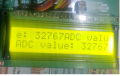
I've just added line sprintf( (char *) A_buffer,"ADC value: %d", ADC_Result );
C:
//
#define _XTAL_FREQ 20000000     // crystal 20MHz

// PIC18F45K80 Configuration Bit Settings
// CONFIG1L
#pragma config RETEN = ON       // VREG Sleep Enable bit (Ultra low-power regulator is Enabled (Controlled by SRETEN bit))
#pragma config INTOSCSEL = LOW  // LF-INTOSC Low-power Enable bit (LF-INTOSC in Low-power mode during Sleep)
// SOSCSEL = No Setting
#pragma config XINST = OFF      // Extended Instruction Set (Disabled)
// CONFIG1H
#pragma config FOSC = HS2       // HS oscillator (high power, 16 MHz-25 MHz
#pragma config PLLCFG = OFF     // PLL x4 Enable bit (Disabled)
#pragma config FCMEN = OFF      // Fail-Safe Clock Monitor (Disabled)
#pragma config IESO = OFF       // Internal External Oscillator Switch Over Mode (Disabled)
// CONFIG2L
#pragma config PWRTEN = ON      // Power Up Timer (Enabled)
#pragma config BOREN = OFF      // Brown Out Detect (Disabled in hardware, SBOREN disabled)
#pragma config BORV = 0         // Brown-out Reset Voltage bits (3.0V)
#pragma config BORPWR = LOW     // BORMV Power level (BORMV set to low power level)
// CONFIG2H
#pragma config WDTEN = OFF      // Watchdog Timer (WDT disabled in hardware; SWDTEN bit disabled)
#pragma config WDTPS = 1        // Watchdog Postscaler (1:1)
// CONFIG3H
#pragma config CANMX = PORTC    // ECAN Mux bit (ECAN TX and RX pins are located on RC6 and RC7, respectively)
#pragma config MSSPMSK = MSK5   // MSSP address masking (5 bit address masking mode)
#pragma config MCLRE = ON      // Master Clear Enable (MCLR Enabled, RE3 Disabled)
// CONFIG4L
#pragma config STVREN = OFF     // Stack Overflow Reset (Disabled)
#pragma config BBSIZ = BB1K     // Boot Block Size (1K word Boot Block size)
// CONFIG5L
#pragma config CP0 = ON         // Code Protect 00800-01FFF (Enabled)
#pragma config CP1 = ON         // Code Protect 02000-03FFF (Enabled)
#pragma config CP2 = ON         // Code Protect 04000-05FFF (Enabled)
#pragma config CP3 = ON         // Code Protect 06000-07FFF (Enabled)
// CONFIG5H
#pragma config CPB = ON         // Code Protect Boot (Enabled)
#pragma config CPD = ON         // Data EE Read Protect (Enabled)
// CONFIG6L
#pragma config WRT0 = ON        // Table Write Protect 00800-01FFF (Enabled)
#pragma config WRT1 = ON        // Table Write Protect 02000-03FFF (Enabled)
#pragma config WRT2 = ON        // Table Write Protect 04000-05FFF (Enabled)
#pragma config WRT3 = ON        // Table Write Protect 06000-07FFF (Enabled)
// CONFIG6H
#pragma config WRTC = ON        // Config. Write Protect (Enabled)
#pragma config WRTB = ON        // Table Write Protect Boot (Enabled)
#pragma config WRTD = ON        // Data EE Write Protect (Enabled)
// CONFIG7L
#pragma config EBTR0 = ON       // Table Read Protect 00800-01FFF (Enabled)
#pragma config EBTR1 = ON       // Table Read Protect 02000-03FFF (Enabled)
#pragma config EBTR2 = ON       // Table Read Protect 04000-05FFF (Enabled)
#pragma config EBTR3 = ON       // Table Read Protect 06000-07FFF (Enabled)
// CONFIG7H
#pragma config EBTRB = ON       // Table Read Protect Boot (Enabled)
// #pragma config statements should precede project file includes.
// Use project enums instead of #define for ON and OFF.

#pragma warning disable 520

#include <xc.h>
#include <stdio.h>
#include <conio.h>

unsigned char Result1;
unsigned char Result2;
volatile unsigned char Result3;
unsigned char Result4;

// The code should set the R/W bit according to its function
#define SLAVE_ADDRESS        0x90         //I2C slave address of ADS1115 (8 bit format)
#define Word_Address         0x01         // Points to Config register


#define LCD_RS              LATBbits.LATB4
#define LCD_TRIS_RS         TRISBbits.TRISB4
#define LCD_RW              LATBbits.LATB5
#define LCD_TRIS_RW         TRISBbits.TRISB5
#define LCD_E               LATBbits.LATB6
#define LCD_TRIS_E          TRISBbits.TRISB6

#define  LCDPORT            LATD
#define  LCDTRISD           LATD

void Port_Initialized (void);
void WriteNibble(unsigned char command);
void WaitLCDBusy(void);
void WriteCommand(unsigned char command);

void Port_Initialized (void)
{
// LATx registers
    LATA =  0x00;
    LATB =  0x00;
    LATC =  0x00;
    LATD =  0x00;
    LATE =  0x00;

//  TRISx registers
    TRISA = 0x00;      // All are output, Unused
    TRISB = 0x00;      // all are output, Unused
    TRISC = 0x18;      // Slave SDA and CLOCK
    TRISD = 0x00;      // LCD
    TRISE = 0x00;      // All are output, Unused

    ANCON0 = 0x00;     // set to digital port
    ANCON1 = 0x00;     // Set to digital port
    CM1CON = 0x00;     // Comparator off
    CM2CON = 0x00;     // Comparator off
    ADCON0 = 0x00;     // A/D conversion Disabled
    ADCON1 = 0x00;     // A/D conversion Disabled
    ADCON2 = 0x00;     // A/D conversion Disabled
}

// Wait for 5 ms
void WaitLCDBusy(void)
{
    __delay_ms(5);
}

//Send a command to the LCD
void WriteCommand(unsigned char command)
{
    WaitLCDBusy();                               //wait until not busy
    LCD_RS = 0;                                  //setup to send command
    WriteNibble(command);                        //write the high nibble
    WriteNibble( (unsigned char)(command<<4) );  //then the low nibble
}

//Initialized  LCD
void LCD_Initialized()
{
    LCDTRISD &=0x0f;                //ensure data bits are output
    LCD_E=0;                        //clear enable
    LCD_RS = 0;                     //going to write command
    LCD_TRIS_E=0;                   //Set enable to output
    LCD_TRIS_RS=0;                  //set RS to output
    LCD_TRIS_RW=0;
    LCD_RW=0;
    __delay_ms(30);                 //delay for LCD to initialize.
    WriteNibble(0x30);              //Required for initialization
    __delay_ms(5);                  //required delay
    WriteNibble(0x30);              //Required for initialization
    __delay_ms(1);                  //required delay
    WriteCommand(0x20);             //set to 4 bit interface
    WriteCommand(0x2c);             //set to 4 bit interface, 2 line and 5*10 font
    WriteCommand(0x06);             //move cursor right after write
    WriteCommand(0x0C);             //turn on display
    WriteCommand(0x01);             //clear display
}

//Send a character to the LCD
void WriteChar(unsigned char chr)
{
    WaitLCDBusy();                         //wait until not busy
    LCD_RS=1;                              //Setup to send character
    WriteNibble(chr);                      //write the high nibble
    WriteNibble( (unsigned char)(chr<<4)); //then the low nibble
}

//Send any 4 bits to the LCD
void WriteNibble(unsigned char command)
{
    LCDPORT &= 0x0f;                        //clear the data bits
    LCDPORT|=((command & 0xf0));            //or in the new data
    LCD_E = 1;                              //enable the LCD interface
    NOP();                                  // delay of 1uS
    NOP();
    NOP();
    LCD_E = 0;                              //disable it
}

void LCD_Data( unsigned char *string)
{
    while (*string != '\0')
    {
      WriteChar(*string);
        string++;
    }
}

//Initialize I2C in master mode
void I2C_Initialized(void)
{
    SSPSTAT=0x80; //Slew rate control is disabled for Standard Speed mode (100 kHz and 1 MHz)
    SSPCON1=0x28; // I2C Master mode, clock = FOSC/(4 * (SSPADD + 1))
    SSPCON2=0x00;
    SSPADD = 49;
    //100kHz clock @ 20MHz Fosc SSPADD = ( (Fosc/4) / BiteRate )-1
   // SSPADD = ( 20MHz / 100KHz ) - 1 = 49
}

// Send an I2C START
// Return 0 if all ok, 1 if bus collision
__bit I2C_Start(void)
{
    BCLIF = 0;  //Clear 'Bus collision" flag
    SEN = 1;    //initiate a START cycle
    while (SEN);    //wait until it has been sent
    return BCLIF;   //return value of BCLIF flag
}
// Send an I2C STOP
void I2C_Stop(void)
{
    PEN = 1;    //initiate a STOP cycle
    while (PEN);    //wait until it has been sent
}

// Send an I2C REPEATED START
void I2C_Restart(void)
{
    RSEN = 1;    //initiate a REPEATED START cycle
    while (RSEN);    //wait until it has been sent
}

//Receive one byte. ackflag=0 to send ACK, or 1 to send NAK in reply
//Send one byte. Return 0 if ACK received, or 1 if NAK received
__bit I2C_Write(unsigned char dat)
{
    SSPBUF = dat;

    asm("nop");     // wait a little for R_W to be set

    while (R_W);    //wait until byte sent and ACK/NAK received
    return ACKSTAT;
}

unsigned char I2C_Read(unsigned char ackflag)
{
    RCEN = 1;   // initiate a RECEIVE cycle
    ACKDT =(__bit)ackflag;    //specify if we should send ACK or NAK after receiving
    while (RCEN);   //wait until RECEIVE has completed
    ACKEN = 1;  //initiate an ACK cycle
    while (ACKEN);  //wait until it has completed
    return SSPBUF;
}

//Send an array of data to an I2C device.
//Return 0 if all OK, 1 if bus error, 2 if slave address NAK, 3 if slave register NAK, 4 if slave data NAK
unsigned char Write_I2C_Device(unsigned char slave_address, unsigned char start_reg, unsigned char buflen, const unsigned char * bufptr)
{
    if (I2C_Start() )   //send a start, and check if it succeeded
        return 1;   //abort if bus collision
    //send the I2C slave address (force R/W bit low)
    if (I2C_Write(slave_address & 0xfe))
    {
        I2C_Stop(); //if address was NAKed, terminate the cycle
        return 2;   //and return error code
    }
    //send the device register index
    if (I2C_Write(start_reg))
    {
        I2C_Stop(); //if register was NAKed, terminate the cycle
        return 3;   //and return error code
    }
    //send the data. buflen might be zero!
    for (; buflen>0; --buflen)
    {
        if (I2C_Write(*bufptr++))
        {
            I2C_Stop(); //if register was NAKed, terminate the cycle
            return 4;   //and return error code
        }
    }
    I2C_Stop();
    return 0;   //no error
}

//Receive an array of data from an I2C device.
//Return 0 if all OK, 1 if bus error, 2 if slave address NAK, 3 if slave register NAK
unsigned char Read_I2C_Device(unsigned char slave_address, unsigned char start_reg, unsigned char buflen, unsigned char * bufptr)
{
    //do a dummy zero length write cycle to set the register address
    unsigned char retval = Write_I2C_Device(slave_address, start_reg, 0, 0);
    if (retval)
    {
        return retval;  //abort if there was an error
    }
    //now start the READ cycle
    if (I2C_Start() )   //send a start, and check if it succeeded
        return 1;   //abort if bus collision
    //send the I2C slave address (force the R/W bit high)
    if (I2C_Write(slave_address | 0x01))
    {
        I2C_Stop(); //if address was NAKed, terminate the cycle
        return 2;   //and return error code
    }
    //receive the data.
    for (; buflen>0; --buflen)
    {
        unsigned char ackflag = (buflen == 1);   //1 if this is the last byte to receive => send NAK

        *bufptr++ = I2C_Read(ackflag);
    }
    I2C_Stop();
    return 0;   //no error
}
const unsigned char ADS1115_data[] =
{
    0x84,  // MSB of the Config register to be written
    0x83,  // LSB of the Config register to be written
};

unsigned char rd_buf[2];
unsigned char A_buffer[20];

int ADC_Result;

void main(void)
{
     unsigned char i = 0;

     unsigned char Data1 [10]="Test";

     Port_Initialized ();
     LCD_Initialized();
     I2C_Initialized();

    // Write to Config register
     Result1 = Write_I2C_Device(SLAVE_ADDRESS , Word_Address , sizeof(ADS1115_data), ADS1115_data);
     __delay_ms(10);


    while(1)
    {
       Result3 = Read_I2C_Device(SLAVE_ADDRESS, 0x00 , 2, rd_buf) ;
       __delay_ms(10);
        asm("nop");

        if(Result3 == 0)  // if successful read..
        {
           ADC_Result = (rd_buf[0] << 8) + rd_buf[1];
           sprintf( (char *) A_buffer,"ADC value: %d", ADC_Result );
           LCD_Data(A_buffer);
        }

    }


}Actually i don't understand how to do it. Right now the problem is that the data is being displayed on both the lines.Whereas it should display on only one line. I changed the command 0x28 for 1 line display but it didn't workVery cool!!
Now, reset the LCD cursor by writing the command ‘Set DDRAM’ to 0 before each update so that the display text starts at the same place.
You need to leave the display at 2 lines.changed the command 0x28 for 1 line display but it didn't work
Also, be sure you are using the version of initialize that clears the display LAST and delays a couple of milliseconds to give the instruction time to execute.
To fix the formatting, consider what the display is doing:
- After init, the cursor is at the first character on the first line.
- Each time you write a character, the cursor moves to the next character.
- At the end of the first write, the cursor is at the next character after the string you just wrote. If you write the next string without resetting the cursor, the new string will appear after the first one - not what you want. You must reset the cursor to the beginning of the line if you want the new text to be in the same place as the old text.
- Reset the LCD cursor by writing the command ‘Set DDRAM’ to 0 before each update so that the display text starts at the same place.
- You don't have to clear the screen each time as you are just writing over the previous text with new text of the same length.
Thanks @JohnInTX Understood
- Reset the LCD cursor by writing the command ‘Set DDRAM’ to 0 before each update so that the display text starts at the same place
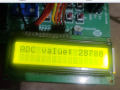
C:
  while(1)
    {
       Result3 = Read_I2C_Device(SLAVE_ADDRESS, 0x00 , 2, rd_buf) ;
       __delay_ms(10);
        asm("nop");

        if(Result3 == 0)  // if successful read..
        {

           ADC_Result = (rd_buf[0] << 8) + rd_buf[1];
           sprintf( (char *) A_buffer,"ADC value: %d", ADC_Result );

           WriteCommand(0x80); //// Move the cursor to beginning of first line.

           LCD_Data(A_buffer);

        }

}16 bits = 65,536 steps (0 to 65,535)
possible values range from −32,768 to 32,767.
How to convert adc value into voltage?
Last edited:
Hey! That looks good.
Volts = (ADC count / 2^N) * Vref.
The ADC is 16bit 2's complement. One bit is the sign and 15 bits are the value so N = 15 and 2^N = 32768. The converted ADC count is some fraction of 2^15 scaled to Vref.
EXAMPLE:
If Vref = 2.048V and the count is 3457, the input voltage is
(3457/32768) * 2.048 = 0.216V
Note that the voltage is measured between AINP and AINN.
Vref and which pins are the analog inputs are determined by how you have written the CONFIG register.
Note that your values for ADC count and ADC max count are signed integers. You might want to convert those to floats (floating point numbers) before doing the math to make it easier. That will make your sprintf format string a little different. There are ways of ordering the integer operations to avoid some of that but you have lots of memory so I'd do it with floats for now. The goal should be to get the conversion done to verify proper ADC operation. You can get fancy later.
A useful display would be to show the ADC counts on one line and the corresponding voltage on the second line.
Carry on!
See 9.5.4 Data Format in the datasheet.How to convert adc value into voltage?
Volts = (ADC count / 2^N) * Vref.
The ADC is 16bit 2's complement. One bit is the sign and 15 bits are the value so N = 15 and 2^N = 32768. The converted ADC count is some fraction of 2^15 scaled to Vref.
EXAMPLE:
If Vref = 2.048V and the count is 3457, the input voltage is
(3457/32768) * 2.048 = 0.216V
Note that the voltage is measured between AINP and AINN.
Vref and which pins are the analog inputs are determined by how you have written the CONFIG register.
Note that your values for ADC count and ADC max count are signed integers. You might want to convert those to floats (floating point numbers) before doing the math to make it easier. That will make your sprintf format string a little different. There are ways of ordering the integer operations to avoid some of that but you have lots of memory so I'd do it with floats for now. The goal should be to get the conversion done to verify proper ADC operation. You can get fancy later.
A useful display would be to show the ADC counts on one line and the corresponding voltage on the second line.
Carry on!
Last edited:
What's the warningEXAMPLE:
If Vref = 2.048V and the count is 3457, the input voltage is
(3457/32768) * 2.048 = 0.216V
Note that your values for ADC count and ADC max count are signed integers. You might want to convert those to floats (floating point numbers) before doing the math to make it easier. That will make your sprintf format string a little different.
Carry on!
main.c:333:45: warning: implicit conversion loses floating-point precision: 'double' to 'float' [-Wconversion]
Result_V = ((ADC_Result /32768) * 2.048);
~ ~~~~~~~~~~~~~~~~~~~~^~~~~~~
Code:
float ADC_Result;
float Result_V;

void main(void)
{
     unsigned char i = 0;

     unsigned char Data1 [10]="Test";

     Port_Initialized ();
     LCD_Initialized();
     I2C_Initialized();

    // Write to Config register
     Result1 = Write_I2C_Device(SLAVE_ADDRESS , Word_Address , sizeof(ADS1115_data), ADS1115_data);
     __delay_ms(10);


    while(1)
    {
       Result3 = Read_I2C_Device(SLAVE_ADDRESS, 0x00 , 2, rd_buf) ;
       __delay_ms(10);
        asm("nop");

        if(Result3 == 0)  // if successful read..
        {

           ADC_Result = (rd_buf[0] << 8) + rd_buf[1];
           Result_V =  ((ADC_Result /32768) * 2.048);
           sprintf( (char *) A_buffer,"ADC value: %4.f", Result_V );

           WriteCommand(0x80); //// Move the cursor to beginning of first line.

           LCD_Data(A_buffer);

        }


    }


}
Last edited: