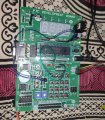
PIC Development Board with PK3

Thread Starter

Djsarakar

Joined Jul 26, 2020
489
Do you have a resistor between the LED and PORT?
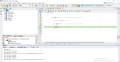
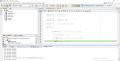
I see RD7 == 1 in your screen shot which should turn the LED on.
RD7 -----.> Resistor ----- LED ----GND
Pull Up resistor connection
C:
#define _XTAL_FREQ 8000000

#include <xc.h>

// PIC18F45K80 Configuration Bit Settings

// 'C' source line config statements

// CONFIG1L
#pragma config RETEN = OFF      // VREG Sleep Enable bit (Ultra low-power regulator is Disabled (Controlled by REGSLP bit))
#pragma config INTOSCSEL = HIGH // LF-INTOSC Low-power Enable bit (LF-INTOSC in High-power mode during Sleep)
#pragma config SOSCSEL = HIGH   // SOSC Power Selection and mode Configuration bits (High Power SOSC circuit selected)
#pragma config XINST = OFF       // Extended Instruction Set (Enabled)

// CONFIG1H
#pragma config FOSC = INTIO2    // Oscillator (Internal RC oscillator)
#pragma config PLLCFG = OFF     // PLL x4 Enable bit (Disabled)
#pragma config FCMEN = OFF      // Fail-Safe Clock Monitor (Disabled)
#pragma config IESO = OFF       // Internal External Oscillator Switch Over Mode (Disabled)

// CONFIG2L
#pragma config PWRTEN = OFF     // Power Up Timer (Disabled)
#pragma config BOREN = SBORDIS  // Brown Out Detect (Enabled in hardware, SBOREN disabled)
#pragma config BORV = 3         // Brown-out Reset Voltage bits (1.8V)
#pragma config BORPWR = ZPBORMV // BORMV Power level (ZPBORMV instead of BORMV is selected)

// CONFIG2H
#pragma config WDTEN = OFF      // Watchdog Timer (WDT disabled in hardware; SWDTEN bit disabled)
#pragma config WDTPS = 1048576  // Watchdog Postscaler (1:1048576)

// CONFIG3H
#pragma config CANMX = PORTB    // ECAN Mux bit (ECAN TX and RX pins are located on RB2 and RB3, respectively)
#pragma config MSSPMSK = MSK7   // MSSP address masking (7 Bit address masking mode)
#pragma config MCLRE = ON       // Master Clear Enable (MCLR Enabled, RE3 Disabled)

// CONFIG4L
#pragma config STVREN = ON      // Stack Overflow Reset (Enabled)
#pragma config BBSIZ = BB2K     // Boot Block Size (2K word Boot Block size)

// CONFIG5L
#pragma config CP0 = OFF        // Code Protect 00800-01FFF (Disabled)
#pragma config CP1 = OFF        // Code Protect 02000-03FFF (Disabled)
#pragma config CP2 = OFF        // Code Protect 04000-05FFF (Disabled)
#pragma config CP3 = OFF        // Code Protect 06000-07FFF (Disabled)

// CONFIG5H
#pragma config CPB = OFF        // Code Protect Boot (Disabled)
#pragma config CPD = OFF        // Data EE Read Protect (Disabled)

// CONFIG6L
#pragma config WRT0 = OFF       // Table Write Protect 00800-01FFF (Disabled)
#pragma config WRT1 = OFF       // Table Write Protect 02000-03FFF (Disabled)
#pragma config WRT2 = OFF       // Table Write Protect 04000-05FFF (Disabled)
#pragma config WRT3 = OFF       // Table Write Protect 06000-07FFF (Disabled)

// CONFIG6H
#pragma config WRTC = OFF       // Config. Write Protect (Disabled)
#pragma config WRTB = OFF       // Table Write Protect Boot (Disabled)
#pragma config WRTD = OFF       // Data EE Write Protect (Disabled)

// CONFIG7L
#pragma config EBTR0 = OFF      // Table Read Protect 00800-01FFF (Disabled)
#pragma config EBTR1 = OFF      // Table Read Protect 02000-03FFF (Disabled)
#pragma config EBTR2 = OFF      // Table Read Protect 04000-05FFF (Disabled)
#pragma config EBTR3 = OFF      // Table Read Protect 06000-07FFF (Disabled)

// CONFIG7H
#pragma config EBTRB = OFF      // Table Read Protect Boot (Disabled)


void main(void)
{

    LATA =  0;
    LATB =  0;
    LATC =  0;
    LATD =  0;
    LATE =  0;

    TRISA = 0b0000001;// RA0 as input,  Switch connected
    TRISB = 0b0000000;// all are output, Unused
    TRISC = 0b0000000;// All are output, Unused
    TRISD = 0b0000000;//  All are output, RD7 LED connected
    TRISE = 0b0000000;// All are output, Unused
   
    ANCON0 = 0; // digital port
    ANCON1 = 0; // digital port

    CM1CON = 0; // Comparator off
    CM2CON = 0; // Comparator off

    ADCON0 = 0; // A/D conversion Disabled

    while (1)
    {

           if (RA0 == 0)   // check switch if pressed
           {
             __delay_ms(40); // wait
           
             if (RA0 == 0)   // check switch if pressed
             {
               LATD7 = 1;   // LED ON
             }
           }
    }
}
 

Attachments

JohnInTX

Joined Jun 26, 2012
4,787
RD7 -----.> Resistor ----- LED ----GND
Pull Up resistor connection
That is a SERIES connection, not a pull up. Series is what you want. But I don't see ANY wires.
Why not use a resistor between the port pin and one of the LEDs on your development board??
You have buttons on that board too.
 

hexreader

Joined Apr 16, 2011
619
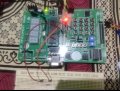
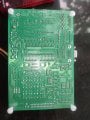
In post #1 you attached a nice clear picture of your board.

I am 90% confident that your board has a 5-pin resistor pack near to the LEDs, even though the schematic shows no resistors to LEDs

Would you be able to post an equally good photograph of the reverse side of the board?

If I can see the traces for the LEDs, then I can probably work out whether there are resistors for the LEDs - or not.

It would be just plain silly to have no resistors, but that is a very cheap board, so anything is possible.

Can you read what is written on the long black component that sits between the lettering for L1 and L2?

Life will be so much simpler if you use the on-board switches and LEDs. And JohnInTx might not need to groan as much.
 

hexreader

Joined Apr 16, 2011
619
I don't see an uncommitted resistor pack.
Schematic shows only one resistor pack RP1 - I suspect that the schematic lies
Board has two 5-pin resistor packs, but hard to be certain what the second one does

Keep using your breadboard resistor until you can post a picture of the board underside

 

JohnInTX

Joined Jun 26, 2012
4,787
Schematic shows only one resistor pack RP1 - I suspect that the schematic lies
Board has two 5-pin resistor packs, but hard to be certain what the second one does

Keep using your breadboard resistor until you can post a picture of the board underside
Good eyes!
 

JohnInTX

Joined Jun 26, 2012
4,787
Yes, I am now 99% sure that your board has series resistors for LEDs

Wire straight to the LED connector - no need for the breadboard resistor any more
Agreed. The common pin goes to the GND section of the triple header array so drive the LED = 1 to turn it on.
Nice catch, hex.
 

Thread Starter

Djsarakar

Joined Jul 26, 2020
489
What the use of five pins 5v and five pins gnd near the CN9

Now Only two wires connected, one for led and other for button

Initially led is off When I press button LED is turning ON
 

Attachments

JohnInTX

Joined Jun 26, 2012
4,787
Top