Odd Question for an Odd Problem: Making an Old Scoreboard into a Clock

Jon Chandler

Joined Jun 12, 2008
1,608
Looking good! That's being driven with the driver board?

Looks like it's time to connect to one digit on the scoreboard (one step at a time....). It should look awesome!

I2C devices can be a big pain in the backside to get figured out. Some of them must be turned on when they're powered up before they'll do anything, and there can be many registers to set up, but once you've got it figured out, it's pretty simple.
 

Thread Starter

r8f1k

Joined Oct 1, 2023
164
That is just running the chip expander. Once we get back after the new year, we are gonna run the whole scoreboard.
 

Jon Chandler

Joined Jun 12, 2008
1,608
Arrgghh. I don't know if this is part of your problem - the I2C addresses I showed on the silk screen aren't correct. My apologies.

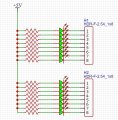
Here is the addressing per the datasheet.

View attachment 310009


View attachment 310008
1. Board addressing is shown here. When the DIP switch is OFF, the bit is equal to 1. When the DIP switch is ON, the bit is equal to 0. Counterintuitive, yes, because the switch connects the bit to ground.

2. Are there pullup resistors on SDA and SCL? 4.7K in exactly one location OR internal pullups on the Arduino. The former is preferred.

3. Did you find an I2C scanner program as I recommended? Using a scanner program will instantly verify connections.

In post #one hundred and ninty, I attached a zip file with a complete schematic. I'm certain I explained about the solder jumpers for the "ones digit". Two lines in the RJ45 cable to Arduino active the ones digit, one for the left score position and one for the right score position. The appropriate solder jumper (left or right) should only be jumped on a total of two digit boards, those adjacent to a ones digit.

SmartSelect_20240109_203238_X-plore.jpg


Sorry, I can't watch your video in detail at the moment.
 

Jon Chandler

Joined Jun 12, 2008
1,608
The problem here is that you're not doing things in small steps. You don't know if you're communicating with the MCP23017 chip on the digit driver board, if you're able to control the outputs or you have the connections mixed up. The problem could be any of those things or even something else. And since you don't know, there's not much I can do with my crystal ball in the shop.

So I suggest the following.

1. Disconnect the digit board from the scoreboard entirely and connect it directly to the Arduino. 4.7k pullup resistors are required on SCL and SDA (connected between SCL and +5v, and another connected between SDA and +5v). You must have +5V, ground, SDA and SCL connected between Arduino and the digit driver board.

2. Find an IC2 scanner program in the Arduino libraries or in a tutorial. Run it and it will return the address if it can talk to the MCP23017. If not, there's a connection problem, a faulty MCP23017 or an error on the board.

3. Connect 16 LEDs and resistors to the output lines as shown and to the 5v Arduino supply. The 5mm LEDs you were testing with and 330 ohm – 1k ohm resistors will be fine (not critical). Verify that each LED functions when controlled by the MCP23017.

scoreboard led test.jpg

4. If the above is successful, make the scoreboard connections and the digits should light up. +12v and +5v will need to be connected, and if separate power supplies are used, the commons must be connected together.

Step at a time, verifying as you go. It may take a little longer but if you don't have all the pieces working and verified, you end up lost.


scoreboard led test.jpg
 
Last edited:

Thread Starter

r8f1k

Joined Oct 1, 2023
164
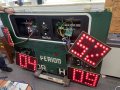
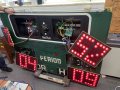
Ok, so we have made large strides recently with Jon’s help and driver boards. We ran into an issue with the brightness of the bulbs, but that was remedied with an upsizing of the main wires. Once that was sorted, we were able to run a program and illuminate all of the lights. Then, we used the time chip and began running a clock and date sequence. Now, she works!!!!! We will still need to sort out the AM/PM and Solstice/Equinox lights, but it is coming together!!!!! We do have one thing that my students are wondering if we can eliminate. Every minute that displays, makes all the illuminated lights, flash once when a new minute begins. Any thoughts?
 

Attachments

Thread Starter

r8f1k

Joined Oct 1, 2023
164
View attachment 319581Ok, so we have made large strides recently with Jon’s help and driver boards. We ran into an issue with the brightness of the bulbs, but that was remedied with an upsizing of the main wires. Once that was sorted, we were able to run a program and illuminate all of the lights. Then, we used the time chip and began running a clock and date sequence. Now, she works!!!!! We will still need to sort out the AM/PM and Solstice/Equinox lights, but it is coming together!!!!! We do have one thing that my students are wondering if we can eliminate. Every minute that displays, makes all the illuminated lights, flash once when a new minute begins. Any thoughts? Above is todays date and the time of 2:52.
 

Jon Chandler

Joined Jun 12, 2008
1,608
Every minute that displays, makes all the illuminated lights, flash once when a new minute begins. Any thoughts?
Describe exactly what you mean by "flash once".

I guess tens and hours change with minutes so that's not a test. I suspect a software error that zeros all the ports before updating to the new values.


The digits look great!
 

Thread Starter

r8f1k

Joined Oct 1, 2023
164
Describe exactly what you mean by "flash once".

I guess tens and hours change with minutes so that's not a test. I suspect a software error that zeros all the ports before updating to the new values.


The digits look great!
Here is the best way I can describe it. Let’s say the time is 2:54. As soon as it changes to 2:55, all of the digits flash very quickly and the time changes. That’s it.

My students did say that the issue could be the result of an update every time a minute changes, just as you pinpointed! They are not sure how it ended up that way, but we will keep at it!!!
 

MisterBill2

Joined Jan 23, 2018
27,651
The momentary "All lights on" flash is caused by an intermediate condition between the previous display and the next display. UNfortunately I am not familiar with the architecture of the system, so my comments are based on guesses. If all of the data is uploaded into a storage register that directly controls the individual digits, then a momentary disconnection may be resulting in the all-on state.
In any case, one solution will be to latch the data into a "next data" latch, and then once that data is stable, latch it into the display driving latch without any reset condition in between.
It might also be that there is a momentary data reset between one display and the next display.
Those suggestions are based on previous experiences and might not relate, or they might not.
 
Last edited:

MisterBill2

Joined Jan 23, 2018
27,651
OK, then, if the architecture is quite different, which is reasonable, then a detailed examination of that architecture, and it's operation, is in order.
Based on the symptom of everything on for some short time, the guess is that for some interval the data is not available. Discovering that interval will require an analysis of the functions of the port expander that I am not familiar with.
 

Jon Chandler

Joined Jun 12, 2008
1,608
I'm going to make this picture bigger, to be sure it's been seen. Surely those people who made so many posts arguing that the approach we took would never work, so many doomsday "RIP AND REGRET" comments, comments about their way is the far superior way to do it, should have some comments now.

The digits are bright and beautiful and have the same look as the original. Getting things working has been a bumpy journey, with students doing the coding, but it all works exactly as planned, with excellent results. Long distance troubleshooting has been a bit of a challenge, but the progress has been great.

IMG_8923.jpeg
 

BobTPH

Joined Jun 5, 2013
11,554
I'm going to make this picture bigger, to be sure it's been seen. Surely those people who made so many posts arguing that the approach we took would never work, so many doomsday "RIP AND REGRET" comments, comments about their way is the far superior way to do it, should have some comments now.
I trust you are not referring to me. I did favor a simpler approach, but I did not say any of the things you mention here. If fact, I said your design was excellent as an industrial quality solution. (post #221)

I am happy he did finally get it working. And I did predict it would take a while.
 

Thread Starter

r8f1k

Joined Oct 1, 2023
164
I’d like to thank all those who have helped with this project, especially Jon who designed the driver boards and who assisted behind the scenes on many occasions. Attached are some photos of the finished product. It was a long road, but my students and I learned a lot.
 
Top