NOR Gate S-R Latch help

Thread Starter

JacobEdward

Joined Apr 29, 2015
23
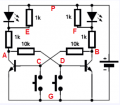
Well I build it on the breadboard in 2001, and YES this circuit work as expected.
As for the 10K resistor. You can use larger resistor values up to 100K.
What type of a transistor you've used ? Also modern LED are very "current sensitive" devices. They can light quite bright, even if the current is lower than 1mA. So in order to rule out this case please add resistors (1kΩ....10kΩ) in parallel with the LED.
And I try to build this circuit tomorrow
View attachment 93223

EDIT
I decided to build this circuit now, and here you have a results.
I use 2xBC337 and 2x10kΩ and 4x1kΩ

Thanks for the tip! Will definitely try this later today.
 

Thread Starter

JacobEdward

Joined Apr 29, 2015
23
I can't see any wiring mistakes, though I don't see all the wires clearly.

Could you have the switches wired for "normally closed?" I ask because the LED's light when you press the left switch.

Have you verified the potentiometers are in fact set to 10K?
No, the push buttons are normally open (there is a capacitor in there to help with double pressing issues, though the capacitor shouldn't be providing a path). I have verified the potentiometers are 10k, but I'll be doing another test today, bringing them up to 50k, I'll be sure to show their resistance values on the video.
 

Jony130

Joined Feb 17, 2009
5,598
Debouncing is not needed here, the positive feedback built-in into the circuit will solve the problem. Sometimes we can add a small capacitor in parallel with the switch to set "initial condition" at startup (you can decide which diode will be ON ).
 

dl324

Joined Mar 30, 2015
18,333
I have verified the potentiometers are 10k, but I'll be doing another test today, bringing them up to 50k, I'll be sure to show their resistance values on the video.
What is your supply voltage and what transistors are you using? If the beta of the transistors isn't high enough, increasing the 10K resistors to 50K may provide insufficient current to saturate the transistor. Vce needs to be low enough to turn the other transistor off.
 

Thread Starter

JacobEdward

Joined Apr 29, 2015
23
I have updates, I've made the circuit very aesthetically pleasing, just for you to verify visually that it is indeed wired correctly (2:20 in the video gives a very clear view). Improvements from the last attempt are with the parallel resistor, I've shown the difference in the video.


First measurement:
Shows the resistance value of one of the 4 resistors (they're all the same), 1 kiloOhm

Second/Third measurement:
Shows the resistance value of the two potentiometers in kiloOhms

Fourth measurement A:
Initially shows the 6.4 Volts coming from the source

Fourth measurement B:
While pressing the right push button (lighting the right LED), there is 3.5 V across the right potentiometer

Fourth measurement C:
While pressing the left push button (lighting the left LED), there is 1.7~1.8 volts across the right potentiometer

Fifth measurement A:
Again showing the initial 6.4 Volts from the source

Fifth measurement B:
While holding down the left push button (lighting the left LED), there is a measured 3.5 Volts across the left potentiometer

Fifth measurement C:
While holding down the right push button (lighting the right LED), there is 1.7~1.8 volts across the left potentiometer

Finally, I show what happens when the two parallel resistors are removed from the circuit.

Intended functionality:
While pressing one push button, it's corresponding LED should go high and remain high until the opposite pushbutton is pressed, pushing it's corresponding LED high and remaining high, etc.

Following this circuit:
http://forum.allaboutcircuits.com/attachments/2015-10-5_17-10-34-png.93223/

Modification with a 20K value instead of a 10K value, I've tested with both and am getting similar results... I have yet to empirically verify through discrete components the phenomenon of hysteresis used in latch/memory circuits. Anybody in the audience with some insight is welcome to comment, thanks!
 

WBahn

Joined Mar 31, 2012
32,874
I'm not interested in watching a video and counting measurements to figure out what you have and have not measured. Make it easy for people to help you, especially when you are asking for free help!

QFF.png
Make the following table:

Condition|A|B|C|D|E|F|P
Left Down|||||||
None Down|||||||
Right Down|||||||
None Down|||||||
Both Down|||||||

Measure all voltage relative to Node G (the negative battery terminal).

Measuring Nodes E, F, and P are not as important, but would be nice to have for completeness.
 

Thread Starter

JacobEdward

Joined Apr 29, 2015
23
I'm not interested in watching a video and counting measurements to figure out what you have and have not measured. Make it easy for people to help you, especially when you are asking for free help!

View attachment 93258
Make the following table:

Condition|A|B|C|D|E|F|P
Left Down|||||||
None Down|||||||
Right Down|||||||
None Down|||||||
Both Down|||||||

Measure all voltage relative to Node G (the negative battery terminal).

Measuring Nodes E, F, and P are not as important, but would be nice to have for completeness.

Here you go:

https://docs.google.com/spreadsheets/d/1DcaYGI6uv2D7Ev5n0HhXTay_0vSv8Ik-UYW6mU2ohGg/edit?usp=sharing

Screenshot 2015-10-20 at 6.17.53 PM.png
 

WBahn

Joined Mar 31, 2012
32,874
You didn't follow the sequence I requested.

First, hold the left button down and take the data.

Then release the left button and take the data.

Then hold the right button down and take the data.

Then release the right button and take the data.

Finally, hold both buttons down and take the data.

This is a state machine which means that its present behavior depends on its history. So you need to take the data following a well defined sequence of steps so that we know what the history was when trying to determine if the present behavior is correct.
 

Thread Starter

JacobEdward

Joined Apr 29, 2015
23
You didn't follow the sequence I requested.

First, hold the left button down and take the data.

Then release the left button and take the data.

Then hold the right button down and take the data.

Then release the right button and take the data.

Finally, hold both buttons down and take the data.

This is a state machine which means that its present behavior depends on its history. So you need to take the data following a well defined sequence of steps so that we know what the history was when trying to determine if the present behavior is correct.

Thanks! Sorry for the confusion, stay tuned
 

Thread Starter

JacobEdward

Joined Apr 29, 2015
23
You didn't follow the sequence I requested.

First, hold the left button down and take the data.

Then release the left button and take the data.

Then hold the right button down and take the data.

Then release the right button and take the data.

Finally, hold both buttons down and take the data.

This is a state machine which means that its present behavior depends on its history. So you need to take the data following a well defined sequence of steps so that we know what the history was when trying to determine if the present behavior is correct.
Alright, here you go:

https://docs.google.com/spreadsheets/d/1DcaYGI6uv2D7Ev5n0HhXTay_0vSv8Ik-UYW6mU2ohGg/edit?usp=sharing

Screenshot 2015-10-20 at 6.40.31 PM.png
 

WBahn

Joined Mar 31, 2012
32,874
Your notes C and D (the bases of the transistors) should never get much above about 0.7 V, so you have either a wiring error or defective components.

Make absolutely sure that you have properly identified the base, collector, and emitter pins on your two transistors. Also make sure that they are actually NPN transistors and not PNP transistors.
 

Thread Starter

JacobEdward

Joined Apr 29, 2015
23
Your notes C and D (the bases of the transistors) should never get much above about 0.7 V, so you have either a wiring error or defective components.

Make absolutely sure that you have properly identified the base, collector, and emitter pins on your two transistors. Also make sure that they are actually NPN transistors and not PNP transistors.
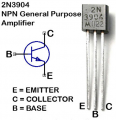
This is the specific BJT I'm using:

https://www.sparkfun.com/datasheets/Components/2N3904.pdf

and if you go to 2:20 of the last video I made, you can see the circuit for yourself (I've made it aesthetically simple to scan). Just as a sanity check I swapped the directions of the BJT's and when I hold down the left or right pushbuttons, both LED's turn on, but I doubled checked the datasheet just in case and they are oriented correctly.
 

absf

Joined Dec 29, 2010
1,968
I think you have the collector and emitter connected backwards.

On the 2n3094 the C is on the right while E on the left and if you use a BC337 then C is on the left while E is on the right.

Allen
 

Thread Starter

JacobEdward

Joined Apr 29, 2015
23
I think you have the collector and emitter connected backwards.

On the 2n3094 the C is on the right while E on the left and if you use a BC337 then C is on the left while E is on the right.

Allen
Just as a sanity check I swapped the directions of the BJT's and when I hold down the left or right pushbuttons, both LED's turn on, but I doubled checked the datasheet just in case and they are oriented correctly.
 

Brownout

Joined Jan 10, 2012
2,390
Well, I can't see the problem. The voltages you're reporting are totally off. Here is what I suggest. Take out the left transistor, 1k resistors, LED and switch and the right 10K resistor. Now you should be left with a simple inverter with the right hand transistor, 10k resistor to base, and 1k resistor/LED in the collector circuit. Now operate the remaining switch. What you should see is the LED light when the switch IS NOT pressed, and extinguish, when the switch IS pressed. If you cannot get this to work, you'll never get your larger circuit to work.

Now, you have a much simpler circuit to work with and debug. Let us know what the base and collector voltages are with the switch pressed and not pressed. Also, please see if you can find something to replace the variable resistors, just so we can see the circuit connections more clearly. They don't need to be exactly 10k, as state before, they can be 10k-50k. But try to find something in the 10k-20k range.

PS: I still can't get over thinking y0u are using PNP (ie 3906) transistors instead of the shown NPN (3904) transistors. I say this because they seem to turn on when the should be turned off, and visa-versa.
 

Jony130

Joined Feb 17, 2009
5,598
BJT pin-out

pinout.png


So we clearly see that in your vid transistor are wrongly connected
And try to measure all the voltage with respect to ground. Connect your black probe to negative terminal of your supply and use the red probe to measure all the voltages.
 

dl324

Joined Mar 30, 2015
18,333
when I hold down the left or right pushbuttons, both LED's turn on
Are both LEDs the same brightness? Without the 1K resistors in parallel with the LEDs, the small current biasing the ON transistor will dimly light the LED that's supposed to be off.
 

Thread Starter

JacobEdward

Joined Apr 29, 2015
23
BJT pin-out

View attachment 93281


So we clearly see that in your vid transistor are wrongly connected
And try to measure all the voltage with respect to ground. Connect your black probe to negative terminal of your supply and use the red probe to measure all the voltages.
You're absolutely right, as it turns out, I was using mosfets, not BJT's (I didn't realize they were mosfets from the original NOR Gate SR Latch)... but I've replaced them with the proper 2N3904's this time... sorry for the confusion.

Here's the proper measurements:

Screenshot 2015-10-21 at 1.53.24 PM.png


dl324

Joined Mar 30, 2015
18,333
The values for nodes C and D don't make sense. They should either be around 0.7V or 0V.

I assume the circuit still isn't working. I haven't and won't watch your videos. I'm retired and have a lot of discretionary time, but I won't waste it watching videos.

There are only 2 transistors; if you understand how it works, it shouldn't take more than a few minutes to wire or troubleshoot.
 
Top