Maybe I am missing something, but this seems trivial to me.
Two buttons, in parallel, activate a single DPST or DPDT relay (from a low voltage source.) The NO contacts of the two poles are wired in place of the two original buttons.
The challenge is in the mechanization of the solution. Based on the description in post #1, the new wireless doorbell button is on an integrated assembly that is not possible to gain access to. It is similar to a "RING" brand of doorbell button device that can not be opened at all. The link to the sounder portion of the system is via a wireless WIFI connection. What is unclear is how the TS was able to measure the open circuit voltage across the push button contacts in the button assembly. So information about that is needed.
Now that I realize hat, it is clear that any sensing of the new device operation will need to be at the receiver end of the connection. But even that is unknown, because no information about the receiver section is known.
The challenge is in the mechanization of the solution. Based on the description in post #1, the new wireless doorbell button is on an integrated assembly that is not possible to gain access to. It is similar to a "RING" brand of doorbell button device that can not be opened at all. The link to the sounder portion of the system is via a wireless WIFI connection. What is unclear is how the TS was able to measure the open circuit voltage across the push button contacts in the button assembly. So information about that is needed.
Now that I realize hat, it is clear that any sensing of the new device operation will need to be at the receiver end of the connection. But even that is unknown, because no information about the receiver section is known.
I only could take out two wires from the momentary push button of that bell. Basically, I have extended that button and if I short those two wires together, the video doorbell rings.
OK, it seems that I did miss that part. Evidently it is a bit different from the "RING"device that I installed for a client. If there is already a voltage across the button contacts, then it is already in a circuit that is probably both a fairly high impedance and also rather noise sensitive. That means no long wires connecting it to an external module.
There is a scheme that will work and provide an isolated photo-transistor output, BUT it will require an adjustable isolated DC power source that can deliver enough current to light an LED. The LED will be used with a photo-transistor to make an isolater. The LED will be in series with the supply, which will be adjusted to provide the same voltage as is across the contacts of the PB. Then the supply/LED will be connected across the contacts, and with the voltage being the same, no current will flow. When the button is pressed the LED will lite, switching on the photo transistor.
There is a scheme that will work and provide an isolated photo-transistor output, BUT it will require an adjustable isolated DC power source that can deliver enough current to light an LED. The LED will be used with a photo-transistor to make an isolater. The LED will be in series with the supply, which will be adjusted to provide the same voltage as is across the contacts of the PB. Then the supply/LED will be connected across the contacts, and with the voltage being the same, no current will flow. When the button is pressed the LED will lite, switching on the photo transistor.
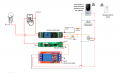
This is interesting. Could you please send me a diagram/ design so that I can understand the circuit? And most probably I can build and test it. Is it similar to the diagram shared in post #21 above by "Panic Mode"?
Is there a reason you don’t like my simpler solution that is guaranteed to work? No need for any electronic components or boards, just straightforward wiring to a simple relay.
The possible problem mentioned by MrBill can be eliminated by placing the relay close to the video doorbell. You already know that an external switch wired to the wires you pulled out will activate it. So will a relay, if it is close enough to it. It might be prone to false triggering if too far away, but that is just speculation and can be tested. And that is not an issue fir the conventional doorbell, since the relay is switching power, not a low level signal.
Is there a reason you don’t like my simpler solution that is guaranteed to work? No need for any electronic components or boards, just straightforward wiring to a simple relay.
The possible problem mentioned by MrBill can be eliminated by placing the relay close to the video doorbell. You already know that an external switch wired to the wires you pulled out will activate it. So will a relay, if it is close enough to it. It might be prone to false triggering if too far away, but that is just speculation and can be tested. And that is not an issue fir the conventional doorbell, since the relay is switching power, not a low level signal.
No. It’s perfectly good and I considered your solution as well. But the issue I’m having is that it’s not possible to hide the press button of the video doorbell and a visitor can press either of buttons. Yes I know it’s little weird but that is how I have to fix my new video doorbell.
I thought I would be able to activate the Wi-Fi switch automatically when the button is pressed at the video doorbell by adding the Wi-Fi switch and the doorbell into a group in the Tuya app. But finally I found that smart doorbells do not have that functionality and they cannot be coupled with anything other than Wi-Fi chimes.
No. It’s perfectly good and I considered your solution as well. But the issue I’m having is that it’s not possible to hide the press button of the video doorbell and a visitor can press either of buttons. Yes I know it’s little weird but that is how I have to fix my new video doorbell.
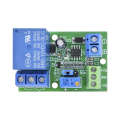
I found a voltage comparator module in AlliExpress. (Attached a photo). Could you please see whether it’s similar to your diagram ?
Link to the item: https://a.aliexpress.com/_mMH13QI
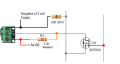
Working with what you show in post #1 I'm adding a FET to the smart button as shown in this diagram.
This should work if the negative side of the smart button can also connect to the grounds of the 3 and 5 volt supplies without causing a problem for the smart button.
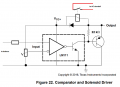
This would work, but an LM311 will cost less than half as much and be much more available. So unless you need the whole military temperature range, the LM311 is an adequate choice.
But what was so complicated about a very simple series circuit: power source, LED, and photo-transistor?
This should work if the negative side of the smart button can also connect to the grounds of the 3 and 5 volt supplies without causing a problem for the smart button.
That means I have to connect the negative voltage wire from the push button of my Video Doorbell with the ground wires of the 3v and 5v relay modules/power supplies, haven't I?
Are there any precautions that I have to take or any exact method that I have to follow in doing it?
Try connecting the negative side of the push button through a 330 ohm resistor to the power supply negative on the 3 volt supply only.
Leave the 3 volt supply negative connected to the 3 volt relay module only.
Edited post #35 to show below mod.

 Facebook
 Google
 GitHub
 Linkedin