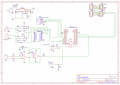
need help routing pcb

MrChips

Joined Oct 2, 2009
34,628
I never use autorouter.

Laying out the first 80% is the easy part. The last 20% is the difficult part. Laying the last two traces is always the greatest challenge.

What use is an autorouter if it leaves me to do the hard work?

We cannot unzip zip files. Can you post images in .jpg or .png format?
 

JohnInTX

Joined Jun 26, 2012
4,787
A lot of the "routing" can take place when you are viewing the PCB 'ratsnest' (unrouted point to point). Push the components around, rotate them, reassign pins etc. to minimize crossings and clumps of traces. For example, the ULN2003 has 7 identical sections that can be assigned at will. LM358 sections can be interchanged, IO pins on the Nano can be reassigned in software. Anything you can do in the ratsnest to make the airwires conect to pins without crossing will make routing easier. Don't forget you can run traces under components, between pins sometimes and on the other side of the board.

I also don't use auto-routing for most boards.

Arrange the components so that the routing 'flows' from inputs towards outputs as best you can. On a 2 sided board, top traces mostly run one way and bottom traces run the other in a grid pattern. Route the power to each chip first using the grid layout. I frequently run a loop around the edges of the board on each side for power and ground. Route small areas like OpAmp resistors, voltage regulator capacitors next using short, direct traces. You'll eventually have a bunch of routed functional blocks that can be connected using longer traces. Don't worry too much about trace thickness, 45 degree corners etc. until you get a section to the point where you are happy with the layout - fancy stuff is harder to edit.

I frequently will route a partial net, just enough to get a few local components connected and leave the traces stubbed. The airwires will show what's remaining on the net. That shows how much trouble I might have getting that section connected to another. Sometimes, it becomes apparent that that entire little section might be better in another place on the board. I can move it as a group to straighten things out while not having to reroute the close-in circuits.

A good resource is to look at other board layouts to see how those are done.

Finally, realize that it will take some time and experience to come up with a design. It's like solving a puzzle. A lot of the process is visual - they don't call it 'artwork' for nothing. Sit back, use your eyes and have at it. Focus on smaller functional blocks one at a time with an eye of how they'll connect to other functional blocks. The more you do, the easier it will become.

Good luck!
 
Last edited:

JohnInTX

Joined Jun 26, 2012
4,787
Also, when you are done, you can post a print of the check-plot. We have many experienced PCB guys here that would be happy to take a look at your layout and offer constructive critiques.
 
Top