Need -20v 0.03A circuit

Irving

Joined Jan 30, 2016
5,134
KiCAD. IMHO the best free open-source schematic-capture & pcb-layout software.

Sadly it doesn't have a perf-board 'feature' unlike Fritzing for example but then again is a much more professional tool.

The important thing when using perf-board for SMPS is to ensure good low-impedance connections in the important switching paths, in this circuit that's between pins 1,6,8 (chip Gnd) on the -ve side and pin 7 (Vsw) on the +ve 'ON' path, and pin 5 (Vin) on the +ve 'OFF' path, though the peak current here is only ~350mA so not so critical.
 

Thread Starter

Gitbizy

Joined Jul 26, 2021
16
@Irving

Also, as far as feeding power from the Nano PSU & -20v module back to the Atari Motherboard itself:
I have 2 options. Some people have hooked up one of these directly to the floppy drive power connector on the motherboard to "reverse feed" the power back into the motherboard, instead of sending power to the 2 pin headers which connect the DC-DC power supply that I am replacing.
Is that a safe thing to do?
The alternative method would be to run ribbon cables from the new PSU board to the J16 and J17 inputs, which are standard pin header strips. are there any concerns about powering that motherboard via ~8 inch ribbon cables 24/26 gauge wire versus heavier gauge wires?

lastly, if I want to use one of these PCB creation services to make me a clean PCB, such as this one, which offers one free prototype (and then I do all the soldering myself), what files do I send them?
World's Fastest PCB Manufacturing - ALLPCB.COM
 

Irving

Joined Jan 30, 2016
5,134
Also, as far as feeding power from the Nano PSU & -20v module back to the Atari Motherboard itself:
I have 2 options. Some people have hooked up one of these directly to the floppy drive power connector on the motherboard to "reverse feed" the power back into the motherboard, instead of sending power to the 2 pin headers which connect the DC-DC power supply that I am replacing.
Is that a safe thing to do?
The alternative method would be to run ribbon cables from the new PSU board to the J16 and J17 inputs, which are standard pin header strips. are there any concerns about powering that motherboard via ~8 inch ribbon cables 24/26 gauge wire versus heavier gauge wires?
I personally would go down the reusing the headers route as this means power is entering the PCB as originally intended and runs less risk of accidental re-routing.

8" ribbon cable 24AWG (typically 16/30WG stranded) is good for 1.6 - 2A per 'core' and drops 16mV per Amp., the header pins are rated for 1 - 2A, so yes that should be fine.

lastly, if I want to use one of these PCB creation services to make me a clean PCB, such as this one, which offers one free prototype (and then I do all the soldering myself), what files do I send them?
World's Fastest PCB Manufacturing - ALLPCB.COM
I'll tidy the layout up for a PCB, generate the Gerber files and send them over in a day or two.
 

Thread Starter

Gitbizy

Joined Jul 26, 2021
16
@Irving

I feel like I've dropped the ball here on my end and I apologize for the miss.

Upon doing further research on the schematic of the computer, I found that the Electroluminescent panel backlight itself needs a special power circuit.

Please see http://www.kecksburgufo.com/StacyDC-DC.pdf

at the bottom of the PSU schematic is EL OUTPUT 85v 590hz and a ground.

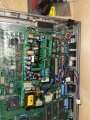
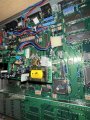
I attached 2 pictures of the PSU. I believe the transformer is part of that circuit to go from 12v to 85v.

the white connector on the side is a "3 pin" connector, but only 2 leads are hooked up, probably the 85v and gnd.

what are your thoughts on that circuit?
 

Attachments

Irving

Joined Jan 30, 2016
5,134
So Q108 and the transformer form a sine wave generator that gives 85v AC at 590Hz (not sure if frequency is critical/relevant). The brightness is controlled by the supply voltage from the power supply formed by IC104 and Q106/Q107...

It would be relatively easy to deliver 85v 'AC' but I know nothing about EL backlights and what they like... however many laptops (eg MacBooks afaik) still use them as they are still more efficient than LED over a wide panel and they don't use big transformers so maybe some switched DC is ok. Maybe you can find a 'backlight' driver module that suits?

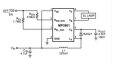
A quick google finds this chip which is $2.44 from Mouser and appears perfect for the job... though no apparent way to adjust the brightness...

1628784715956.png
 
Last edited:

schmitt trigger

Joined Jul 12, 2010
2,091
The frequency is somewhat critical on an EL, which determines both intensity and color.
For testing purposes I have lit ELs directly from 60 Hz but they look weird and don’t know what this will do to its lifetime.
 

Thread Starter

Gitbizy

Joined Jul 26, 2021
16
So Q108 and the transformer form a sine wave generator that gives 85v AC at 590Hz (not sure if frequency is critical/relevant). The brightness is controlled by the supply voltage from the power supply formed by IC104 and Q106/Q107...

It would be relatively easy to deliver 85v 'AC' but I know nothing about EL backlights and what they like... however many laptops (eg MacBooks afaik) still use them as they are still more efficient than LED over a wide panel and they don't use big transformers so maybe some switched DC is ok. Maybe you can find a 'backlight' driver module that suits?

A quick google finds this chip which is $2.44 from Mouser and appears perfect for the job... though no apparent way to adjust the brightness...
Thanks for the reply. I didn't realize that was DC to 85v AC.
I am going to study this schematic some more and report back.


There is a brightness control on the LCD panel itself. I am going to open up the circuitry on the LCD (not taking apart the panel part, just the status lights etc. and look and see how things are wired.
 

Irving

Joined Jan 30, 2016
5,134
That control almost certainly is a variable resistor to ground that connects to the 'brightness' input on the DC-DC board and adjusts the 'on-time' of the buck converter Q106/Q107 by comparing a sample of the output voltage to the ramp voltage from IC101, the main SMPS controller.

EL-off high forces the output of comparative IC104B high, turning off Q106/Q107 and shutting down the 85v oscillator.
 
Last edited:

Thread Starter

Gitbizy

Joined Jul 26, 2021
16
@Irving (or anyone) can you please look at the PDF in post #24, specifically the bottom of the page where there are two pins EL OFF and BRIGHT. If you trace those back it looks like they go into a small IC, NJM 2403D, one into PIN 3 and one into PIN 5.

That IC is labeled 2403D JRC 9308. It is an 8 pin (4 pins a side) tiny IC.
https://www.digikey.com/en/products/detail/njr-corporation-njrc/NJM2403D/805634


That whole part of the circuit is fed from the DC 11-18v input.

in order to activate the "85v output", I believe I need to send some voltage into both PIN 3 and PIN 5. Right now neither of those pins are connected and thus that part of the PSU is flatlined and not producing any voltage.

Any ideas as to what voltage it will take to trigger those two PINS to pass voltage to the power side of the 85v PSU?

What I am trying to do is put a meter on the output side of that PSU to get readings on it.

The STACY schematics are very limited and have various errors in them, namely where these 2 pins are on the motherboard itself.
I know where those PINS are on the PSU but I don't know whether those PINS want 0-12v DC (presumably)??

What I am looking for is what voltage to feed to those two PINS so that I can activate the 85v PSU.
 

Irving

Joined Jan 30, 2016
5,134
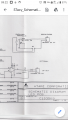
We already discussed this in post #28, but if you connect EL_OFF to BRIGHT with a 5k variable resistor that should turn the backlight on. See sheet 43 in the schematics below

screengrab-20210921-092243.png
 
Top