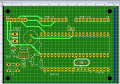
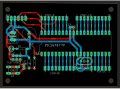
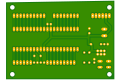
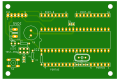
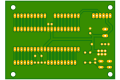
My first PCB design

Thread Starter

King2

Joined Jul 17, 2022
163
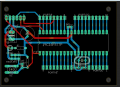
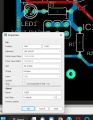
By changing the DRC Annular ring settings, this will change all pads that have been set to auto.
Try changing Pads, Top, Bottom, Min value to 20ml. Click on Apply and observe the changes.
I have tried this. It changes the pad size of all components. I want to change size of LED resistor, capacitor and crystal

If you want to change the pad size of an individual device there are two things you can do.
You can select a single pad, set the shape, diameter, and drill and place it over the existing pad.
The dimension of the component's are given in its datasheet

I want to change pad size of LED resistor, capacitor and crystal . What parameter do I set for this
1676048693363.png
 

MrChips

Joined Oct 2, 2009
34,817
i reread all the previous posts but still i don't understand what is "wire jogs"
Can someone tell me in image what exactly is "wire jogs" ?
It means tracks at funny angles or strange displacements that don’t align with layout grid. You have many of these.
 

ericgibbs

Joined Jan 29, 2010
21,442
Hi K2.
Try to visualize a 0.1 inch matrix grid pattern on your PCB layout.

Placing pads on the 0.1 inch grid, it is essential for some components so that they align with the grid.
eg: IC components.
While it is not essential for some components, it is preferred for all pads to be on the grid, or if space limitations 0.05 inch.

A routing copper track can follow any path you decide, but again it preferred that it aligns with the grid.
Any bends in the track, can be what you decide, but it can lead to a messy looking PCB and poor alignment where a track meets a pad.

Regarding 45deg or 90deg bends in the track, if you use either, it should ensure that you have good track to pad contact area.

Regarding pad sizes, have enough copper area around the pad, so that when you solder or have to replace a faulty component, the pad does not lift off the board.

Use a 40pin DIL socket for your PIC, I would advise against a 'turned pin version' socket as you are using the board as programmer

Remember it is your project and, as we all have done, you will make mistakes and hopefully learn.

Be aware, there is a lot of nonsense information on the web regarding copper artwork for PCB's

E

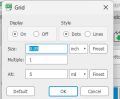
Added a 0.1 inch grid overlay, using IC pads as reference point

EG57_ 574.png
 
Last edited:

nsaspook

Joined Aug 27, 2009
16,325
Looking better everyday.

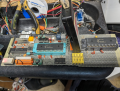
Remember that this board can also be used with the latest PIC18 devices, they still have 40 pin DIP packages. I have an old prototype perf board with 40 pin ZIF sockets (they take a bit of extra space so a design must be modified for ZIF usage) that is using a pic18f47Q84 with the internal OSC.
for a 64MHz processor clock.
1676127989291.png
The PIC18-Q84 microcontroller family is available in 28/40/44/48-pin devices for many automotive and industrial
applications. The many communication peripherals found on the product family, such as Controller Area Network
(CAN), Serial Peripheral Interface (SPI), Inter-Integrated Circuit (I2C), two Universal Asynchronous Receiver
Transmitters (UARTs), can handle a wide range of wired and wireless (using external modules) communication
protocols for intelligent applications. Combined with the Core Independent Peripherals (CIPs) integration capabilities,
this capacity enables functions for motor control, power supply, sensor, signal and user interface applications.
Additionally, this family includes a 12-bit Analog-to-Digital Converter (ADC) with Computation and Context Switching
extensions for automated signal analysis to reduce the complexity of the application.
https://www.mouser.com/datasheet/2/268/PIC18F27_47_57Q84_Data_Sheet_40002213E-2891742.pdf

1676128060766.png
 
Last edited:

MrChips

Joined Oct 2, 2009
34,817
Nothing obvious that would affect the performance of the circuit.
You have come a long way.

As a perfectionist, one can always find one more thing to tweak. It never ends.

I don't see the need for R2.
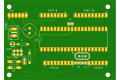
Also, since you are going to get overlay printed, move all component IDs to an appropriate. and visible location. Make sure they are not on a pad area. You may want to place a board description, date and rev no. You can have text on the overlay as well as on copper layer.
 

nsaspook

Joined Aug 27, 2009
16,325
Nothing obvious that would affect the performance of the circuit.
You have come a long way.

As a perfectionist, one can always find one more thing to tweak. It never ends.

I don't see the need for R2.
Also, since you are going to get overlay printed, move all component IDs to an appropriate. and visible location. Make sure they are not on a pad area. You may want to place a board description, date and rev no. You can have text on the overlay as well as on copper layer.
The series resistor is recommended to limit current into the pin.
1676130389049.png1676130508919.png
 

MaxHeadRoom

Joined Jul 18, 2013
30,662
Personally I would have placed the ISP port SV1 away from the mounting hole and nearer the edge of the board, this allows a Pickit etc, programmer to plug directly in and lay flat with the board , if a right angle connector is used.
 

nsaspook

Joined Aug 27, 2009
16,325
Personally I would have placed the ISP port SV1 away from the mounting hole and nearer the edge of the board, this allows a Pickit etc, programmer to plug directly in and lay flat with the board , if a right angle connector is used.
+1
That's what I normally do.
1676133903762.png1676133934154.png1676144769767.png
The secondary function is a two signal I/O (CAN RXTX here) connector with power/gnd.
1676134104318.png
 
Last edited:

ccp

Joined Jul 3, 2015
1
Like a beginner driver, you started driving a Ferrari. Don't. Try EasyEDA for example. Much easier, much better. Good luck.
 
Top