i recommend 3-step program:
do yourself a favour and install Everything from voidtools.com. assign it some hotkey (i use F4). relax and enjoy.
you no longer need to know where the datasheets of any documents are, just enter part of the file name and Everything will find it for you.
but since you do want to store datasheet paths, no problem - find the file you want using Everything, right click on it and use "Copy Full name to Clipboard", than paste that into datasheet field of your KiCad symbol. DONE!
OR....
create new path and call it DS (or DataSheet or whatever).
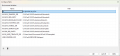
From main window use menu references > Configure Paths. Click on + button to add new path and give it a name such as DS, and specify path where you keep the datasheets.
Open symbol library, open symbol you want to modify then enter path to PDF file and save. done...
instead of ..\..\abc\def\file.pdf
you will see kicad-embed://file.pdf
i recommend 3-step program:
do yourself a favour and install Everything from voidtools.com. assign it some hotkey (i use F4). relax and enjoy.
you no longer need to know where the datasheets of any documents are, just enter part of the file name and Everything will find it for you.
but since you do want to store datasheet paths, no problem - find the file you want using Everything, right click on it and use "Copy Full name to Clipboard", than paste that into datasheet field of your KiCad symbol. DONE!
btw. defining own paths is the way to go. i started that when i got tired of 3D models vanishing after every KiCad upgrade. also handy when running different versions in parallel (no need to duplicate 3D models).

 Facebook
 Google
 GitHub
 Linkedin