LibreOffice Writer

Thread Starter

biferi

Joined Apr 14, 2017
516
I use the Free Program LibreOffice Writer.

I need help with doing just one thing.

Before I get into it does anybody use about this Program?
 

Thread Starter

biferi

Joined Apr 14, 2017
516
I want to print just 6. or so Envelopes one after the next with difer Addresses on them.

I do not want to get into making a Data Bass.

So I go to Insert then Envelopes and the window opens.

I fill out my Address then the Person it will go to and under Format I pick Number 10 Envelope.

Then I click New Document and it brings me back to my page and all looks good.

So I go to the top of this page and click it to put my Cursor.

Then I pick Insert Page Break because I need a new Page.

Now I go back to Insert Envelope and the same window opens.

Now I replace the old Address with the new one and this time I click Insert and it works.

It brings me back to the page now I have one Envelope after another with 2. Different Addresses on them.

Now if I do the same thing and go to Insert Envelope the window opens and I can put the new Address in but at the Bottom it just has Modify?

I do not want to Modify it I think I am doing the whole thing wrong.

Can somebody help I am so close thank you?
 

Papabravo

Joined Feb 24, 2006
22,058
Can you think of each envelope as a separate document. Will the paper tray on your printer accommodate envelopes?
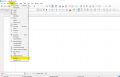
On my version there is an envelope wizard accessible from the main menu as

Insert | Envelope..

This just the thing for printing envelopes one at a time without having to retype the return address.

1723756880886.png

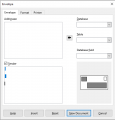
Here is the Envelope Tab
1723756969143.png

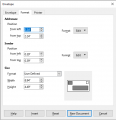
Here is the Format Tab

1723757070094.png

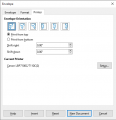
Here is the Printer Tab

1723757149642.png

Each envelope looks like it can be created and saved as a separate document.
 
Last edited:

Thread Starter

biferi

Joined Apr 14, 2017
516
My Printer can take Envelopes.

I use to get the Avery Address Template and open it in LibreOffice Writer .

I would go down the page and type every bodies Address in the Label.

It would look good on Screen but if I print them out the Addresses would never be all the way on the Label.

Can what I want to do just for one Envelope?
 

Papabravo

Joined Feb 24, 2006
22,058
My Printer can take Envelopes.

I use to get the Avery Address Template and open it in LibreOffice Writer .

I would go down the page and type every bodies Address in the Label.

It would look good on Screen but if I print them out the Addresses would never be all the way on the Label.

Can what I want to do just for one Envelope?
It seems like you should be able to do one envelope at a time and save each envelope as a separate file if you want. You still have to experiment to get the text on the envelope in the right place. The printer tray on my printer will actually accept #10 envelopes but I haven't tried printing on an envelope yet.
 

Thread Starter

biferi

Joined Apr 14, 2017
516
My Printer does take Envelopes.

I was telling how if I get the Avery Lable Templates and type right on the Labels when I print the labels out the Address do not always fit on the Label.

If you look at the Label on screen it looks like the whole Address is on the Label.

Getting back to using LibreOffice to print on Envelopes.

I go to Insert then Envelope and fill in the Address and pick Number 10 Envelope then click New Document and all looks good.

So right now just one Envelope is showing on screen with all the right Information on it.

If I want to ad another Envelope under this one am I not right I have to make a Page Break to have a Clean Page to start it over with?

Just tell me this first?

Thanks
 

sparky 1

Joined Nov 3, 2018
1,218
Libre calc has the format for sorting merging printing and tricky stuff for lists whereas writer is focused on the many formats.
The team that maintains libre writer continued to develop it further compared to open office build.
Not sure about envelopes, the chart below shows which features they wanted to incorporate.
Libre office runs on windows. The later versions accept VBA interacts with writer as a script such as an envelope script.
LibreOffice vs OpenOffice | LibreOffice - Free and private office suite - Based on OpenOffice - Compatible with Microsoft
excel - How do I make vba code compatible with libre office - Stack Overflow
Envelope Printing the EASY way - English - Ask LibreOffice
 
Last edited:
Top