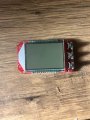
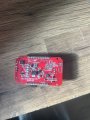
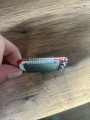
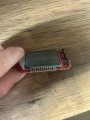
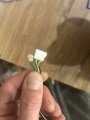
Hello, I have an lcd from an e scooter which works but has missing segments and I was wondering if there is a way of bringing the missing segments back please?
There is not much to be done with the actual display, although in the one photo I see black particles behind the pins. So possibly a careful cleaning could remove the possibly conductive material. Also, a close examination of the solder connections might reveal an open or cracked solder connection.
Segment drivers might possibly be damaged by static, I am not aware of any repair for that fault.
Could they be in parallel? They are side by side and it's a pretty big coincidence that two 100 ohm resistors in parallel would be 50 Ohms. Note the traces on your board.
I looked at the photo and the two "101" resistors look healthy. In addition, dropping resistance is not a normal resistor failure mode.
If the motor scooter is engine driven, there may be a vibration induced broken connection on the PCB, but that is not a common failure on electric vehicles.
Ok thank you for the advice. Because it was still showing the missing segments though, would that mean that it is something on the board and not the lcd itself?
Ok thank you for the advice. Because it was still showing the missing segments though, would that mean that it is something on the board and not the lcd itself?
Yes. I suspect that there is a separate pin connection for each segment.
See if you can reverse engineer the LCD and determine the function of each pin. Then check the solder connection and trace for the malfunctioning pin.
I have tried adding fresh solder to each leg but it’s hard to get all around the pins so I was going to try using a heat station not to high to heat each pin of solder up to hopefully do it properly.
Every LCD module has a common pin connection called backplane.
In normal operation, the voltage on a segment has to be 180° out of phase with the voltage on the backplane.
I have not tried this, but try using a 1.5 V battery between the backplane and a segment. If this works, try to find which pin is connected to the malfunctioning segment.
I will be back in my cave later this week. Then I will be able to devise a test for you.
I was wondering if I can’t work out the issue I have this spare display witch the wiring layout is described in the picture but it has one 6 pin connector whereas my one has one 5 pin connector and one separate connector for the blue wire witch does not connect to anything it stays unplugged. Could I use the spare display but solder the old connector onto the spare display matching the colours but leave the blue wire unattached?
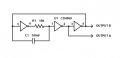
Here is an oscillator circuit to test the LCD module.
This oscillator outputs two signals that are out of phase (complementary) at approx. 500 Hz.
In order to enable any segment on the LCD, you need to connect one output to COM (or backplane, BP) on the LCD and the other output to the segment pin. Hence you need to locate the COM pin first. To to this, test one pin at a time against all other pins. The COM pin will be found when it allows you to identify all the other segments. Sometimes there are multiple pins that are COM.
CD4069B or MC14069BCP hex inverter gates will operate on supply voltages from 3 V to 18 V. Use whatever voltage is convenient for you. A 9 V battery will be fine. The current required is not important because the LCD takes less than 1 μA.
Connect pin 7 to 0 V and pin 14 to the +ve supply.
Connect unused inputs pins 9, 11, 13 to GND.
Go through this test systematically and write down which pin is connected to which LCD segment.
Edit: You need to remove the LCD from the circuit board in order to test it. Otherwise, I don't know if you can safely test it at a lower voltage, say 3 V, without damaging some other component on the board.

 Facebook
 Google
 GitHub
 Linkedin