Is it just me - LTSpice

Thread Starter

Futurist

Joined Apr 8, 2025
736
I just started to explore LTSpice but find the UI incredibly frustrating.
1744743645899.png

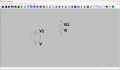
I placed the voltage src and clicked ESC, then I placed a resistor and clicked ESC, now I want to rotate the resistor but the rotate icon is greyed out.

I click the resistor and nothing happens to the rotate icon.

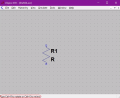
I right click the resistor and get just this
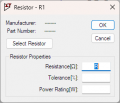
1744743752989.png

If I try to move it, drag it, then the entire circuit moves as if every component has been selected.

If I click the "Move Mode" on the toolbar then I can select the resistor and move it, and even though the rotate icon becomes active I can't click it because I need to move the mouse to click the toolbar but it drags the resistor along as I do that.

It's infuriating how do others do this simple basic task?
 

crutschow

Joined Mar 14, 2008
38,435
but find the UI incredibly frustrating.
Until you learn how to do some of the basic commands, it can be.
There are a number of keyboard short-cut commands that are handy, and once you memorize the ones you use frequently, drawing schematics becomes a lot easier.
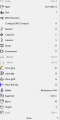
They are listed at the right-side of the Edit drop-down (below):

For example after selecting the resistor with the Move (M) command, you can then rotate it with the Rotate command (Ctrl+R).

1744745014290.png
 

Thread Starter

Futurist

Joined Apr 8, 2025
736
Thank you fellas, I've been working diligently to understand and I'm getting the hang of this.

But something has just blown me away. A transient analysis of the simple circuit was making sense but then she pointed out that the current flow through the resistor was "opposite" to what some might expect (hence the red/yellow plots).

Click to see, it is prepositioned:


She says the system has a "concept of direction" but that's very confusing, you can't even tell which "direction" is set for the resistor just by looking at the circuit and I find this utterly bewildering.

I'm sure this can make sense and it is a freedom to plot things in helpful ways but to say a resistor has a "polarity" that kills me, I mean the current WOULD BE the same so what use is this idea?

Put the resistor one way around and the plots match physical reality, reverse it though and it doesn't. If this was a complex circuit and a resistor was the "wrong way" around how would one know? how could one trust that what the simulation is showing is what one would see in reality?
 

Thread Starter

Futurist

Joined Apr 8, 2025
736
It gets worse, it's not just resistors, I have just simulated a circuit and plotted capacitor current, then I rotated the capacitor and lo-and-behold the current plot reversed, I don't see how people can function with this, unless you know and verify that these components are oriented the "right way" around, how can you trust what the graphs are saying??

Can a piece of wire also be rotated and cause current to flow in reverse...
 

crutschow

Joined Mar 14, 2008
38,435
Put the resistor one way around and the plots match physical reality, reverse it though and it doesn't.
The resistor, inductor, and capacitor have a "polarity" in the sense that it has been assigned an arbitrary direction for current versus the polarity across the component, which can be confusing.
(There's no way to avoid that, if you think about it).
To avoid that ambiguity for the resistor I edited the resistor symbol and added a dot to the end where a positive voltage at that end causes a current to flow from the end to the other (below):
1744754223542.png
The attached res.asy symbol file should have that added dot, if you want to replace your resistor symbol file with that.
You could modify the capacitor and inductor symbols the same way if you like.

In general you can put the cursor over a component after a transient simulation and it will show the direction of current flow for a plus voltage at the shaft end of the arrow.
You can then reverse the component if you want to change the polarity in you plots.
Alternately you can add a minus sign in from of the variable in your plot to reverse the plot polarity.
 

Attachments

Thread Starter

Futurist

Joined Apr 8, 2025
736
The resistor, inductor, and capacitor have a "polarity" in the sense that it has been assigned an arbitrary direction for current versus the polarity across the component, which can be confusing.
(There's no way to avoid that, if you think about it).
To avoid that ambiguity for the resistor I edited the resistor symbol and added a dot to the end where a positive voltage at that end causes a current to flow from the end to the other (below):
View attachment 347111
The attached res.asy symbol file should have that added dot, if you want to replace your resistor symbol file with that.
You could modify the capacitor and inductor symbols the same way if you like.

In general you can put the cursor over a component after a transient simulation and it will show the direction of current flow for a plus voltage at the shaft end of the arrow.
You can then reverse the component if you want to change the polarity in you plots.
Alternately you can add a minus sign in from of the variable in your plot to reverse the plot polarity.
Thank you Sir.

My difficulty is this though, that what is the problem this is addressing? A real resistor can be placed either way around and when I measure current it is the probe positions that will show either +7mA or -7mA depending on how I choose to orient the meter probes.

It seems they are using the component orientation to encode something that is in reality a meter probe orientation.

Why do they do this only for current and not also voltage? or am I missing something very basic here (I studied all this forty years ago so I am rusty to put it mildly).

The fact is that in reality reorienting a resistor or capacitor or inductor will not cause current flow to reverse and so a simulator (simulating reality) should not behave this way. It's clear too that this is a very powerful too designed by absolute experts, but this basic usage feature is just bewildering.

Perhaps I'm missing something...but this has stopped me dead in my tracks, how can I work with (even understand) a tool that attaches significance to the orientation of passive components.
 
Last edited:

crutschow

Joined Mar 14, 2008
38,435
It seems they are using the component orientation to encode something that is in reality a meter probe orientation.
You need to view this as the current meter probe orientation being determined by the component orientation, since the simulator doesn't have a meter probe.
How would you do it that in the simulation software to do what you want?
Why do they do this only for current and not also voltage? or am I missing something very basic here
You are missing the basic fact that node voltages do not have orientation, whereas current direction through a component does.
Perhaps I'm missing something...but this has stopped me dead in my tracks, how can I work with (even understand) a tool that attaches significance to the orientation of passive components.
So tell me exactly how this could be done with the simulator without the components having current orientation for displaying the results of the simulation?
The only solution I can think of is to attach a dot to the components to indicate which the direction the current a positive current goes through it, as I did with the resistor.

You seem to be having a fundamental problem with understanding why what you ask is not possible in this simulator.
If this is a deal breaker for you, then perhaps you would prefer to use a toy simulator like on the Falstad website, which shows the current direction on the schematic during the simulation as a moving series of dots.
 
Last edited:
Hi, when in doubt, simplify the problem. In your case I suggest returning to first principles on Ohm's Law and Kirchhoff's Laws.

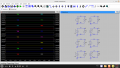
I put together a simulation of 8 cases using 4 voltage sources and 4 current sources which clearly demonstrate these laws in the program. Pay careful attention to the orientation of the components as well as whether or not the voltage / current in the graph has a positive or negative sign. The sign will tell you which direction the electromotive force (voltage) is biased or in which direction the electrons (charge, current) are travelling.

Keep these rules in mind:
1) The current through a resistor is directly proportional (linear) to the voltage across it (Ohm's Law).
2) The sum of all currents entering a node are equal to the sum of currents leaving the node (Kirchhoff's Current Law).
3) The sum of all voltages around a closed loop is zero (Kirchhoff's Voltage Law).
4) Convention current exits the positive terminal of a voltage / current source and enters the negative terminal.

If you go through each of the cases in the simulation you'll find these propositions to be true. I specifically made the voltage source, current source and resistor each a value of 1 to remove the coefficients from the computations.

And if you look closely, Circuits A&B are equivalent from the perspective of the resistor. Same goes for C&D, E&F, G&H. Again pay special attention to the sign on the voltage / currents.

Also, I placed the voltage label on the wires by right-clicking and selecting "Place .op (operating point) Data Label". You can't do this with currents because of the way the program computes. For currents, you can hover your mouse over specific components to see which direction current is flowing.

Screenshot from 2025-04-15 18-24-04.png
 

Attachments

Thread Starter

Futurist

Joined Apr 8, 2025
736
Hi, when in doubt, simplify the problem. In your case I suggest returning to first principles on Ohm's Law and Kirchhoff's Laws.

I put together a simulation of 8 cases using 4 voltage sources and 4 current sources which clearly demonstrate these laws in the program. Pay careful attention to the orientation of the components as well as whether or not the voltage / current in the graph has a positive or negative sign. The sign will tell you which direction the electromotive force (voltage) is biased or in which direction the electrons (charge, current) are travelling.

Keep these rules in mind:
1) The current through a resistor is directly proportional (linear) to the voltage across it (Ohm's Law).
2) The sum of all currents entering a node are equal to the sum of currents leaving the node (Kirchhoff's Current Law).
3) The sum of all voltages around a closed loop is zero (Kirchhoff's Voltage Law).
4) Convention current exits the positive terminal of a voltage / current source and enters the negative terminal.

If you go through each of the cases in the simulation you'll find these propositions to be true. I specifically made the voltage source, current source and resistor each a value of 1 to remove the coefficients from the computations.

And if you look closely, Circuits A&B are equivalent from the perspective of the resistor. Same goes for C&D, E&F, G&H. Again pay special attention to the sign on the voltage / currents.

Also, I placed the voltage label on the wires by right-clicking and selecting "Place .op (operating point) Data Label". You can't do this with currents because of the way the program computes. For currents, you can hover your mouse over specific components to see which direction current is flowing.

View attachment 347117
This is appreciated, I will explore this and refresh my memory on this stuff.
 

Thread Starter

Futurist

Joined Apr 8, 2025
736
You need to view this as the current meter probe orientation being determined by the component orientation, since the simulator doesn't have a meter probe.
OK that's what I was thinking, it just a way of defining which way around to insert the virtual ammeter.

How would you do it that in the simulation software to do what you want?
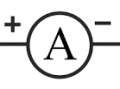
I can envisage alternative ways, I mean if I was designing something like that. The first thing that springs to mind is to have an ammeter component with a symbol like this:

1744812941703.png

Something like that would mirror reality and not involve the orientation of components. Then to measure current in any conductor one could just hover it over a wire and click an insert button or something to have the system insert it, this would also be closer to reality in the sense that we never directly measure current in a component but only in a conductor connected to the component.

Then one could flip the meter to reverse the current reading, but this is all academic, it is what it is and I understand the UI on LTSpice is quite dated now and unlikely to change.

You are missing the basic fact that node voltages do not have orientation, whereas current direction through a component does.
So tell me exactly how this could be done with the simulator without the components having current orientation for displaying the results of the simulation?
Well I can attach a voltmeter in two ways just as I can an ammeter, I think this is the crux of my confusion, it will sink in though once I use it for a while.

The only solution I can think of is to attach a dot to the components to indicate which the direction the current a positive current goes through it, as I did with the resistor.
Perhaps, I think my confusion is due to implying that a resistor behaves differently if I flip it having to alter a component orientation in order to measure current in either way, this is never something we do in reality and that's confused me a bit.

You seem to be having a fundamental problem with understanding why what you ask is not possible in this simulator.
If this is a deal breaker for you, then perhaps you would prefer to use a toy simulator like on the Falstad website, which shows the current direction on the schematic during the simulation as a moving series of dots.
No it's not a deal breaker, just a source of confusion when initially encountered, I can hover the mouse as you say to see how the current measurement is being oriented, perhaps being able to flip that direction by clicking the component and choosing a direction would be a bit better too, rather than manipulating a component itself.

If one designs a complicated schematic before doing any real measurements then today one must hover over every passive component to see if they were inserted the "right way around" I suppose an experienced user do this sub consciously though.

Imagine two resistors in series where one is oriented the opposite of the other, it starts to get bewildering.

I think this is all just historic, designed as best they could back in the day when initially developing all this.
 

ericgibbs

Joined Jan 29, 2010
21,425
hi F,
Ref the current direction.
The Sym Ammeter may help.

Note:
if the current is in the direction of the Arrow symbol, it shows positive

if the current is in the opposite direction of the Arrow symbol, it shows negative.

E

Update: added a zip file.

EG57_ 2819.gif
 

Attachments

Last edited:

Thread Starter

Futurist

Joined Apr 8, 2025
736
Well I have started looking at QSpice, of course I'm a novice when it comes to simulation but I am finding the UI is more modern and well thought out. QSpice is free too and here's an overview:


I can see too that it does not rely on orientation, but instead you can hover over a resistor and add the current probe one end for +ve way around and hover over the other end for a -ve way around, that is less confusing to me.

I'm interested in hearing what you experts thinks of this tool.
 

crutschow

Joined Mar 14, 2008
38,435
Perhaps, I think my confusion is due to implying that a resistor behaves differently if I flip it having to alter a component orientation in order to measure current in either way, this is never something we do in reality and that's confused me a bit.
I understand,
It's just the way Spice chose to indicate current direction in a component.
Adding dots to the symbols would certainly help, since then you would then know the component current polarity from the schematic, and could reverse it if desired, by changing its orientation with a CTL-R while placing it.
 

Papabravo

Joined Feb 24, 2006
22,075
Qspice is apparently basically an upgraded version of LTspice.
Don't know what the differences are.
It is most assuredly NOT an upgraded LTspice. It is the simulator M.E. would have written from scratch if he'd had the opportunity. He had to quit ADI to make it a reality. IMHO, an awesome achievement.
 
Top