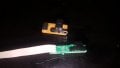
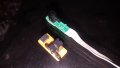
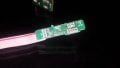
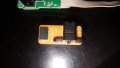
Im student. I dont find my encoder cables.

I've repaired some of these encoders. When they fail, the sewing machine goes crazy as it can't find the position due to the faulty encoder. From the schematic, one can deduce this is a complex encoder to use. To be honest, I don't recommend an Arduino project with this device. You can go with basic ones, since it's easier to find Arduino information related. What is the range of speed yo want to measure? Do you want to determine position? You haven't provided enough information about the project, so we could suggest other paths.
 

MaxHeadRoom

Joined Jul 18, 2013
30,695
@Xavier Pacheco Paulino According to your reverse engineered DWG, if correct, the bottom dual slot opto is not going to produce a dual quadrature signal if this is what is required, although the board could be modified to produce this signal, also if the OP needs this for a separate project of this type, there is Ebay versions (471527682229) for $3.00.
Max.
 

Thread Starter

Yusuf Delibaş 1

Joined Aug 19, 2018
18
Are you hoping to repair a sewing machine that uses such an encoder? Or is this an item intended for some arduino project from which you learn NOTHING. Cables with lots of different colors generally DO NOT have a standard color code, and tracing out the circuit revealed an assembly that will need some support electronics to do anything such as provide an actual signal to drive logic. And none of the arduino project books will give you even one word about how that circuit works. And understanding how to connect a processor to the real world is important. While the manufacturer may not provide information about the encoder, the maker of the sewing machine it would be part of may be able to help.
Thank you for your comment, but it is not my fault to not know arduino. Because my branch is not arduino. I am a student and I have a workshop at the same time. I want to make a game controller and I need an encoder for it. I have codes ready for this, I will use them. I just wanted a simple help. I do not understand why you made such a harsh comment. But thank you.
 

Thread Starter

Yusuf Delibaş 1

Joined Aug 19, 2018
18
[QUOTE = "Xavier Pacheco Paulino, posta: 1298463, üye: 291212"] Bu kodlayıcılardan bazılarını tamir ettim. Başarısız olduklarında, dikiş makinesi hatalı kodlayıcı nedeniyle pozisyonu bulamadığı için delirir. Şematik olarak, bunun çıkarımı, kullanılabilecek karmaşık bir kodlayıcıdır. Dürüst olmak gerekirse, bu cihazla bir Arduino projesi önermem. Arduino bilgilerini bulmak daha kolay olduğu için, temel olanlarla gidebilirsiniz. Ölçmek istediğiniz hız aralığı nedir? Pozisyon belirlemek ister misiniz? Proje hakkında yeterince bilgi sağlamadınız, bu yüzden başka yollar önerebiliriz. [/ QUOTE]


Project this.

I do not know whether to give Youtube links. If you are forbidden, you are warning me.

I will play the game steering with feedback. There are software written for it. The codes are all set. I do not have a problem with mechanics. The encoders you mentioned are very expensive in my country. If I buy through Ebay, my product exceeds 40 days to come to me. It is my vision to use the opportunities available. But if it is not possible I will buy it.

I enjoy doing something I do not know. Because I learned something. I have a lot of projects, and they are one of them. I do not like getting ready. As long as I come from my hand, I do everything myself. I like this.

Thank you so much for your help.
 

MisterBill2

Joined Jan 23, 2018
27,684
I certainly was not intending to be harsh with you. The issue is with the arduino folks who do not accept that the users also need to understand some actual electronic systems instead of just assembling he parts that they sell. Most of the projects could be done in a simpler and better manner without using a computer board package, and the user would develop some understanding of how circuits function.
Also, there is the reality that most of the people visiting this website have no experience at all with the specific encoder product that you are asking about, and so we are not able to offer any useful responses. I have used many quadrature encoders over the past years but I have never seen one like you have shown in the pictures. So while I understand in detail how the specific components function I have no means of providing much useful information about using that specific item, which I have never seen before.
 
Although I have provided an schematic of the encoder, all I've done with it is within hardware level. That's why I can't offer much help. The point is to study the schematic to see what information we can extract. The schematic is okay. I have confirmed it.
 

Thread Starter

Yusuf Delibaş 1

Joined Aug 19, 2018
18
I certainly was not intending to be harsh with you. The issue is with the arduino folks who do not accept that the users also need to understand some actual electronic systems instead of just assembling he parts that they sell. Most of the projects could be done in a simpler and better manner without using a computer board package, and the user would develop some understanding of how circuits function.
Also, there is the reality that most of the people visiting this website have no experience at all with the specific encoder product that you are asking about, and so we are not able to offer any useful responses. I have used many quadrature encoders over the past years but I have never seen one like you have shown in the pictures. So while I understand in detail how the specific components function I have no means of providing much useful information about using that specific item, which I have never seen before.
I apologize if I misunderstood you.
I do not have an electronic knowledge and I wanted to ask you. I'm going to buy a new encoder. Thank you very much.

I wrote a message to the manufacturer.
I will tell you if they come back.
 

Thread Starter

Yusuf Delibaş 1

Joined Aug 19, 2018
18
a friend said with the help of an oscilloscope. you can find each point on the oscilloscope. When you connect the encoder to the oscilloscope, he said a pulse every time. Could it be true?
 
a friend said with the help of an oscilloscope. you can find each point on the oscilloscope. When you connect the encoder to the oscilloscope, he said a pulse every time. Could it be true?
You could study your encoder with an oscilloscope for sure. But you certainly need to know each point function. That encoder has couple of cables you should be aware of the function of each one. And the best way to test it would be with the original sewing machine which uses the enconder, as you can see the real signals the designer would expect. But everything will depend on your application :)
 

MisterBill2

Joined Jan 23, 2018
27,684
a friend said with the help of an oscilloscope. you can find each point on the oscilloscope. When you connect the encoder to the oscilloscope, he said a pulse every time. Could it be true?
Yes, it is true, BUT it is not quite that simple. To have an output from the encoder you do need a bit of an external circuit and you must have a source of the correct voltage to power the circuit. That is quite simple but absolutely needed for it to work.
So really, the answer is indeed, "YES, BUT...."
 

Thread Starter

Yusuf Delibaş 1

Joined Aug 19, 2018
18
You could study your encoder with an oscilloscope for sure. But you certainly need to know each point function. That encoder has couple of cables you should be aware of the function of each one. And the best way to test it would be with the original sewing machine which uses the enconder, as you can see the real signals the designer would expect. But everything will depend on your application :)
I understand. I can not use. :)

I have one more question. What is the difference between a 5-wire encoder and a 4-wire encoder?

1. + and - and a and b and z
2. + and - and a and b

What is the difference ?.
Chinese encoders can see my work?
 

bertus

Joined Apr 5, 2008
22,942
Hello,

The a and b outputs are likely the two phases of the encoder signal.
The z output is likely an index signal.

Bertus
 

MaxHeadRoom

Joined Jul 18, 2013
30,695
@Yusuf Delibaş 1 Do you want to distinguish direction difference, if so you need the A-B quadrature type encoder, if just rate of rotation, then the single pulse will suffice.
The A & B pulses are just the basic quadrature pulses, if you see A B with the complements shown as /A & /B then these are used for interference free transmission IC's RS485 etc. .
As Bertus says the Z is once per revolution pulse used for zero reference purposes.
You can ignore the Z pulse if not needed.
Max.
 

MaxHeadRoom

Joined Jul 18, 2013
30,695
The previous link shows how to obtain 4x the natural quadrature count, it can also be used just to increase by x2 if need be, by only counting 2 rising edges instead of 4.
Max.
 

Thread Starter

Yusuf Delibaş 1

Joined Aug 19, 2018
18
Hello to everyone.
I came back again.

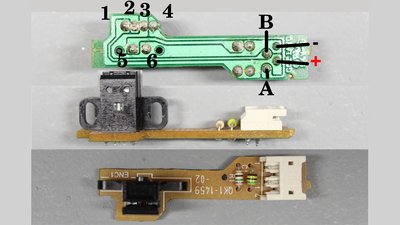
I've replaced two printers. I removed the encoders. Now I ask again. How can I use them. :) Which pins - and +? Which pins a or b or z? I hope I can use them. I could not find the datasheets.
 

Attachments

MisterBill2

Joined Jan 23, 2018
27,684
To use either of the two devices that yo show you will also need the slotted disk that goes with them, or an equivalent part to break the light beam. The devices shown in your pictures do not appear to have any resistors as part of the assembly, so you will need to provide 3 resistors to use them. One resistor to set the LED current, and then two resistors to bias the two photosensors so that you will have the correct signal voltage for your digital board to use. Those resistors are probably still on the circuit boards of the printers that you replaced. But they may be surface mount devices that are quite difficult to re-use.
 

MaxHeadRoom

Joined Jul 18, 2013
30,695
Here is a typical spec sheet that shows the placement of resistors, the value depends on the DC level you are using, for exact 90° separation the slotted disc has to be tailored to the distance between each cell, as the sheet shows.
Max.
 

Attachments

Thread Starter

Yusuf Delibaş 1

Joined Aug 19, 2018
18
Hello to everyone. encoders worked. finally helped. I did some reverse engineering of the 4-pin encoders and found their outputs. I tested it with a multimeter by connecting it to the 3.3v outputs of the Arduino. Then I prototype the prototype and test it. It works very precisely and very successfully.

Thanks to everyone who helped. Maybe I can tell you how I did it during the day.
 
Top