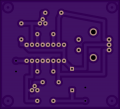
I think pads are missing from my PCB?

Thread Starter

smwalker

Joined Apr 9, 2017
11
Hi all. Recently found a project PCB I wanted to tackle, my first. They had the board design file all ready to go so I sent it off to OSH Park for printing. I was just excited that it uploaded so I really did not check things over. But Now I think I have a problem. There seems to be pads missing from the board in a couple spots. But I am not sure if the original designer used some sort of special fixture and did not need a pad in these spots? Area I am concerned about is where the 12 volt and the 5 volt enter the board.

So here is the schematic:
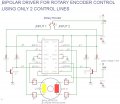
sch.jpg

Here is the Board he built ( Do not have a pic of the back) :
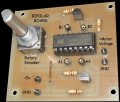
Board 1.jpg

Here is my uploaded board on OSH front and back:
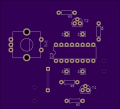
boad 2.png

board 3.png
Did I mess up?
 

eetech00

Joined Jun 8, 2013
4,705
Hi

there are pins marked +5, GND and Motor voltage,GND. Those are the supply pins. The motor voltage would be 12 v if that’s the voltage rating for your motor..

eT
 

eetech00

Joined Jun 8, 2013
4,705
My motor is 12 volts yes. SO there do not seem to be pads at the 4 supply pin holes? Is that correct?
ok..now I see what you are talking about. Look at board-3.jpg.

there are holes but:
The +supply pads are covered with resist. The ground pads should each have a thermal relief pad and they are missing. Overall, Not a very well designed PCB.

eT
 

jpanhalt

Joined Jan 18, 2008
11,087
Yes, the pads are there, but the information you sent Oshpark probably showed them as via's. There is a difference. Vias can be/are a signal layer. Pads on top for SMD include a a t-stop and t-cream to prevent the resist. Through hole, they also include the bottom equivalents.

1) Scrape off the resist. I would use a fiberglass detail brush available at auto places and probably any place that sells fine finishes. Looks like a twist-able eraser but is made of fine fiberglass stands.
2) Be sure they are connected properly electrically.

In the future, be sure to use a "pad" not a via when designing. They may look the same, unless you have all layers visible. In Eagle, maybe other programs too, you also need to distinguish between something you draw (e.g., a line, circle, rectangle) and something for a signal and name (e.g. a net or polygon).

Edit: As for thermal reliefs for ground pads, sometimes they are left off intentionally. They make soldering a little easier, but their absence does not affect performance negatively.
 
Top