Stripped Capacitor Contact Pads During Home Thermostat Repair

Thread Starter

mazsola

Joined Nov 3, 2025
3
Hey All,

I am new to electronics repair. Before spending a couple of grand to replace a thermostat with a malfunctioning screen, I am attempting a repair suggested on the following forum:

https://www.ifixit.com/Guide/Lennox+iComfort+10F81+Thermostat+Blank+Screen+Fix/156024

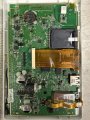
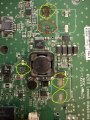
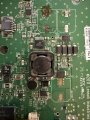
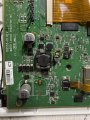
Unfortunately, when removing the capacitors, I stripped most of the contact pads. I’ve attached a few images of the board and the damage I’ve caused.

I am able to remove the pads from the old capacitors, but how do I attach them back to the board (get them to stick)?

Also, aside from the pad slot I circled in red, it’s not clear to me what wires the other pad slots are connecting to.

If anybody has any advice or recommendations for what to try next, I’d appreciate it!
 

Attachments

Thread Starter

mazsola

Joined Nov 3, 2025
3
After looking at the board for a while and noticing the different shades of green, I now know where to make contacts for the capacitors. I’ll see what I can do with some copper tape and solder.
 

dl324

Joined Mar 30, 2015
18,219
Welcome to AAC!
I now know where to make contacts for the capacitors. I’ll see what I can do with some copper tape and solder
They sell adhesive backed copper tape for electronics, stained glass, and gardens (slug barriers). The tape specifically for electronics will be the most expensive, so I'd go with the other choices.

Heat from soldering will melt the adhesive, so take care when soldering to it.

To connect to the traces, scrape away the solder resist near the end you want to connect to. Use wire and flux to make the jumper connections.
 

MrAl

Joined Jun 17, 2014
13,667
Hey All,

I am new to electronics repair. Before spending a couple of grand to replace a thermostat with a malfunctioning screen, I am attempting a repair suggested on the following forum:

https://www.ifixit.com/Guide/Lennox+iComfort+10F81+Thermostat+Blank+Screen+Fix/156024

Unfortunately, when removing the capacitors, I stripped most of the contact pads. I’ve attached a few images of the board and the damage I’ve caused.

I am able to remove the pads from the old capacitors, but how do I attach them back to the board (get them to stick)?

Also, aside from the pad slot I circled in red, it’s not clear to me what wires the other pad slots are connecting to.

If anybody has any advice or recommendations for what to try next, I’d appreciate it!
Hi,

Strictly speaking, you do not have to actually replace the pads you just have to make sure the components are wired back together in the way they were originally. If the left side of the cap went to say R23, then the left side of the cap has to be wired to R23 again, if the right side to pin 99 of IC 26 then it has to go to that again. Once you get the connections made and tested, you can then apply a dab of epoxy or something to stabilize it physically.

One thing you do have to be careful about. If there are any vias involved, you have to make sure those connections through the board are still making good contact. Maybe an Ohm's check or something to make sure the vias are OK.
 

Rf300

Joined Apr 18, 2025
72
Why did you think that dumb recapping would solve your problems? It looks like the capacitors are used in a DC/DC converter. So you have to use low ESR types, a general purpose capacitor will cause problems in a DC/DC converter. For that you have to check the data sheets of capacitor manufacturers to select the correct type befor you order something at a renowned distributor and not at Ama..., Ali... and so on.

Back to your damaged PCB. Since you weren't able to desolder the components, I doubt that you will be able to do the repair of the solder pads. The large copper area around the destroyed solder pads will act like a heat spreader for your soldering iron. You need a professional regulated soldering station to get enough heat to the solder points.

Simple connection by wires may cause problems in DC/DC converters, because due to the high switching speed you need connections with low inductivity between the components. Usually this can't be done with simple wires in the air but only with wide and short PCB traces. A DC/DC converter which isn't properly layouted due to repair wires may cause problems with lower efficiency, bad voltage regulation, disturbed signals due to internal EMC problems and so on. This could cause a disturbed display, for example.
 

Thread Starter

mazsola

Joined Nov 3, 2025
3
Thank you all for your comments and suggestions.

As for why I tried the "dumb recapping" solution: someone online reported the exact same failure symptoms I experienced and demonstrated that recapping fixed the problem. Given that the capacitors only cost a few dollars, I thought it would be worth attempting a cheap fix before replacing my thermostat.

I was able to repair the damaged pads with copper tape, solder and enough heat (I had to be patient!). I verified connectivity of all of the points, e.g., R37 to the large capacitor at the bottom of the attached image.

Unfortunately, although the appearance of the screen changed slightly, it is still not functioning properly, so I'll probably have to replace the unit.

Thanks again for your help!
 

Attachments

Top