I can't program my pic16f627a with pickit3

Thread Starter

Arjune

Joined Jan 6, 2018
354
I hope the installation directory of the MPLAB X is in default location, then there is no problems. Problem may be lay in your project directory. Navigate to your project folder and make right click on the folder name. Depending of the file explorer app there may appear drop-down menu where you can choose to open terminal in this location. In therminal window type in pwd command and you will see full path of this folder. Alternatively just open terminal window and navigate to the project directory with ls -l and cd commands. Usually is the default location for yor project /home/Your_user_name/MPLABXProjects/Your_project_name
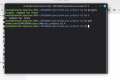
I see the path of the project in the terminal-it has spaces. Do I just delete spaces in that line using the terminal to edit then click enter? I can't backspace before the dollar sign to edit the path. What about all the other files and folders in that path-if any, do I access them to delete spaces and if so, how do I access the files and folders? I'm afraid of doing irreversible damage. The project is in the default location.

Screenshot terminal path.png
 
Last edited:

trebla

Joined Jun 29, 2019
599
You can rename the project but i think for you is simpler to create a new project with new name without spaces in it. You can then create new empty c file and copy contents from old projects c file in MPLAB X editor windows. Don't forget to set new project to main project before compiling.

Are you sure the PIC chip you use is good? Maybe you can try another one.
 

Thread Starter

Arjune

Joined Jan 6, 2018
354
You can rename the project but i think for you is simpler to create a new project with new name without spaces in it. You can then create new empty c file and copy contents from old projects c file in MPLAB X editor windows. Don't forget to set new project to main project before compiling.

Are you sure the PIC chip you use is good? Maybe you can try another one.
I don't think I put spaces in my filename--maybe it was generated by my mplab x IDE. Before I tried a pic16f628a then I bought the pic16f627a --all giving the same error. Any how I will try another pic16f627a.
 

Thread Starter

Arjune

Joined Jan 6, 2018
354
Program successful with no spaces in filename path! Led is blinking!
Maybe I spoke too soon, I can't program the device again. I tried different chips and failed.:mad:
 
Last edited:

Thread Starter

Arjune

Joined Jan 6, 2018
354
Since my blinking led program failed, can someone give me another program to try, to do something else with the pic16f627a. Maybe an oscillator for a specific frequency that is audible with a speaker. Maybe something more simple like just turning an output high. Also tell me of an 8pin pic microcontroller that I can try so I can order it on ebay. Maybe the government hacked my computer and that is why I failed to program the PIC. I think I failed because no one believes in me, I have to believe in everyone. There are limited amounts of programs on the internet--like it was deleted. I am forced to go to college and pay money for privileged information.
 
Last edited:

Thread Starter

Arjune

Joined Jan 6, 2018
354
Since my blinking led program failed, can someone give me another program to try, to do something else with the pic16f627a. Maybe an oscillator for a specific frequency that is audible with a speaker. Maybe something more simple like just turning an output high. Also tell me of an 8pin pic microcontroller that I can try so I can order it on ebay. Maybe the government hacked my computer and that is why I failed to program the PIC. I think I failed because no one believes in me, I have to believe in everyone. There are limited amounts of programs on the internet--like it was deleted. I am forced to go to college and pay money for privileged information.
I get an unexpected exception error--java heap space --at startup, and I don't know if its the IPE or IDE. I don't know what to do.
 

trebla

Joined Jun 29, 2019
599
MPLAB IDE and MPLAB IPE are different programs and both use Java to run. If you open your project in IDE then you don't need to run IPE for program the chip, you can do it right fom IDE. Sometimes IDE shows unexpected exeption error after installing some plugins or packs, usually it does not affect IDE-s working state. If the error stays, then try to deactivate recently installed packs or plugins.
 

Thread Starter

Arjune

Joined Jan 6, 2018
354
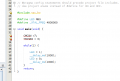
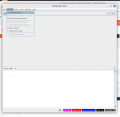
I installed v6.00 of the IDE. The cmcon and trisb3 is underlined red in the program-is this a fault? Also it seems the IPE didn't install properly. Screenshot 1mplabide.pngScreenshot ipev6.png
 

Thread Starter

Arjune

Joined Jan 6, 2018
354
These lines look OK to me. The ide does sometimes flag lines that it thinks are wrong which are perfectly fine. The compiler has the final word.
I installed MPLAB X IDE v 6.05 and get the same error I checked electrical conduction of connections on the breadboard and they are fine. I ordered chips from DIGIKEY, maybe they sold me bad chips on eBay, the pic16f627a and pic16f628a. When they come in the mail, I'll try them. Did anyone have success with these chips and the Pickit3 with the program I am using to blink an LED?
 
Last edited:

AlbertHall

Joined Jun 4, 2014
12,626
So, probably, there is a problem with the connections between the PIC and the pickit3 or there is no power to the PIC.
Is this circuit on a breadboard?
Is the PIC powered from the pickit3 or by an external supply?
 

Thread Starter

Arjune

Joined Jan 6, 2018
354
So, probably, there is a problem with the connections between the PIC and the pickit3 or there is no power to the PIC.
Is this circuit on a breadboard?
Is the PIC powered from the pickit3 or by an external supply?
Connections on the breadboard is OK and connections from the PIC and pickit3 is fine--I checked continuity with my multimeter. There is external power to the pic device with a 7805 regulator and it is recognized by the IPE when connecting to the pickit3. I was wondering if spaces on certain folder names could be the problem. The project filename has no spaces but where else could there be a problem with spaces; can you advise me what these folder names are and how to find these folders and how to make corrections if necessary?
 
Last edited:

trebla

Joined Jun 29, 2019
599
The project filename has no spaces but where else could there be a problem with spaces; can you advise me what these folder names are and how to find these folders and how to make corrections if necessary
If you are installed the MPLAB in default location (usually /opt/microchip/mplabx/v6.xx) , then there is probably no problems, check only your project path. Can you write the hex file i uploaded for you? Check that the folder name path where this hex file resides is without spaces.
 

Thread Starter

Arjune

Joined Jan 6, 2018
354
If you are installed the MPLAB in default location (usually /opt/microchip/mplabx/v6.xx) , then there is probably no problems, check only your project path. Can you write the hex file i uploaded for you? Check that the folder name path where this hex file resides is without spaces.
It's in the default location. There are no spaces in your hex file name. I tried your hex file again and couldn't write it, I get the same hex error as before. By spaces, you mean blank spaces and not hyphens or underscores, right?
 

Thread Starter

Arjune

Joined Jan 6, 2018
354
Hyphens and underscores are ok. I upload a new hex file which is compiled on the Linux machine and tested to programming and working on the PIC.
I'm sorry Trebla, your new hex file produces the same error. Could it be that all the PIC chips I bought on eBay are faulty. I'm not sure but maybe I bought the 628a from AliExpress. I tried both the PIC16f627a and PIC16f628a, I mean, once in a while-maybe two times they were programmed successfully. What about spaces in the C program itself--could that be an issue that could effect the hex output when building. I have a strange feeling that invisible spaces are being injected into the program and hex file by a malicious source to make it fail-someone doesn't want me to succeed at this--this is my paranoia however. What about 32 bit libraries--I did install some of them when I installed the IDE as instructed on the internet search. Are there 32 bit libraries that may be missing? I have a 64 bit system and I learned that the IDE is a 32 bit program. The installation file said it was 64/32 bit on the microchip website and I'm confused what it really is.
 
Last edited:
Top