Do you mean the Notification tab? This is accesible via Window->IDE Tools->Notificatons menu itemsI lost that configuration error tab -near the output tab, on the bottom of the screen to the right because I X it out by accident
If you want to use external power for the target PIC device then you must configure IPE power settings to off (do not power target from PicKit3).Also, please explain the settings of the IDE to how I route my external 5v power to the Pickit3-target device. How do I make sure I'm seeing the right windows for my current project also?
I think you're right, configuration loading errorI find assembler much harder than C so I use C exclusively.
I have attached an image of my MPLABX screen. Do you mean the 'Output - Configuration Loading Error' tab that is missing?
If so that appears when first loading MPLABX.
I rather try to resolve the current dilemma with the picIf you have not programmed in ASM or C, I would suggest starting out with a different MCU, one that is easier to follow. My choice would be TI MSP-EXP430G2ET LaunchPad.
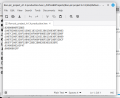
:02400E00783FF9
So should I try replacing your line of hex to my line of hex and then try programming the device? I think I can edit my hex file with my text editor then load the changed hex file. Maybe the LED will be blinking then if flashing succeeds with no error? Am I thinking correctly?The Intel HEX file format is explained here. I tried to reproduce your code with MPLAB X 6.25, unfortunately it does not support PicKit3 anymore and i don't have any pic16f627A chips so i have not actually tested this. But i see difference in hex files, in second line from the end:
Code::02400E00783FF9
Your hex file failed and your C program failed also. They said add the CMCON =7; to turn off the comparators before the TRISB3=0;. Can you build the program again with the CMCON = 7; (the instruction difference) line and produce the hex file and let me know it so I can try it?You can try write my hex file to PIC and see if that works, no need to edit your hex file. Also, please look at the newmain.c file, is there same instructions compared to your program?
Thank you MrchipsYou cannot just edit a hex file and expect it work.
Each line of the hex file is there for a purpose. Plus, there are checksums in the line.
Programming with the newly loaded hex file also failed. Something must be wrong on my end.Added CMCON =7 and compiled.
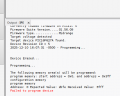
I have a 5v power supply with a 7805 regulator going to the power pin of the PIC and connected to VDD of the pickit3 and ground. The low voltage LVP pin is unconnected. I measured the voltage for fluctuations during flashing and there is none. There is no pull up resistor from pin 1 MCLR to VDD....I added a 10K pull up resistor. Programming still fails. I get this message from the ide output:Some of the files in this Project "Ron-pic project A1" contain spaces or odd characters in their name or their path. This could potentially cause issues during the build process. This is a limitation of GNU Make tool that we use as part of our build process. Removing spaces from all file and folder names included in this project will eliminate this potential issue.ome of the files in this Project "Ron-pic project A1" contain spaces or odd characters in their name or their path. This could potentially cause issues during the build process. This is a limitation of GNU Make tool that we use as part of our build process. Removing spaces from all file and folder names included in this project will eliminate this potential issue. What does this mean?How do you feed power to the PIC during programming?
Some processes in Linux do not work correctly if filenames or folder names contain spaces or non-US alphabet characters. I use always underscore _ character in filenames if i need separate some parts in this name. Maybe this will be the issue.Removing spaces from all file and folder names included in this project will eliminate this potential issue. What does this mean
How do I find the files and paths that I have to remove spaces or odd characters from filenames. I don't know what this is referring to. I have to be sure the project will find the files after removing spaces or odd characters.Some processes in Linux do not work correctly if filenames or folder names contain spaces or non-US alphabet characters. I use always underscore _ character in filenames if i need separate some parts in this name. Maybe this will be the issue.
Do not include standard PIC header file, for MPLAB X projects is only #include <xc.h> needed (path to actual chip header file is generated automatically in MPLAB X), *.inc files are needed headers for assembler programs, if you use only C then do not include this file. And i suggest make clean build (Clean and Build Main Project) after you are made some changes in your project, this will eliminate unnessesary and potentially conflicting content from your project.
Today, back in my workshop, i copied this project to my Linux machine (Kubuntu) and compiled with the MPLAB X 6.20. Programmed the PIC16F628 old version chip with PicKit3 directly from MPLAB X IDE. Chip is powered from PicKit3, MCLR pin is connected to VDD via 10k resistor and a 100nF capacitor is connected between VDD and VSS pins. I get only warning that the chip ID is incorrect because i programmed the same hex file generated for PIC16F627A to PIC16F628-04 chip. But programming was successful and the LED starts flashing.
If this HEX file i sent to you does not write to chip then this will be caused from:
-bad connections between programmer and chip
-lack of pullup 10k resistor and 100nF capacitor (althrough i was able to program without one)
-confict between onboard power and PicKit power sources, use only one of them in same time
-bad file and folder names in project path
-bad chip
-bad PicKit
I hope the installation directory of the MPLAB X is in default location, then there is no problems. Problem may be lay in your project directory. Navigate to your project folder and make right click on the folder name. Depending of the file explorer app there may appear drop-down menu where you can choose to open terminal in this location. In therminal window type in pwd command and you will see full path of this folder. Alternatively just open terminal window and navigate to the project directory with ls -l and cd commands. Usually is the default location for yor project /home/Your_user_name/MPLABXProjects/Your_project_nameHow do I find the files and paths that I have to remove spaces or odd characters from filenames.