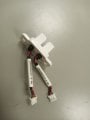
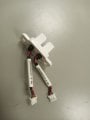
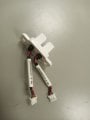
Hi, everyone I have one bubble detector sensor but I do not know how to test its working if someone can guide me or can share something about this sensor that would be highly appreciable thank you
Do you have the complete device, including the electronics package, battery, and the display? or just the actual sense portion, light source, support, and light sensor? If it is a battery powered package, the first step is to see if the battery is able to power it. If this is an IV bubble sensor, the battery may not be able to power it.
If it is an actual "BUBBLESENSE" brand of sensor with the two fiber optic cables, that is quite different. I know a lot about those sensors because I designed the electronics package.. And built a few prototypes.
So we will need a description, although part number and data sheet would allow you to be able to check it.
If it is neither of those, we will still need a description.
Hi, everyone I have one bubble detector sensor but I do not know how to test its working if someone can guide me or can share something about this sensor that would be highly appreciable thank you
Hi, everyone I have one bubble detector sensor but I do not know how to test its working if someone can guide me or can share something about this sensor that would be highly appreciable thank you
Do you have the complete device, including the electronics package, battery, and the display? or just the actual sense portion, light source, support, and light sensor? If it is a battery powered package, the first step is to see if the battery is able to power it. If this is an IV bubble sensor, the battery may not be able to power it.
If it is an actual "BUBBLESENSE" brand of sensor with the two fiber optic cables, that is quite different. I know a lot about those sensors because I designed the electronics package.. And built a few prototypes.
So we will need a description, although part number and data sheet would allow you to be able to check it.
If it is neither of those, we will still need a description.
OK, what I see is a beam-break optical sensor, able to sense solid objects as well as bubbles. Mostly this type of device is used to detect mechanical motion, not bubbles passing through a tube. One side has a light source and the other side has a light sensor.
I am making a guess that this is a functioning item and not a failed item that has been replaced.
Testing this device will require both a voltmeter/multimeter and an adjustable DC power source. Also required are pieces of solid wire able to enter the openings of the connectors, OR, two 0.025 Inch square connector pins.
The first step will be a close examination to see if there is any marking that identifies which side is the light source. If there is no marking seen, then the next step will be to determine which side is which.
This can be done easily if the available multimmeter has the ability to measure diode forward voltage drop. The check may need to be done on both sides. Connect the meter to one connector, positive to the red side, negative to the black side, and set the mode to measure diode forward drop. If a voltage between about 1.2 volts and 2 volts is read, that is probably the LED side, if an open circuit is indicated, reverse the polarity of the connections and see if that indicates a voltage in that range. If not, set to the resistance range and observe the reading, if it shows open circuit, reverse the polarity of the connection and check in that direction. If a fairly high resistance in either direction is indicated, it may be the sensor side. In that case, shine a bright light onto the sensor gap and note if the resistance reading changes. If it does, then that is the sensor side..
Checking for actual functioning would be next.
Now I see that within the white tubes must be some circuitry, since each connector has three wires while each probe side only has two wires. Unfortunately I did not use the magnified view the first time I looked at the photo.
WShat is missing is another view of the device and some reference as to the actual size. It may be larger than the optical interrupter devices I am familiar with. A search using that part number on the white sleeves may show something.
Now I see that within the white tubes must be some circuitry, since each connector has three wires while each probe side only has two wires. Unfortunately I did not use the magnified view the first time I looked at the photo.
WShat is missing is another view of the device and some reference as to the actual size. It may be larger than the optical interrupter devices I am familiar with. A search using that part number on the white sleeves may show something.
Searching sleeves part number is not showing anything and this sensor works on ultrasonic technology in which one side is the transmitter and other side is receiver and there is gap between these two in that gap tube will be inserted and if there is bubble inside the tube or air in tube then this sensor give high TTL output but the problem is that I just want see the output signal and this I am not able to see and I don't know how to test this sensor thanks for your reply
If you are able to verify that both red wires are the +5 supply, or maybe the +12 volt supply, then it should be possible to power both and observe the voltage on the third terminal. And then put a piece of the right type of plastic tube into the gap, and put some water into the tube, and observe the output change state.

 Facebook
 Google
 GitHub
 Linkedin