How to make the pcb for this schematic?

Thread Starter

alekwyp

Joined Mar 19, 2025
14
Hi!

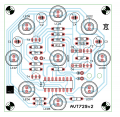
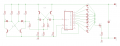
Its my first time working with eagle and i dont really have a clue how to even start. I want to make a PCB for this schematic but I don't know how to route the traces on the PCB or where to place the components at all. Could someone help me please? That's the schematic im working with. The LEDs light up sequentially in 2 different speeds, and the middle one is on all the time. The source will be a 9V battery. I need all the routes to be on the bottom of the PCB, but maybe adding some wire bridges would help? I've also attached the files below.
1743377192041.png
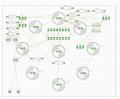
That's the PCB, i didnt really do anything here, just put all the elements, and diodes in a correct order in a circle.
1743377252099.png
 

Attachments

MrChips

Joined Oct 2, 2009
34,628
You have created two files, the schematic file in .sch and the board file in .brd.

In the .brd window, you can begin manual routing.
You can go to the Edit menu and select Route.
Or, what most people would prefer to do, is look on the icons at the left side of the screen and click on the Route icon.

Now select an air-wire on the board screen and start routing. It is that simple. Usually, the tracks on the bottom layer are coloured in blue.
 

nsaspook

Joined Aug 27, 2009
16,250
Here is a possible starting point for you to get started with. Used zero ohm resistors to connect GND and VSS, added and moved things around a bit.
Traces on the bottom with a GND pour on the top.

Not checked for proper circuit operation or even PCB parts placement on the board, just no DRC or ERC errors.
 

Attachments

Thread Starter

alekwyp

Joined Mar 19, 2025
14
I get these errors, when im trying to open the file that you sent:
"
Warning(s):
line 7: unknown attribute 'keepoldvectorfont' in tag <setting>
line 1323: unknown attribute 'urn' in tag <library>
line 1327: unknown attribute 'library_version' in tag <package>
line 1327: unknown attribute 'urn' in tag <package>
line 1370: skipped unexpected tag <packages3d>
line 1379: unknown attribute 'urn' in tag <library>
line 2428: unknown attribute 'library_version' in tag <package>
line 2428: unknown attribute 'urn' in tag <package>
line 2453: skipped unexpected tag <packages3d>
Error:
line 2462, column 10: redefinition of name 'rcl' in tag <library>
"

Am i missing some libaries that you used?

Maybe its because im using an old eagle version 6.6
 
Last edited:

nsaspook

Joined Aug 27, 2009
16,250
I get these errors, when im trying to open the file that you sent:
"
Warning(s):
line 7: unknown attribute 'keepoldvectorfont' in tag <setting>
line 1323: unknown attribute 'urn' in tag <library>
line 1327: unknown attribute 'library_version' in tag <package>
line 1327: unknown attribute 'urn' in tag <package>
line 1370: skipped unexpected tag <packages3d>
line 1379: unknown attribute 'urn' in tag <library>
line 2428: unknown attribute 'library_version' in tag <package>
line 2428: unknown attribute 'urn' in tag <package>
line 2453: skipped unexpected tag <packages3d>
Error:
line 2462, column 10: redefinition of name 'rcl' in tag <library>
"

Am i missing some libaries that you used?
Likely lets see if I can export it from 9.6.2 to Eagle 7
 

Attachments

Thread Starter

alekwyp

Joined Mar 19, 2025
14
Yes it Was, however i can't use it, because i can't add additional elements except wire bridges. This is a complete project with a working PCB, however my task is to make a new pcb using the same elements but in different order than originally.
Thats the originall PCB. Thank You for the help though :)
1743396925733.png
 

boostbuck

Joined Oct 5, 2017
1,033
To 'manual route' your board, click on menu Edit-Route (or equivalent shortcut icon on the left) then select one leg of a component. The associated airwires and destinations will change colour and you drag copper (make sure layer 16-Bottom is selected) using your mouse and the buttons on it. Move your components layout to facilitate copper layout and minimize jumps.

To perform a bridge or jump, while pulling copper with the mouse click to stop the copper at a point, select layer 1-Top and pull to the end of the jump, then select 16-Bottom and continue. Vias will be placed where you changed levels.
 

nsaspook

Joined Aug 27, 2009
16,250
Yes it Was, however i can't use it, because i can't add additional elements except wire bridges. This is a complete project with a working PCB, however my task is to make a new pcb using the same elements but in different order than originally.
Thats the originall PCB. Thank You for the help though :)
View attachment 345732
As I suspected. You asked for help, not for the complete job to be done for you. Your task now, if you really want to learn, is to remove the additional circuit elements I added to fix the original poor circuit design.
 

meth

Joined May 21, 2016
298
If the LED's have to be in circle with one in the middle I dont think you have too much freedom changing the layout of the other parts (with 1-layer PCB).
If the LED's can be in any arrangement.. maybe place all of them in line with one side connected to GND and begin solving your Sudoku to the other side.
 
Top