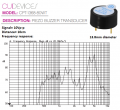
Around 60 decibels, is that loud for a small speaker?I suggest using a chip recorder like a surface mount ISD1610, wouldn't need a micro. How loud does it need to be?
I don't expect to be holding the button down for more than 15 seconds? Even that is a stretch.Not sure but can test later today as I have that chip.
What's the max time you need the sound for when the button is pressed?
Hello! Thank you for providing this code. There are a couple modifications I'd need, but I'm not super familiar with this coding language.Sounds like a simple alternating tone between two high pitched frequencies. I think it would be fairly simple to generate on an ATTiny85.
I use the Arduino IDE and a programmer from Sparkfun to program the ATTiny85. There is a command, tone(), which plays a tone through a pin to a piezo speaker.
The following code example would work.
UPDATE: I missed the pushbutton switch. It is easy to modify the sketch to use a pushbutton. Let me know if you need help in modifying the code.Code:unsigned int hitone = somevalue; unsigned int lotine = anothervalue; unsigned int timetone = xxx; unsigned int outpin = pp; while (-1) { tone(outpin, hitone ); delay(timetone); tone(outpin, lotone); delay(timetone); }
I can easily modify the sketch to do both of those things. BUT, you’d need to supply the frequency of the high and low tones and how fast you’d want them to change.Hello! Thank you for providing this code. There are a couple modifications I'd need, but I'm not super familiar with this coding language.
Primarily, I would need the code to be modified for the push button. But if it's possible to run two things at once on the microcontroller, I'd also want a light that turns on and off alongside the speaker.
It seems like the ISD1610 is made for recording and playback? Unless it can generate sounds as well, I feel like that would require a bit more work to get it to loop a short sound and stop immediately.I can easily modify the sketch to do both of those things. BUT, you’d need to supply the frequency of the high and low tones and how fast you’d want them to change.
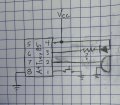
I could assign pin numbers for the pushbutton, the light and the speaker assuming an ATTiny85. But I am leaving for vacation so further support would have to wait until I return in a week or so.
In the meantime, if I were you I’d follow up on the ISD1610. It might be a better fit for your application.
I had a few minutes and I wrote the code for what you asked. There’s probably room for improvement, but this should work.It seems like the ISD1610 is made for recording and playback? Unless it can generate sounds as well, I feel like that would require a bit more work to get it to loop a short sound and stop immediately.
I'll most likely order an ATTiny85, since I found one that comes with a programmer as well. As for the wait, it will take at least a week to get here anyways, so I should be good on that regard.
// Sonic Screwdriver
#define Forever TRUE
int hitone = somevalue; // must be replaced with a freq.
int lotone = anothervalue; // must be replaced with a freq.
int timetone = 300; // modify to make desired buzz
int trigger = 0;
int sound = 1;
int light = 2;
void setup() {
pinMode(trigger, INPUT_PULLUP);
pinMode(sound, OUTPUT);
pinMode(light, OUTPUT);
}
void main() {
while (Forever) {
noTone(sound);
digitalWrite(light, HIGH);
while (digitalRead(trigger) == LOW){
digitalWrite(light, LOW)
tone(sound, hitone );
delay(timetone);
tone(sound, lotone);
delay(timetone);
}
}
}

If you record the sound for the full 20 seconds using a ISD1620 then it wouldn't be a problem. Each press of the play button starts from the beginning.I don't expect to be holding the button down for more than 15 seconds? Even that is a stretch.
Hello! One more quick thing, since I'm struggling to find it.I leave Friday night, so probably will answer any questions until then.
No, I don’t know. But 1.1mm is extremely small. Like a strand of spaghetti. Are you sure that’s the width?Hello! One more quick thing, since I'm struggling to find it.
Would you happen to know what battery would fit in a container the size of my provided dimensions (1.1mm wide)? Or at least what battery that size would have a holder I can buy for it?
Apologies, I meant 1.1cm, or 11mm.No, I don’t know. But 1.1mm is extremely small. Like a strand of spaghetti. Are you sure that’s the width?
Hello again! Quick question.An ultra bright LED of the desired color is connected via a resistor to pin 3. The resistor value depends on the voltage supplied, the LED characteristics (Vf and IMAX) and limiting current to 5-10mA. If you need assistance in calculating the resistor value, supply the above parameters.
I routinely check LEDs with no series resistor tp limit the current. OF COURSE, a bit of sense is required to avoid causing damage. The check always starts well below the normal forward voltage, and of course the LED is observed while checking. An LED will usually start to illuminate about a volt below the published forward voltage. Just like a diode, the transition from non-conduction to full conduction is not a single point occurrence.Nobody makes a 3V LED because it is not simply a very hot piece of wire, instead it is a special diode.
1) All diodes have a range of voltages, an LED diode might be from 2.7V to 3.3V but typically be 3.0V.Then with a 3.0V supply, a 2.7V LED will instantly burn out and a 3.3V LED will not light.
2) The LED voltage changes with temperature changes even as it warms up. Then the heating might cause its voltage to drop increasing the current which increases the heating and it continues heating until it burns out.
I somewhat understand? Not completely, but enough to rephrase my question.Nobody makes a 3V LED because it is not simply a very hot piece of wire, instead it is a special diode.
1) All diodes have a range of voltages, an LED diode might be from 2.7V to 3.3V but typically be 3.0V.Then with a 3.0V supply, a 2.7V LED will instantly burn out and a 3.3V LED will not light.
2) The LED voltage changes with temperature changes even as it warms up. Then the heating might cause its voltage to drop increasing the current which increases the heating and it continues heating until it burns out.
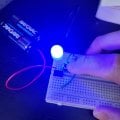
That's odd, then. With my current setup the light is very adequately bright with only 2 AAs powering a microcontroller.A microcontroller powered with 3.0V will not produce an output of 3.0V at 20mA, Its unloaded output will be 3.0V but loaded with 20mA it might produce only 2.5V.
The specs for your blue LED says 3.0V to 3.4V. If it is actually 3.4V then will it light up when fed only 2.5V? I doubt it.
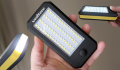
I have a modern but cheap flashlight that has 60 white surface-mount LEDs in parallel and all matched for voltage and brightness and powered by three AAA "Sooper Heavy Dooty" battery cells with no current-limiting resistor. When the cheap battery failed I replace it with Name-brand alkaline cells and now the brightness is blinding.

And what will it be when the battery voltage drops to 2.5V? Batteries are at their rated voltage for only a small part of their useful lifetime. And what would it be if you manufactured 1000 boards and some of the LEDs were at the high end if 3.4V?That's odd, then. With my current setup the light is very adequately bright with only 2 AAs powering a microcontroller.