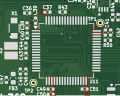
How to design a PCB to allow current measurement of each device ?

Thread Starter

freeflyer

Joined Sep 9, 2016
148
I desinged a PCB for a battery powered application but it is drawing more current than I expceted.

I am about to redesign the PCB and would like to be able to measure the current draw of each device on the PCB.

The PCB is 4 layer (the inner layers are power and ground).

Is there a method I can use when designing the PCB that will allow me to measure the current draw of each device ?

I can't see how it can be done, because each device has via's to the power planes but these would need to be made open circuit so that the current measurement can be made.

I thought about using a zero ohm resistors/links, but can't see how this would work espeically when a device has multiple power pins such as an MCU.

Then I have a concern about affecting the impedance of the power source. The via's (which are close to each device) provide a low impedance path. But if I were to add zero ohm resistors for each power source then could this affect the impedance ?

In which case implementing functionality to allow current measurement of each device would create further problems ?
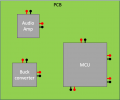
1766179618493.png
 

schmitt trigger

Joined Jul 12, 2010
2,027
Don’t use a zero-ohm jumper as a resistor. Even though it does have a low value resistance, it is not tightly defined as a proper low-ohm resistor would be.
By low-ohm, I mean at or below 1 ohm.
 

Thread Starter

freeflyer

Joined Sep 9, 2016
148
Thanks, but how do I handle devices that have multiple power pins (such as the MCU) ? I would have to fit multiple links for each power pin and then is there a risk it could affect impedance etc ? For example, if the MCU HAS 6 pairs of power pins then I would need to add 6 links and somehow open these links so that I could measure the current draw. Bearing in mind there will be decoupling capacitors at each pair of power pins and these need to be close to the device.
 

WBahn

Joined Mar 31, 2012
32,703
If the problem is that some device is drawing more power than expected, then the focus needs to be on identifying the part and then making appropriate changes to the design. Those changes will almost certainly necessitate a new PCB design.

So don't try to design a final PCB that allows you to measure the currents to each device. Instead, if possible, breadboard the design and measure the currents that way. If a PCB is unavoidable because of the packages involved, then design a PCB whose sole purpose is going to be making these tests. Don't worry about messing up the performance -- that's not the goal.

For parts that have multiple power connections, route them to a single point near the device, take that through a jumper, and then pin the other side to the power plane. You can then install a current sensing resistor on the jumper when you want to measure the current, and a shorting jumper when you don't. This allows you to easily change resistor size to get a reasonable signal without excessive voltage drop. An alternative is to put the sensing resistor on the board in parallel with the shorting jumper.

Perhaps an even more important task is going to be learning why you missed the expected current draw of your design in the first place, so that you do a better job in the future.
 

Thread Starter

freeflyer

Joined Sep 9, 2016
148
Thanks all, the issue is that I have already used development boards and jumper wires to develop both the hardware and software before designing the original pcb.

But for some reason, and I don’t know why, the development board with jumper wire setup drew less current than the original pcb, even though electrically they should be the same (I even removed leds and level shifters from the development board to try and match my pcb).

So when I redesign my pcb, I was wondering if there was a way to isolate the. power to each device so I could find where there might be an issue
 

WBahn

Joined Mar 31, 2012
32,703
If your final PCB and your development setup draw significantly different power, then the two are not electrically the same -- something is different, even though you might not realize it.

Another approach is to incrementally populate a PCB and measure the total supply current at each step. Look for the big jump, keeping in mind that the problem might not be with the newly added part, but perhaps the addition of that part is causing an additional draw by one of more of the others. Still, it should significantly narrow the search. Don't be afraid to do surgery on this board -- it's a temporary diagnostic took, so don't develop an emotional attachment to it (that's what my shooting coach says about empty magazines).
 

panic mode

Joined Oct 10, 2011
4,864
do surgery on the existing board - cut power trace at strategic locations and measure current of each stage. when done, you can patch it up - treat it like solder jumper or place a resistor.
 

WBahn

Joined Mar 31, 2012
32,703
do surgery on the existing board - cut power trace at strategic locations and measure current of each stage. when done, you can patch it up - treat it like solder jumper or place a resistor.
May be easier said than done since it's a four-layer board with inner planes being power and ground. A lot depends on whether it was laid out with rework in mind (my guess is that it wasn't).
 

schmitt trigger

Joined Jul 12, 2010
2,027
If your final PCB and your development setup draw significantly different power, then the two are not electrically the same -- something is different, even though you might not realize it.
This. Exactly this.
If I had a dollar each time someone has said that their actual physical circuit is exactly IDENTICAL to so-and-so, but the latter works and the former doesn’t……I still wouldn’t be a rich person but I would have had lunch in an expensive restaurant.
 

Thread Starter

freeflyer

Joined Sep 9, 2016
148
Thanks all,

I posted about the excessive current draw on an earlier post which has details about the design...

https://forum.allaboutcircuits.com/...-current-when-devices-are-in-shutdown.207854/

I have compared the scematics of the development boards to the schematic of my PCB and cannot see any differences. This is why I took the time and effort to remove componets that were on the development board that were not on my PCB (such as LEDs, level shifters, voltage regulators etc).

Unfortunatley I think it will be difficult if not impossibole to isolate the power for each device on my original PCB, because the PCB is very compact and some of the compoents are very small with pins underneath the package. It would require specialist tools to remove or fit these components.

Even with the specialist tools, the tracks and via's to the power plane are very short (as they should be) so I can't see how it would be possible to isolate the power anyway.

I have changed the design which is why I am redesigning the PCB, I am now using a different bluetooth receiver and a different amp (which uses I2S instead of analogue).

Due to the very small components I cannot assemble the PCB myself, so I cannot incrementally populate the PCB and measure the total supply current at each step. I had to pay the manufacturer to assemble the PCB.

The current draw issue is when the device is in shutdown so the excessive current is small, but this is a small battery powered device that I want to last as long as possible during shutdown (weeks or months).

I saw a post on Linkedin where someone was having the same issue and it turned out to be the PCB had not been properly cleaned by the manufactuer (left over flux etc). So he cleaned the board and it fixed the leakage current.

It seems there is no method to isolate the power to each device, unless I make a larger board with links to connect each device to the power plane. So I might just have to hope that the new design does not have the same issue.
 

MisterBill2

Joined Jan 23, 2018
27,164
A completely different option would be to use a good resolution thermal camera! Whatever device is using the most power will probably be the warmest, and that will show you where to investigate.
From your comments it also seems that there are a few surface mount active devices on the PCB. So lifting pins is not an option.
So certainly the thermal camera makes sense.
It is not likely to be able to work in the standby mode.
 

Thread Starter

freeflyer

Joined Sep 9, 2016
148
A completely different option would be to use a good resolution thermal camera! Whatever device is using the most power will probably be the warmest, and that will show you where to investigate.
From your comments it also seems that there are a few surface mount active devices on the PCB. So lifting pins is not an option.
So certainly the thermal camera makes sense.
It is not likely to be able to work in the standby mode.
Thanks but I already tried this as explained in my other post (post #12)...

https://forum.allaboutcircuits.com/...-current-when-devices-are-in-shutdown.207854/

As I am looking at a current of less than 2mA I have doubts that a thermal camera could pick this up
 

Thread Starter

freeflyer

Joined Sep 9, 2016
148
The ICs with multiple power pins - how sure are you that those are independent and not internally connected?
I have no idea, but even if they were, it would be difficult if not impossible to cut the very short track going to the via that connects it to the power plane.

1766263309038.png
 

drjohsmith

Joined Dec 13, 2021
1,549
a few things to remember
by puting putting power down tracks or resistors, your affecting the noise voltage seen by the chip. It may or may not have an effect on the chips performance , or even change its current consumltion. you need to be aware of and decide if its significant for you

current consumltion across a resustor nedds to be meassured differential, so if you use a scope, you nedd an appropreat probe setup.

if you use a volt meter to meassure current , remember the current might not be linear / constant. i.e. a micro, might turn on forv10us, take 10mA, then turn off for a second taking 100 nA. what your meter might read needs to be decoded, dependng on the meter

personaly for a first test , i like to use a multimeter , then a differential probe setup.
 

MisterBill2

Joined Jan 23, 2018
27,164
OK, another inspiration that would be ONLY FOR DEBUGGING.!! Add another layer to the stack.Presently it is a four layer PCB. DO NOT CHANGE any of those layers! add one more with power monitor connections. With the addition you can add a lot of probe points, although you might need to add some small breaks so that you could isolate the different power connections. Adding one more board as a one-off effort can provide a lot of access. Then after the problem is solved, return to the four layer version, and hope that the added layers were not the permanent fix.

And a question: Is that photo in post #17 the entire PCB?? OR, are you 'only showing us what you think we need to know"??? That happens a lot, and often the problem has been from the portion we are not shown.
 

drjohsmith

Joined Dec 13, 2021
1,549
more current than you expected ?
what were you expecting?
what do you get ?
not having your circuit or design notes,
we can but speculate
common reasons for rouge power :
a. design not working as expectec
b. pull ups / pull downs
c. phantom power , a chip thats meant to be off, having power / signal applied to io pins, power getting in via the inherant esd diodes of the silicon.
 
Top