How to control two identical DVRs independently

Thread Starter

AlbertHall

Joined Jun 4, 2014
12,625
I done a stupid thing:oops:
I have a DVR (digital video recorder) but it has a fairly limited number of things you can tell it to record. So I decided to buy a second one so that when the list on one was full I could record on the other. The big mistake was to buy the very same model as they will respond to the same remote commands. So pressing record will tell both machines to record whichever remote I use.

The new one hasn't arrived yet so I could send it back and buy a different one but...

Can anyone think of a way of only enabling only one (or the other) to respond to the remote?
 

LesJones

Joined Jan 8, 2017
4,511
Some of the Humax DVRs have the option of configuring alternative codes. I have the information how to do this somewhere.

Les.
 

MaxHeadRoom

Joined Jul 18, 2013
30,654
Do they have to be in exact proximity to each other, in some cases you can separate them just a small distance and place a small angled cover over the IR receiver.
Or as Les posted, alternate codes.
Max.
 

Thread Starter

AlbertHall

Joined Jun 4, 2014
12,625
Do they have to be in exact proximity to each other, in some cases you can separate them just a small distance and place a small angled cover over the IR receiver.
Or as Les posted, alternate codes.
Max.
It is one of the most 'generous' remotes - you can point it almost anywhere in the room and the DVR will respond - So I think this has a fairly small chnace of success.
 

Thread Starter

AlbertHall

Joined Jun 4, 2014
12,625
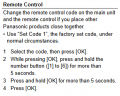
I just did another bad thing. I read the manual! I found the section below which does look like I can 'personalise' the remotes to a specific DVR.

Thanks guys.
Now I just need to wait until the new one arrives to try it out.
upload_2018-8-3_23-13-27.png
 

Thread Starter

AlbertHall

Joined Jun 4, 2014
12,625
Why don't you try it out on the one you have now? You will have the time to work out any problems in advance, so when the other arrives, it's plug it in and GO!
I have and I believe my present one is using code 2 but until I can try it with two of them I am not going to know, but it's looking good.
 

Dodgydave

Joined Jun 22, 2012
11,395
I have and I believe my present one is using code 2 but until I can try it with two of them I am not going to know, but it's looking good.
Just done this with my dvd and freeview recorder, dvd set to code2, freeview set to code1, it works a treat, to set the remote controls , just hold the code number and OK buttons together for 5 seconds, then its programmed. If you then use the wrong remote, the display flashes Code *
 

Thread Starter

AlbertHall

Joined Jun 4, 2014
12,625
An advantage occurs to me. Whichever one I am using, it is the same remote with the same buttons in the same place.
 
Top