How Could I Convert BenQ MS500 Projector to LED

Status
Not open for further replies.

Thread Starter

zakmuh

Joined Jul 25, 2016
59
Hi,

Hope you all are well. I need some help with converting my BenQ DLP projector lamp from halogen to LED. For this I need to bypass the ballast to trick the mainboard to say a lamp is present and working. This has 2 steps to follow:
1. Bypassing or fooling the ballast
2. LED lighting source (this is not an issue at all-I can get this sorted)

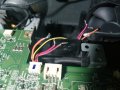
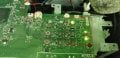
As you can see the attache pics.....there is a vertical circuit board connected to main power supply board and 5 wires coming from that to mainboard (connection port J13). At the moment with lamp removed and ORANGE, RED and BLACK connected (brown and yellow disconnected), the projector turns on the ballast and works for good 1min and then shuts down completely - no any lights on, not even stand by mode. .

Pin reference for J13 (5 set of wires coming from intergated ballast section):
PIN No5 - board marking TP48 - wire colour yellow - 3.3v (constant from flashing green to solid green, after tuning the projector on)
4 - TP49 - orange - 1.6v constant
3 - TP50 - red - 3.3v (constant like yeelow one above - this is the one turning on the ballast circuit - I could hear squeaking noise at start up)
2 - TP51 - brown - 3.3v (voltage drops to 0 when light turns solid green)
1 - TP51 - black - same like brown above 3.3v (voltage drops to 0 when light turns solid green)

During the 1 min period, its working as it should - I can see the menu on the screen. Would you think the thermal switch playing any role here for shutting it off after that 1 min?

Do above all make sense and point in any direction?

Any advice would be highly appreciated.

Cheers

Zaky


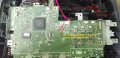
Power supply board with integrated ballast on the right
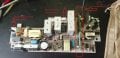
WhatsApp Image 2024-09-26 at 16.50.55.jpeg

Mainboard

WhatsApp Image 2024-09-26 at 16.50.52.jpeg


WhatsApp Image 2024-09-26 at 16.51.44.jpeg


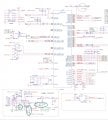
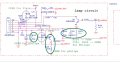
Schematic diagram

Schematic diagram.jpg
 
Last edited:

MisterBill2

Joined Jan 23, 2018
27,164
The difficult part will be the LED projection light source. The power will be simple, just put in a new power supply. But it appears that the preset supply also powers other portions of the projector.
 

Thread Starter

zakmuh

Joined Jul 25, 2016
59
The difficult part will be the LED projection light source. The power will be simple, just put in a new power supply. But it appears that the preset supply also powers other portions of the projector.
Hi Bill

Thanks for you reply. My idea is to use car HID light for this but thats the next task and I believe thats doable with a new power supply for LED. Getting the projector to run without a bulb and not shuttif off after 1 min, is the challenging part.

cheers
 

MisterBill2

Joined Jan 23, 2018
27,164
As I examine the circuit in more detail I see no hint as to the current lamp supply voltage. So it is likely that an entirely new power supply will be needed for the LED lamp. It also appears that there is a great deal of circuit not shown in the PCB schematic drawing. In fact, not one hint about powering the current lamp. So quite probably the present PCB will need to remain. It is clear that we see almost no portion of the illumination portion of the system.
 

Thread Starter

zakmuh

Joined Jul 25, 2016
59
Hi,

You can download the full schematic diagram here:
https://elektrotanya.com/benq_ms500...s513p_ver.00b_level3_sch.pdf/download.html#dl

Its one power supply board, which powers up the ballast section when RED wire send signals to J13 on ballast side. I think YELLOW one sends high voltage signal?

I'm not looking for a power source for the LED....Im after a method that can trick the main board and stop the ballast getting activated for powering up - this would then enable me to get rid of the halogen lamp, without mainboard shutting down the power after 1 min.

Cheers
 

Thread Starter

zakmuh

Joined Jul 25, 2016
59
Hi Guys

Heres a vidoe of my projector working....having the halogen lamp removed and LED powerd externally.


What would be the problem that it turns off after 1 min - power indicator goes off as well. I then have to wait for like 30 secs to turn it on.
 

Thread Starter

zakmuh

Joined Jul 25, 2016
59
I've got new voltage readings as follows...

When switched on (flashing green light)
Yellow (PIN 5-TP48) and Red (PIN 3-TP50) sends 3.3v to ballast board
Orange (PIN 4-TP49) reads 2.62v until the LED turns ON, and when LED is ON it goes to 1.36v
Brown (PIN 2-TP51) and black (PIN 1-TP52) 0v to 3.3v coming FROM ballast

LED stays ON for max 5secs and turns OFF. After its OFF
Yellow and Red same reading as above, 3.3v to ballast board
Orange comes back to 2.62v from 1.36v
Brown and black jumped to 0v from 3.3v

Projector would then run for max 1min, then cuts off

WhatsApp Image 2024-09-26 at 15.53.35.jpeg
 

MisterBill2

Joined Jan 23, 2018
27,164
Since the goal is to make the lamp control believe that the lamp is operating correctly, a logical start will be to understand how the lamp would operate correctly. That means knowing what sort of voltage is supplied to the lamp filament, unless it is a gas discharge lamp. That means that we need to see the portion of the circuit associated with the lamp operating correctly, rather then the portion warning us that it is not.
Thus far I have not seen any portion of the circuit directly connected to the lamp, nor read one word of description as to how the lamp system operates.
 

Thread Starter

zakmuh

Joined Jul 25, 2016
59
Hey Bill

Thanks for your reply mate but Im sorry, I dont know how to read a schematic diagram..so I'm struggling to find circuit for lamp. did you have a look at the link Ive given above for the full diagram?

Anyways...Ive managed to get the projector to work without shutting off for good 15 mins but again shuts down . As soon as the flashing green turned solid, I disconnected Orange (PIN 4-TP49) before it jumping back to 2.62v and this keep the projector ON.

So from this, I'll have to fit a switch to turn off the ballast for solid green light

Does this mean that when lamp is not present, ballast sending a high voltage, hence the system shutting it down?

Thanks
 

Thread Starter

zakmuh

Joined Jul 25, 2016
59
Morning Bill and others

New update:
Soon after power light turned solid green, I disconnected J13 (5 set wires) from mainboard and the projector runs all okay.

I think mainboard checking for ballast signal when loading-if all okay- its not bothered anymore and functions properly. I think I'll have to get a switch fitted to make it like pulling the choke before starting in a motorbike lol.

Im not a technician and have no much ideas how electronic works. So Ive been doing loads of trial-and-error method whole night long and got this to work. I need to investigate further to see if I could get this to work without disconnecting J13. I'll keep you posted.


J13 disconnected.jpeg
 
Status
Not open for further replies.
Top