
 Facebook
 Google
 GitHub
 Linkedin
Hello everyone!
First post, still pretty new to electronics, been doing a little audio stuff, guitar pedals and such... Starting to learn about arduinos and raspis, etc.
But this is something a bit different.
Long story:
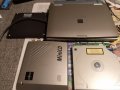
So I found an old laptop(Fujitsu Lifebook b142) in the trash way back and only got to playing with it now, finally got win 98 installed on it, which was a pain since it doesn't have a cd-drive and the external PCMCIA cd-drive i found with is apparently busted. So only an external floppy drive now. Had to remove the HD and connect it to a pc with an IDE to USB adapter, put in the win98 cd install files and yeah it's working, except for a broken right button of the mouse. Touch screen is pretty nice considering it's from around 99... Opened up the CD-drive and was wondering if you guys could help...
TLDR;
Busted Archos/Fujitsu miniCD PCMCIA -CDROM drive:
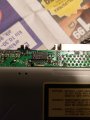
Sot it powers up, disc spins, read indicator up led lights up but the power indicator led doesn't. PC finds the PCMCIA adapter cable, but doesn't recognize the drive itself. Opened it up and found this 16pin IC which literally looks a bit burnt.
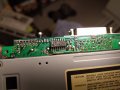
So I'm asking if an IC can burn like this, and if it is a likely culprit? If so, then any help identifying it and finding an alternative is welcome. The parts I can read seem to read:
f*B86AJ
M**4K*
4050M
Where "*" is for burnt. The f seems like a logo. The B on the first row might be an 8.
Thanks,
icgriller
First post, still pretty new to electronics, been doing a little audio stuff, guitar pedals and such... Starting to learn about arduinos and raspis, etc.
But this is something a bit different.
Long story:
So I found an old laptop(Fujitsu Lifebook b142) in the trash way back and only got to playing with it now, finally got win 98 installed on it, which was a pain since it doesn't have a cd-drive and the external PCMCIA cd-drive i found with is apparently busted. So only an external floppy drive now. Had to remove the HD and connect it to a pc with an IDE to USB adapter, put in the win98 cd install files and yeah it's working, except for a broken right button of the mouse. Touch screen is pretty nice considering it's from around 99... Opened up the CD-drive and was wondering if you guys could help...
TLDR;
Busted Archos/Fujitsu miniCD PCMCIA -CDROM drive:
Sot it powers up, disc spins, read indicator up led lights up but the power indicator led doesn't. PC finds the PCMCIA adapter cable, but doesn't recognize the drive itself. Opened it up and found this 16pin IC which literally looks a bit burnt.
So I'm asking if an IC can burn like this, and if it is a likely culprit? If so, then any help identifying it and finding an alternative is welcome. The parts I can read seem to read:
f*B86AJ
M**4K*
4050M
Where "*" is for burnt. The f seems like a logo. The B on the first row might be an 8.
Thanks,
icgriller
Attachments
-
 155.1 KB Views: 5






