H-bridge problemas..

Thread Starter

Captain E

Joined Jun 16, 2015
81
Hi..
Having some problem learning how to use the H-bridge I have indeed.
I have read and looked at a few tutorials on H-bridges, and on what I know, I think this should be working. I know what all the ports are for and what you do with them, so I wanted to make it simple for starters: turn the motor on any way around.
There is something I'm missing.

My circuit:
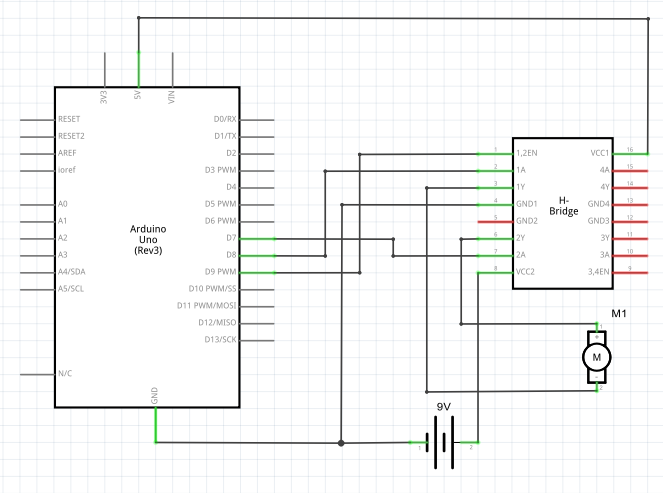
My code:
Code:
void setup() {
  pinMode(9, OUTPUT);    //enable pin
  digitalWrite(9, HIGH); //Motor is ON
  pinMode(8, OUTPUT);    //Control pin n.1
  digitalWrite(8, HIGH); //..set to HIGH
  pinMode(7, OUTPUT);    //Control pin n.2
  digitalWrite(7, LOW);  //..set to LOW 
}                        // =>motor should be spinning?

void loop() {
  // no need for this, JUST GET THE MOTOR SPINNING D':
}
TEACH ME THE WAY OF CORRECT CIRCUITS MASTERS :C
The arduino projects book I got isn't covering a lot of this :/

Q1: What am I doing wrong?
Q2: Why is there four ground pins on the bridge? Can I use one of them for connecting to ground with both my 9V power supply and the Arduino's ground?

Thank you!
 

pwdixon

Joined Oct 11, 2012
488
You need to tell us what h-bridge chip you are using.
I expect that you need to connect more GNDs on the chip perhaps.
 

pwdixon

Joined Oct 11, 2012
488
It looks like all four grounds on the chip must be connected for it to work correctly although the datasheet is not greatly forthcoming on the subject.
 

Thread Starter

Captain E

Joined Jun 16, 2015
81
Bro that chip is using circuit for running motor ... study data sheet for this IC.... Do not use high amp rating motor be care full and strict to IC rating
For running motor, yes I know, that's what I'm trying to do. Data sheet and I dont get along.. The motors are fine :3
 

Thread Starter

Captain E

Joined Jun 16, 2015
81
Still no progress.. Been sitting here for some time now with the damn bridge... :C
Have anyone of you used these ones before?
 
Last edited:

shortbus

Joined Sep 30, 2009
10,050
The grounds on the 293 serve two functions, they are grounds and 'heat sinks' for the chip. Don't know anything about Ardino's or any micro's, but looks like you have the 293 "en1-2" pin wired to a PWM output from the micro. If the output is a PWM it won't work, it needs a steady voltage of at least 3V minimum, to enable the 293.

And those chips are notorious for the voltage they drop across them. Your 9V is that from a "transistor radio" PP3 battery? If so they are not really suited for motors, not enough power from them. They can measure 9V and still not have enough current for a motor.
 
Last edited:

Thread Starter

Captain E

Joined Jun 16, 2015
81
The grounds on the 293 serve two functions, they are grounds and 'heat sinks' for the chip. Don't know anything about Ardino's or any micro's, but looks like you have the 293 "en1-2" pin wired to a PWM output from the micro. If the output is a PWM it won't work, it needs a steady voltage of at least 3V minimum, to enable the 293.

And those chips are notorious for the voltage they drop across them. Your 9V is that from a "transistor radio" PP3 battery? If so they are not really suited for motors, not enough power from them. They can measure 9V and still not have enough current for a motor.
Thanks alot for helping me. All outputs from the micro is now digital 0V/5V. Unfortunately it is still not working :/

I checked with a multimeter on the outputs from the bridge, and I noticed that BOTH of the outputs gives ~0.8V to both poles of the motor.
Shouldn't just one of them do this and the other one work as the ground pin for the motor? Still 0.8 is to small, but this might be some error that will take us to the fix?
 

shortbus

Joined Sep 30, 2009
10,050
OK new question for you, are you making both 1A and 2A pins on the 293 high at the same time? If so that could be your problem. One of the "A" pins should be high and the other low for motor opperation. The outputs of the 293 are 'totem pole', so one of them has to be off to complete the circuit. If both "A" pins are high there is no path to ground for the motor. Check out figure #5 on page #9 of this data sheet. Especially the 'truth table' used for the circuit.
http://www.google.com/url?sa=t&rct=...odSPGOdUTVnna3Sv2uDP0_A&bvm=bv.96952980,d.eXY
 

Thread Starter

Captain E

Joined Jun 16, 2015
81
OK new question for you, are you making both 1A and 2A pins on the 293 high at the same time? If so that could be your problem. One of the "A" pins should be high and the other low for motor opperation. The outputs of the 293 are 'totem pole', so one of them has to be off to complete the circuit. If both "A" pins are high there is no path to ground for the motor. Check out figure #5 on page #9 of this data sheet. Especially the 'truth table' used for the circuit.
http://www.google.com/url?sa=t&rct=j&q=&esrc=s&source=web&cd=10&ved=0CEEQFjAJ&url=http://www.ti.com/lit/ds/symlink/l293.pdf&ei=_1-UVaCbG4GdNsq8gfAE&usg=AFQjCNFitCLodSPGOdUTVnna3Sv2uDP0_A&bvm=bv.96952980,d.eXY
Nope, the control pins for the motor is different. One HIGH and one LOW.

Thanks tho :/
 

Thread Starter

Captain E

Joined Jun 16, 2015
81
My circuit is still exactly like the circuit I posted as an image, and to me it looks like it should be working, but nah :/

What I'm sure of:

- the enable pin is given 5V/HIGH constantly.
- the battery gives about 7V to the external power spot, bridge-pin 8.
- the 5V for operating the bridge is given to the correct spot, bridge-pin 16.
- one of the two control-pins is given 5V constantly, and the other one 0V constantly.
- both grounds (bridge-pin 4 & 5) are connected to a common ground with the battery and arduino.

so basically still the same circuit as the image I posted, and the output and inputs are correct.

Maybe the bridge is broken? =0
 
Last edited:

shortbus

Joined Sep 30, 2009
10,050
Is this on a breadboard? Or soldered on vero or strip board? Some times a low priced breadboard doesn't make good contact with pins of a chip. Or the h-bridge chip could be fried.

Isn't 7V the minimum voltage rating from the data sheet? If not a name brand chip(TI or the like) the minimum voltage might not be enough.

Running out of ideas for you.:) I'm not an engineer just a hobby type guy.

 

Thread Starter

Captain E

Joined Jun 16, 2015
81
Is this on a breadboard? Or soldered on vero or strip board? Some times a low priced breadboard doesn't make good contact with pins of a chip. Or the h-bridge chip could be fried.
I'm using the breadboard that comes with the the starters kit of Arduino UNO, which the bridge came with aswell, so that would be weird :0


Isn't 7V the minimum voltage rating from the data sheet? If not a name brand chip(TI or the like) the minimum voltage might not be enough.
From its datasheet:
The L293 is designed to provide bidirectional drive currents of up to 1 A at voltages from 4.5 V to 36 V.
It should work with 5V :/


Running out of ideas for you.:) I'm not an engineer just a hobby type guy.
I appreciate that you give me the help you can =)

Today is electronics-shopping-mania and I'll get a socket for the bridge, and maybe it will work then, if fitting in the breadboard is the problem.
I'll try and post back how it went later today :)
 

pwdixon

Joined Oct 11, 2012
488
- both grounds (bridge-pin 4 & 5) are connected to a common ground with the battery and arduino.[/QUOTE said:
The datasheet wants all four grounds connected, it may not be a problem but could be worth a try at least. You might also try connecting the opposite side of the bridge inputs to disable and off for completeness.
 

PeterCoxSmith

Joined Feb 23, 2015
148
Have you tried to run the motor directly from the battery? That is a simple test to start with. Disconnect the motor from the circuit and make sure there is no mechanical load and the shaft is free to turn. Apply the battery and see the shaft spin. It should spin at maximum unloaded speed and draw a lowish current. You could measure the current too.
 

Thread Starter

Captain E

Joined Jun 16, 2015
81
this just in:
BREAKING NEWS:
After a nice electronics shopping day, I got home with a few sockets that fits with the bridge.
I attached it on the sock, but realiced it then got worse connection to the breadboard. I took it out, got some problem tho which ended up with a few of the bridge pins was bent, so I simple bended them back.
I once again connected the h-bridge the same way as I have done before, with the help from you guys: all four bridge-grounds connected to the common ground, pushing at the bridge and such,

..AND IT WORKED THIS TIME!! ヽ(◉◡)ノ
(the motor is now going vroooom the way it should!)

I dont know why though, the only things different this time was:
- a completely new battery and a new manufacturer (still a 9V alkaline though)
- some bending on the pins..


But also as you guys said, it needs a little push, as the broadband connection of it is terrible. (I did this earlier aswell, but that time it didn't work)

Another discovery:
Only ONE ground had to be connected for it to work, any of the four grounds, even on the other side of the bridge.. :0


Thank you guys for your friendly and helpful support! You guys rock

 
Top