GPIO conventions on STM32

Thread Starter

Futurist

Joined Apr 8, 2025
720
I'm fiddling around with different options for configuring SP1 on the Nucleo F446RE board. One drag is that I set it all up to use PA5 as the SCL on SPI1 and it all works fine BUT I realized that PA5 is also the boards user LED and I now want to use that.

After several hours scouring the web, datasheets and manuals it dawned on me that it would be very helpful to be able to refer to GPIO pins by their common names like PA1, PB6 and so on.

HAL seems to not bother with this and so we have to explicitly state GPIOA and PIN6 when we want to use PA6 as the MISO pin for SPI1.

So I devised these simple macros:

C:
#define ENCODE_PIN(B,P) ((uint64_t)(((uint64_t)(B) << 16) | (uint16_t)(P)))
#define DECODE_PIN(P)   ((uint16_t)((uint64_t)(P) & 0xFFFF))
#define DECODE_BASE(P)  ((uint32_t)((uint64_t)(P) >> 16))

Then I can do this

C:
#define PA1 ENCODE_PIN(GPIOA_BASE,GPIO_PIN_1)
#define PA2 ENCODE_PIN(GPIOA_BASE,GPIO_PIN_2)
#define PA3 ENCODE_PIN(GPIOA_BASE,GPIO_PIN_3)
#define PA4 ENCODE_PIN(GPIOA_BASE,GPIO_PIN_4)
#define PA5 ENCODE_PIN(GPIOA_BASE,GPIO_PIN_5)
#define PA6 ENCODE_PIN(GPIOA_BASE,GPIO_PIN_6)
You get the picture, this then lets me write helper functions that accept a 64 bit encoded port/pin and decode them inside the function when I'm setting up the SPI and GPIO. The code can be more generic looking because it just gets the PORT and the PIN from the encoded value and the caller only ever worries about the universal PIN ID (PA1, PB7, PD8 etc).

But does HAL do this already somewhere so I don't reinvent the wheel...

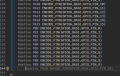
By the way, in case people think that's a lot of typing it isn't. Visual Studio leverages Copilot AI and is able to correctly infer what I'm doing, just pressing enter after PB9 leads to this:
1745083336824.png

I just press TAB and it inserts that suggested line, it even automatically knew that after PA15 it needed to start using GPIOB_BASE, that's very powerful.
 

nsaspook

Joined Aug 27, 2009
16,249
I'm fiddling around with different options for configuring SP1 on the Nucleo F446RE board. One drag is that I set it all up to use PA5 as the SCL on SPI1 and it all works fine BUT I realized that PA5 is also the boards user LED and I now want to use that.

After several hours scouring the web, datasheets and manuals it dawned on me that it would be very helpful to be able to refer to GPIO pins by their common names like PA1, PB6 and so on.

HAL seems to not bother with this and so we have to explicitly state GPIOA and PIN6 when we want to use PA6 as the MISO pin for SPI1.

So I devised these simple macros:

C:
#define ENCODE_PIN(B,P) ((uint64_t)(((uint64_t)(B) << 16) | (uint16_t)(P)))
#define DECODE_PIN(P)   ((uint16_t)((uint64_t)(P) & 0xFFFF))
#define DECODE_BASE(P)  ((uint32_t)((uint64_t)(P) >> 16))

Then I can do this

C:
#define PA1 ENCODE_PIN(GPIOA_BASE,GPIO_PIN_1)
#define PA2 ENCODE_PIN(GPIOA_BASE,GPIO_PIN_2)
#define PA3 ENCODE_PIN(GPIOA_BASE,GPIO_PIN_3)
#define PA4 ENCODE_PIN(GPIOA_BASE,GPIO_PIN_4)
#define PA5 ENCODE_PIN(GPIOA_BASE,GPIO_PIN_5)
#define PA6 ENCODE_PIN(GPIOA_BASE,GPIO_PIN_6)
You get the picture, this then lets me write helper functions that accept a 64 bit encoded port/pin and decode them inside the function when I'm setting up the SPI and GPIO. The code can be more generic looking because it just gets the PORT and the PIN from the encoded value and the caller only ever worries about the universal PIN ID (PA1, PB7, PD8 etc).

But does HAL do this already somewhere so I don't reinvent the wheel...

By the way, in case people think that's a lot of typing it isn't. Visual Studio leverages Copilot AI and is able to correctly infer what I'm doing, just pressing enter after PB9 leads to this:

View attachment 347471

I just press TAB and it inserts that suggested line, it even automatically knew that after PA15 it needed to start using GPIOB_BASE, that's very powerful.
You're thinking too much like an applications programmer abstracting away the hardware details instead of an embedded guy that wants to always see every bit of hardware detail in hardware interfacing code. We like to see less hardware abstraction in the code for easier hardware debugging. The HAL is doing what embedded HW guys that also write SW like, not what software programmers want when they see hardware.
 

Thread Starter

Futurist

Joined Apr 8, 2025
720
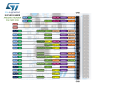
I'm trying to fathom why code that uses SPI1 (on a Nucleo 446RE) and pins PA5, PA6 and PA7 (as sck, miso and mosi) works fine, but if I try to use PB3 as the SPI sck (and enable GPIOB clock and so on) and continue to use the same pins for miso and mosi it doesn't work.

PA5 and PB3 are each designated as available for SPI on this board...

1745088741159.png
Is there something fundamental I'm not understanding here? I can see that some of the GPIO pins are dark blue and wonder if that means something...
 

MrChips

Joined Oct 2, 2009
34,621
@MrChips - You mentioned that you do not use HAL and so on, so does that mean you also don't use the STM32CubeMX tool when you design stuff?
Yes and no.
When I started programming STM32 in 2011, HAL and STM32CubeMX were not available. Hence I had to learn and get comfortable programming hardware modules directly.

Sometimes, I use the STM32CubeIDE but don't bother with the auto code generation process.
 

Thread Starter

Futurist

Joined Apr 8, 2025
720
Yes and no.
When I started programming STM32 in 2011, HAL and STM32CubeMX were not available. Hence I had to learn and get comfortable programming hardware modules directly.

Sometimes, I use the STM32CubeIDE but don't bother with the auto code generation process.
I'm impressed that kind of confidence and skill can only be acquired by absolute commitment to a problem, I can tell you've put the hours in, you and @nsaspook
 

Thread Starter

Futurist

Joined Apr 8, 2025
720
You're thinking too much like an applications programmer abstracting away the hardware details instead of an embedded guy that wants to always see every bit of hardware detail in hardware interfacing code. We like to see less hardware abstraction in the code for easier hardware debugging. The HAL is doing what embedded HW guys that also write SW like, not what software programmers want when they see hardware.
I'd probably agree with you if I did this professionally for a year, as a novice it can very very quicky overwhelm the mind and anything that reduces the chances of me walking through dense fog is a big help.

Anyway this tiny bit of code is now more flexible than before:

C:
    // Init the control pins
  
    GPIO_InitStruct_ctrl.Pin   = DECODE_PIN(ce_pin);
    GPIO_InitStruct_ctrl.Mode  = GPIO_MODE_OUTPUT_PP;
    GPIO_InitStruct_ctrl.Pull  = GPIO_PULLUP;
    GPIO_InitStruct_ctrl.Speed = GPIO_SPEED_LOW;

    HAL_GPIO_Init(DECODE_BASE(ce_pin), &GPIO_InitStruct_ctrl);
    HAL_GPIO_WritePin(DECODE_BASE(ce_pin), DECODE_PIN(ce_pin), GPIO_PIN_RESET);
  
    GPIO_InitStruct_ctrl.Pin   = DECODE_PIN(cs_pin);
    GPIO_InitStruct_ctrl.Mode  = GPIO_MODE_OUTPUT_PP;
    GPIO_InitStruct_ctrl.Pull  = GPIO_PULLUP;
    GPIO_InitStruct_ctrl.Speed = GPIO_SPEED_LOW;

    HAL_GPIO_Init(DECODE_BASE(cs_pin), &GPIO_InitStruct_ctrl);
    HAL_GPIO_WritePin(DECODE_BASE(cs_pin), DECODE_PIN(cs_pin), GPIO_PIN_SET);
The calling "application layer" now looks like this:

C:
Configure(SPI1, TIM1, PA0, EXTI0_IRQn, PA1, PA4, &device, fault_handler)
Now I can rapidly move say the CE pin from PA1 to say PB14 and the code will just work, only the caller need change. No doubt if I worked with this stuff day in/out for a year I'd be much less prone to confusion and have less need for these things.
 

Thread Starter

Futurist

Joined Apr 8, 2025
720
Do you guys have or use tools that you can use to "dump" an entire MCU, like printed text or something that lets you see the state of every peripheral and IO pin and so on, as an debugging/diagnostic aid?
 

nsaspook

Joined Aug 27, 2009
16,249
Do you guys have or use tools that you can use to "dump" an entire MCU, like printed text or something that lets you see the state of every peripheral and IO pin and so on, as an debugging/diagnostic aid?
Why would you need to do that with modern debuggers with software and hardware set-points on controller hardware designed with internal debugger systems? Sure, you can read and dump the flash HEX file or view the ASM listing if you need or want to. The programmer/debugger has that capability and much more but I seldom need it.
 

nsaspook

Joined Aug 27, 2009
16,249
I'd probably agree with you if I did this professionally for a year, as a novice it can very very quicky overwhelm the mind and anything that reduces the chances of me walking through dense fog is a big help.

Anyway this tiny bit of code is now more flexible than before:

C:
    // Init the control pins

    GPIO_InitStruct_ctrl.Pin   = DECODE_PIN(ce_pin);
    GPIO_InitStruct_ctrl.Mode  = GPIO_MODE_OUTPUT_PP;
    GPIO_InitStruct_ctrl.Pull  = GPIO_PULLUP;
    GPIO_InitStruct_ctrl.Speed = GPIO_SPEED_LOW;

    HAL_GPIO_Init(DECODE_BASE(ce_pin), &GPIO_InitStruct_ctrl);
    HAL_GPIO_WritePin(DECODE_BASE(ce_pin), DECODE_PIN(ce_pin), GPIO_PIN_RESET);

    GPIO_InitStruct_ctrl.Pin   = DECODE_PIN(cs_pin);
    GPIO_InitStruct_ctrl.Mode  = GPIO_MODE_OUTPUT_PP;
    GPIO_InitStruct_ctrl.Pull  = GPIO_PULLUP;
    GPIO_InitStruct_ctrl.Speed = GPIO_SPEED_LOW;

    HAL_GPIO_Init(DECODE_BASE(cs_pin), &GPIO_InitStruct_ctrl);
    HAL_GPIO_WritePin(DECODE_BASE(cs_pin), DECODE_PIN(cs_pin), GPIO_PIN_SET);
The calling "application layer" now looks like this:

C:
Configure(SPI1, TIM1, PA0, EXTI0_IRQn, PA1, PA4, &device, fault_handler)
Now I can rapidly move say the CE pin from PA1 to say PB14 and the code will just work, only the caller need change. No doubt if I worked with this stuff day in/out for a year I'd be much less prone to confusion and have less need for these things.
That great if it's easier for you but you're reinventing a wheel in ways that will steer you away from most public examples of coding of your controller vendors environment. I would spend more time looking at the actual code that does the functionality at a low-level for the HAL. If you want to understand embedded programming, you need to go to the source.
 
Last edited:

MrChips

Joined Oct 2, 2009
34,621
Memory dump - ha, ha!
Brings back memories of programming in Fortran on a CDC6400/6600 in university days.
When your program crashed, all we got was about 20 pages of core dump and you had to go to the computer systems analyst in order to decode why your program crashed.

Now I can set breakpoints, single step through code, watch variables, CPU registers and hardware registers to find the SW/HW bug.
 

nsaspook

Joined Aug 27, 2009
16,249
Memory dump - ha, ha!
Brings back memories of programming in Fortran on a CDC6400/6600 in university days.
When your program crashed, all we got was about 20 pages of core dump and you had to go to the computer systems analyst in order to decode why your program crashed.

Now I can set breakpoints, single step through code, watch variables, CPU registers and hardware registers to find the SW/HW bug.
Segmentation fault, core dumped.
200w.gif
 

Thread Starter

Futurist

Joined Apr 8, 2025
720
I'm now running my receiver "app" using SPI2 (to avoid using pins that have a system use on that Nucleo board). But it no longer works, of course this is my fault but I have carefully checked manuals, books and my wiring and code and can't see anything obvious.

So I ask, on that Nucleo F446RE board/chip, is there anything fundamentally different about SPI2 compared to SPI1? I did read that SPI2 uses the APB1 bus not APB2 like SPI1 uses.

Could that be a factor here?

Here's the settings for the SPI itself FYI, unchanged from SPI1:

Code:
device_ptr->spi.Instance = spi_base;
device_ptr->spi.Init.Mode = SPI_MODE_MASTER;
device_ptr->spi.Init.Direction = SPI_DIRECTION_2LINES;
device_ptr->spi.Init.DataSize = SPI_DATASIZE_8BIT;

// These two settings set the SPI mode to 0
device_ptr->spi.Init.CLKPolarity = SPI_POLARITY_LOW;
device_ptr->spi.Init.CLKPhase = SPI_PHASE_1EDGE;

device_ptr->spi.Init.NSS = SPI_NSS_SOFT; // SPI_NSS_HARD_OUTPUT
device_ptr->spi.Init.BaudRatePrescaler = SPI_BAUDRATEPRESCALER_8;
device_ptr->spi.Init.FirstBit = SPI_FIRSTBIT_MSB;
device_ptr->spi.Init.TIMode = SPI_TIMODE_DISABLED;
device_ptr->spi.Init.CRCCalculation = SPI_CRCCALCULATION_DISABLED;
device_ptr->spi.Init.CRCPolynomial = 10;
There might be nothing wrong with the SPI at all (it seems that reads/writes are working) but I wanted to ask this about SPI1 vs SPI2.
 
Last edited:

Thread Starter

Futurist

Joined Apr 8, 2025
720
Oh and I have a good question for you guys.

When testing all this I am debugging two boards, each has its own USB connection to my desktop and I am running two instances of the debugger and all this works fine, solid, very solid.

But when I stop debugging the transmitter, would I be right in assuming that code is still running? and the transmitter is still generating an RF signal?

Is there a way to stop debugging and somehow for the device to NOT run the app?
 

Thread Starter

Futurist

Joined Apr 8, 2025
720
Actually SPI2 is working, I can see that the NRF registers when I read them back, contain what was just written to them, my problem lies elsewhere...
 

Thread Starter

Futurist

Joined Apr 8, 2025
720
Well life can be full of surprises.

Triple checking code, wiring, and everything else yielded no fruit.

I decided to reconnect the receiver as it was before to SPI1 pins and retest, because that was working yesterday (and the codebase committed in Git).

It didn't work, and I recalled that yesterday there was a period of like a quarter hour where it misbehaved like this and moving the two devices physically "fixed" the problem.

Cut a long story short, the transmitter antenna was the problem, the way these things screw on is a bit weird and it wasn't screwed on correctly.

So now, rewire it again and retry SPI2...
 
Last edited:

Thread Starter

Futurist

Joined Apr 8, 2025
720
Nope, not working with SPI2.

I wonder, there are several GPIO pins that can be used for SPI1 and I need to ask if I can use any combination?

eg. CS can be PB9, PB12, PC7 or PB4 and MOSI can be PC3, PB15, PC1.

So does the choice of one of the four pins for CS restrict which of the three pins I can use for MOSI? or am I free to choose any one of those three MOSI pin irrespective the pin I choose for CS, MISO etc?
 
Top