Fan replacement in Benq W4000i

Thread Starter

YoFran

Joined May 13, 2025
3
Dear all,
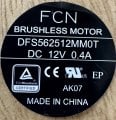
I'm facing an issue at replacing a fan in a Benq W4000i. I bought several different fan but none of it are fonctionning. The original fan is the one with the picture attached. I've tried with a noctua Noctua NF-A6x25 FLX without any result.
What I investigate so far :
- The projector start without a fan pluged
- I've tried to reach the same impedance of the original fan with a resistance on the Noctua
- I've tried to find what make this fan special and nothing popup

Can you see any other point to investigate ?

I'm clearly not an expert.

Thanks for your help
 

Attachments

sagor

Joined Mar 10, 2019
1,046
Whatever device is supplying the +12V to the fan may be "blown". You need to check that there is indeed +12V on the wires feeding the fan. From there, you can focus on either a fan issue, or a voltage supply issue.
How many wires were on the old fan? Some may have been 3 wire or even 4 wire. Those may be providing feedback or be used for fan speed control (PWM) on one of the extra wires.
 

Thread Starter

YoFran

Joined May 13, 2025
3
Thanks for your replies . For the old fan it’s noisy but keep running. It’s when I switch to another fan that there is no rotation. The old fan has a 3 wires connection. And, indeed, I also tried to replace with a fan with same brand and reference. The new has 4 wires and the PCB from external view seems different. I wondering if Benq asked for a special edition.

thanks for your help
 

sagor

Joined Mar 10, 2019
1,046
A 4 wire fan is likely a PWM driven fan (variable speed). It will not run properly without a PWM signal from a controller. A 3 wire fan is usually not PWM, just a regular fan with a feedback wire to indicate it is rotating.
 

Thread Starter

YoFran

Joined May 13, 2025
3
Thanks Sagor,
We agree on that. A four wire fan will run at full speed if there is no PWM signal. I still have no clue how to investigate any further to find the root cause of the issue.
 

MisterBill2

Joined Jan 23, 2018
27,173
GIVEN the additional information in post#4, that the present fan still runs but is noisy, it seems that the external driver circuit is still working. So a logical first step would be to clean the fan and lubricate the bearings. Almost always, the failure of such fans is the bearings, the exceptions being in some very poor quality products.
One alternative could be to locate a replacement fan that fits mechanically but uses mains power. THAT could be the simple way to go.
 
Top