My hope going into this was a simple short or similar on the momentary switch. Obviously, that was naive!
However, I still believe this problem can be solved with a very small board (consisting of a small, simple circuit) that will fit inside the snowman.
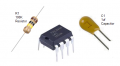
I have some experience with electronics: using breadboards, soldering components, etc. I have a bunch of resistors of all values for small electronics on hand. I'll need to procure the capacitors and IC. Depending on the cost, I may have a custom PCB made for this purpose (as I need to duplicate this circuit for a matching Santa as well). Otherwise, I'll just solder to a small blank PCB. They look inexpensive at Amazon.
I removed the connector from the circuit board to the momentary switch.
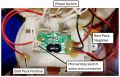
The voltage measures between 4.8 and 4.9 VDC on the pins in the momentary switch housing mounted to the circuit board (see photo above). New batteries!
I was surprised that the lights activated when the multimeter leads made contact with the momentary switch pins in the housing on the board.
I removed the connector from the circuit board to the momentary switch.
The voltage measures between 4.8 and 4.9 VDC on the pins in the momentary switch housing mounted to the circuit board (see photo above). New batteries!
The switch has two contacts on the PCB. Let's call them A and B. Doesn't matter which is which, just be sure to always refer to a given pin by the same name.
With the switch connector removed, measure the voltage difference between each pin and the negative side of the battery pack (let's call that pin GND).
So, two measurements. One between Pin A and GND and the other between Pin B and GND. What values do you get?
Now short Pin A to Pin B and measure the voltage between them and GND. What value do you get?
I was surprised that the lights activated when the multimeter leads made contact with the momentary switch pins in the housing on the board.
0.000v between neg and Pin A of the momentary switch*
4.8v between neg and Pin B of the momentary switch
*When I measured between neg and Pin B, the lights activated, and when I re-checked Pin A with lights activated, the result was 0.002v.
0.002v between the neg and Pins A and B shorted to each other.
These measurements were taken with my Fluke 117 True RMS multimeter with manual pressure of the multimeter leads to the pins and neg contact with one lead touching each pin.
I could show you the circuit if you can post photos of both sides of the circuit board with the connected wires inside the snowman.
Will need access to the board to do any modifications regardless.
I think this was the request that caused the confusion. I believe you really just wanted to see what the connections were. Hopefully, the photo I provided does that. I don't believe I need to get a photo of the other side of the circuit board. True?
*When I measured between neg and Pin B, the lights activated, and when I re-checked Pin A with lights activated, the result was 0.002v.
0.002v between the neg and Pins A and B shorted to each other.
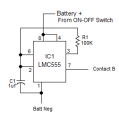
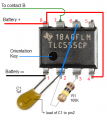
This looks straightforward and only two components aside from the small circuit board.
Pin 5 is not depicted, so I assume it's not used, with no need to tie to ground, etc.?
Pin 7 - I'm not sure what's happening here. Does it connect to shorted Pins A and B from the momentary switch connector housing on the circuit board?
Pin5 isn't used, leave unconnected.
Pin7 connects to the "B" side of the push button switch. Do not short A and B together.
One more test for clarity.
Connect B side of switch to negative battery with a jumper wire and see if that triggers the lights.
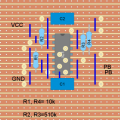
Here's a quick stripboard layout I drew up as an example of how you might wire the CD4066B circuit. If making it myself I'd compress it more, but I've spread it out a little so as to be more obvious. The only thing to note is the wire underneath the I.C. connecting pin 7 to GND; I often put links between pins beneath chips when it's convenient!
Here's a quick stripboard layout I drew up as an example of how you might wire the CD4066B circuit. If making it myself I'd compress it more, but I've spread it out a little so as to be more obvious. The only thing to note is the wire underneath the I.C. connecting pin 7 to GND; I often put links between pins beneath chips when it's convenient!
@sarahMCML: I'm confused on a couple of points in your layout.
1) What is the significance of the circles like these?
2) The drawing implies that board consists of horizontal tracks from side to side (such that the IC pin 11 is connected to R3 and R4 and also to a wire that goes down to C1). But, if that's the case, then wouldn't both C1 and C2 be shorted out? And wouldn't opposite pins on the IC be shorted together?
Are the circles places where the tracks have been cut?
But even that would still leave a number of things shorted, it would seem.
Contact "B" was described in post 46 from your suggestion.
Pin7 is an open collector output.
Battery operated and extremely low drive current, cap not required.
I'm just showing the physical connections. The assembly can be on any nonconductive surface and the parts "glued" in place.
Most likely. I'm not concerned with the drive current, but more with the switching transients, but I see that you are managing that because the discharge pin isn't being used to rapidly discharge the capacitor.
I'm just showing the physical connections. The assembly can be on any nonconductive surface and the parts "glued" in place.

 Facebook
 Google
 GitHub
 Linkedin