It's not a 30 second timer, it is electronically activating the push button appx every 0.8 seconds.
If one side of the switch is connected to neg or positive battery then a circuit with fewer parts using a cmos 555 can work also.
It's not a 30 second timer, it is electronically activating the push button appx every 0.8 seconds.
If one side of the switch is connected to neg or positive battery then a circuit with fewer parts using a cmos 555 can work also.
OK, but since the button circuit is unknown, and there is NO ISOLATED CONNECTION available on any 555 timer circuit, there could be some problems.
ALSO, connecting a non-isolated voltage to one of those button leads might easily destroy the small processor that controls all of the package. THAT ISOLATION is important, and not even possible with a simple 555 timer scheme.
It is often wise to carefully consider the possible effects of applying voltages to portions of a totally unknown but obviously complex circuit.
I said; "if one side of the button is connected to battery negative or positive".
If the above is true then isolation is a non issue.
The 555 would either provide a high or low level trigger pulse.
This is why I asked the TS to check the voltages and/or wiring on the switch.
What happens if you hold the button for more than 30 seconds?
Or try this: Hold the button for 15 seconds and see how long the snowman does its thing. If it still does only the 30 seconds regardless of how long you hold the button then it's a "One-Shot". That means when you push the button it sets in motion a 30 second countdown. No matter how many times or how long you push the button within that 30 seconds, the snowman only runs for 30 seconds. A "One-Shot" is a Mono-Stable Non-Retriggerable Multivibrator.
If you press the button and 25 seconds later you push the button again and the snowman continues for an additional 30 seconds then it's a Retriggerable Multivibrator, meaning you can reset it as many times as you like during the countdown. Every time you reset it - it continues to run. OR in other words, you can change the push button to a switch, turn it on, and the snowman should glow all day and night. Until the batteries die.
How about, instead of insisting that the beginner can accurately make a rather vital measurement that may have serious consequences if they get it wrong, or do some damage while making the measurement.
Why not just use the isolated switch output from that alternative scheme circuit sown in post #11!!
Why the fixation on a non-isolated output circuit that consumes a lot more power??? A truly brilliant circuit deserves respect!!
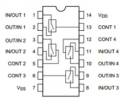
You need to connect Pin 14 to your 4.5 V DC and Pin 7 to your GND (the negative side of your battery pack).
Any unused control pins (pins 5,6,12,13) need to be tied to GND or Vdd. The easiest way to do this is choose either pin 6 or pin 13 as your unused switch and tie it to the power pin right next to it.
The circuit using a LMC555 would consume less then 200ua and require possible only two additional components.
I'm not disrespecting crutschow's circuit, just saying there may be a simpler solution.
You need to connect Pin 14 to your 4.5 V DC and Pin 7 to your GND (the negative side of your battery pack).
Any unused control pins (pins 5,6,12,13) need to be tied to GND or Vdd. The easiest way to do this is choose either pin 6 or pin 13 as your unused switch and tie it to the power pin right next to it.
@WBahn, This is what I infer, using info from your message above:
PIN 1 - I think I need this. Do I? If so, what do I connect it to?
PIN 2 - I think I need this. Do I? If so, what do I connect it to?
PIN 3 - do not connect
PIN 4 - do not connect
PIN 5 - tie to PIN 7
PIN 6 - tie to PIN 7
PIN 7 - tie to battery pack ground (negative)
PIN 8 - do not connect
PIN 9 - do not connect
PIN 10 - do not connect
PIN 11 - do not connect
PIN 12 - tie to PIN 7
PIN 13 - I think I need this. Do I? If so, what do I connect it to?
PIN 14 - tie to battery pack (positive)
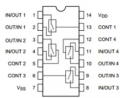
@WBahn, This is what I infer, using info from your message above:
PIN 1 - I think I need this. Do I? If so, what do I connect it to?
PIN 2 - I think I need this. Do I? If so, what do I connect it to?
PIN 3 - do not connect
PIN 4 - do not connect
PIN 5 - tie to PIN 7
PIN 6 - tie to PIN 7
PIN 7 - tie to battery pack ground (negative)
PIN 8 - do not connect
PIN 9 - do not connect
PIN 10 - do not connect
PIN 11 - do not connect
PIN 12 - tie to PIN 7
PIN 13 - I think I need this. Do I? If so, what do I connect it to?
PIN 14 - tie to battery pack (positive)
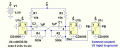
His circuit uses THREE of the four switches in the package. Two, U1a and U1b, are part of the multivibrator. The third, U1c, is the one that connects to the two sides of your pushbutton.
Note that the V+ and GND pin of all three switches in the schematic refer to the same Pin14/Pin7 connections. The E pin on each switch is that switch's control input.
You have lots of options, since there is no difference between one switch and any other, or between the two in/out pins on a given switch. So wire it up in the most convenient way for your layout.
His circuit uses THREE of the four switches in the package. Two, U1a and U1b, are part of the multivibrator. The third, U1c, is the one that connects to the two sides of your pushbutton.
Note that the V+ and GND pin of all three switches in the schematic refer to the same Pin14/Pin7 connections. The E pin on each switch is that switch's control input.
You have lots of options, since there is no difference between one switch and any other, or between the two in/out pins on a given switch. So wire it up in the most convenient way for your layout.
I see components like caps and resistors. I have no idea why they're there. Do I have to buy them or are they part of the IC? Sorry, but this isn't clicking.
Seems like it would be easier to just say which pins connect to what, but I understand this isn't how those in the know communicate such things.
I'm curious about the 555 option as well, hoping it'll be easier to sort out.
I could show you the circuit if you can post photos of both sides of the circuit board with the connected wires inside the snowman.
Will need access to the board to do any modifications regardless.
I see components like caps and resistors. I have no idea why they're there. Do I have to buy them or are they part of the IC? Sorry, but this isn't clicking.
Seems like it would be easier to just say which pins connect to what, but I understand this isn't how those in the know communicate such things.
I'm curious about the 555 option as well, hoping it'll be easier to sort out.
The good news is that you don't need to know why they are there in order to build the circuit. You just have to be able to build the circuit according to the diagram (which is not to say that doing that is not challenging if you've never done it before).
The same will be true with the 555-based circuit -- there are timing resistors and capacitors in it, too. But the same thing applies. If someone else (i.e., us) figure out the component values for you, then you just have to be able to wire them up.
Which brings us to the "wire them up" part.
How were you planning to physically do this?
If we were to hand you the components, how would you put them together? Just soldering component leads together is not a good option. It's potentially doable, but would not be very fun to do, would be very error prone, and would be very fragile.
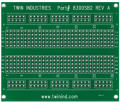
Probably the best way would be to use a protoboard similar to the following:
This would let you mount the components on the board and then add wires to connect them together. You would still need to consider how to protect it in use. You could put it in a small project box, or perhaps you could find a suitable place to mount it to (or in) your snowman. The amount of effort involved is going to be pretty similar whether you use the circuit crutschow offered, or a 555-based solution.
There are a few reasonable ways to implement a solution for your problem. The simplest, from a hardware standpoint, would be to use a small, cheap microcontroller. But you would need to buy (or otherwise obtain) the programmer and the software and then learn how to write the program and then program the device. If you had any interest in doing other projects, that would be something to seriously consider. If this is a one-off, then that would be very hard to justify, either the time, the money, or the effort.
I didn't list specific pins since that would not necessarily lead to the easiest/best physical layout, since the four switches on the IC are interchangeable.
You have to buy the parts and then see how to best lay them out on a protoboard.
This requires some work on your part.
There are protoboard layout programs that can help with that task.
I'm not up to doing that, but perhaps someone else here can help.
I could show you the circuit if you can post photos of both sides of the circuit board with the connected wires inside the snowman.
Will need access to the board to do any modifications regardless.

 Facebook
 Google
 GitHub
 Linkedin